On a PC this is Alt+O,C,A, as explained here.
Is there an equivalent keyboard shortcut in Excel for Mac, to fit the column width to the width of the text?
I'm using the 2011 version.
On a PC this is Alt+O,C,A, as explained here.
Is there an equivalent keyboard shortcut in Excel for Mac, to fit the column width to the width of the text?
I'm using the 2011 version.

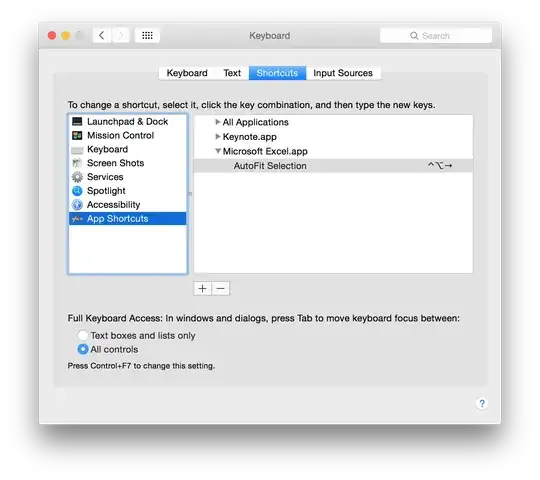
Although Microsoft did not include many keyboard shortcuts in their Office Suite for Mac, you can make your own for any app including Office apps. To do so:
In this case you must type in AutoFit Selection just as it appears on the menu in Excel. (Format > Column > AutoFit Selection)
You can choose any key combination that suits your fancy.

Sorry if may sound slightly off the topic, but for ease,
This gives autofit column width of an active worksheet. To avoid any potential overlapping shortcuts.

Step1:
Step2: -Keep the cursor in between the Vertical column line (Between A and B columns) and double-tap. All the text will fit into the column width. Keep cursor in between the column line


