I have an old keyboard I'd like to use on recent devices (no PS2 port). But it's still on a 5 pin din plug. I tried to plug that in a Din-2-PS2 adapter and that in PS2-2-USB, but the keyboard was not recognized at all. Is there anything I have to consider here? Should it work, or is there a reason why it cannot work?
Asked
Active
Viewed 3.0k times

2 Answers
14
There is a simple reason why it does not work. The keyboard does not talk the USB protocol.
With most mice and keyboards you have the following options:
- PS/2 mouse, using the PS/2 protocol. Works only in PS/2 plug.
Does not work with a PS/2 to USB plug. - USB mouse, using the USB protocol. Works only via and USB plug.
- A mouse understanding both PS2 and USB, auto-detecting which wiring is in use. This one will work both when plugged into a PS/2 port and when (with a convertor) plugged into an USB port.
The same is true for keyboards, though there are many more mice that support both PS/2 and USB than keyboards.
Now your keyboard has a old din plug. That means it is probably very old. Thus it is unlikely that it groks both the pre-PS2 din way and the modern USB method. This is why it fails.
If you want to get it to work you will need to add an active device which speaks both the old protocol and the new one. A mere plug which connects a few cables will no do.
Some nice picture to help me gain rep let the younger readers understand just what AT Din5, PS/2 etc is:
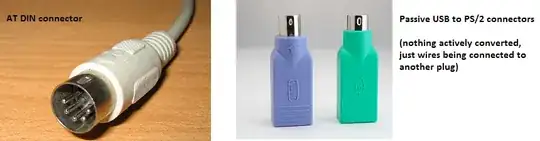
And some convertors with active electronics inside them. These will work, even for old PS/2 keyboards. I never tested them with an additional AT keyboard plug.

Hennes
- 64,768
- 7
- 111
- 168
-
So you are suggesting to get a passive DIN2 to PS2 connector and plug that in an active PS2 to USB plug? – kcode Mar 25 '13 at 17:35
-
I am suggesting that that **may** work. But as I wrote, I never actually tested that. I do have used things like the bottom left 'active cable` and they work even with very old keyboards which do not understand USB. (In fact, I am typing that from the IBM model M keyboard I tested it with. Made in 1991 and still working). However going back to DIN5 keyboards is out of my experience. I do not know if those are fully compatible with PS/2. (with fully I mean: If only the form differs, but the signals are compatible). – Hennes Mar 25 '13 at 17:42
-
3It worked. Buying an active PS2 to USB plug did the trick. I'm now typing with one of the first Cherry G80/3000 with a DIN5 plug on Windows 8 :) – kcode Mar 28 '13 at 08:40
-
Yay! (Still typed from a 24 year old model M). – Hennes Mar 28 '13 at 11:58
-
Can you say where you got it, or the make/model, or what keywords will bring it up, because I have been searching for one and can't find any. I have an old MicroType MT-1 keyboard with a big ol' DIN-5 plug that I'd like to use on a machine with PS/2 or USB only. – Peter Flynn Oct 01 '15 at 15:39
-
Gooling for [Din 5 to PS2](https://www.google.co.uk/#q=DIN+5+to+PS2) yields several hits for me. – Hennes Oct 01 '15 at 18:43
-
I have an old Kinesis Contour keyboard with a DIN5 connector. The keyboard still works perfectly, and is expensive to replace. I use a passive adapter to convert that to mini-DIN6 and then plug that into an active AT-USB adapter. Looks silly but works perfectly. – kevin cline Oct 27 '17 at 00:25
2
DIN-5 used and PS/2 both use the same protocol, colloquially known as "AT". (in the case o PS/2, it's "ATX".) That's why the PS/2 is simply smaller, using a mini-DIN-6 connector instead o a DIN-5
Please note that really old keyboard (early 1980's keyboards), though using the 5-DIN connector, used the older XT protocol, so it probably wouldn't be compatible.
As far as the computer is concerned, there shouldn't be any difference between a PS/2 keyboard and a DIN-5 keyboard with a PS/2 adapter. So either the adapter is malfunctioning, or something isn't working on the USB side o things.

Tel Edoara
- 21
- 1