5

I mostly connect to the Internet with a Reliance 3G dongle with these specifications:

enter image description here

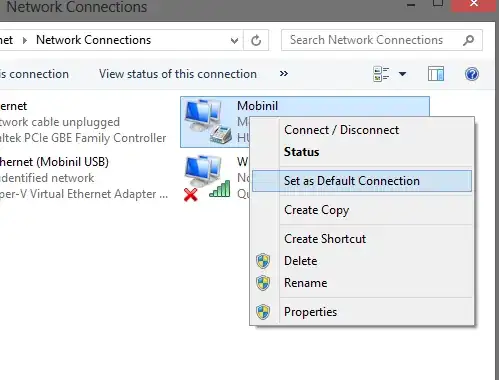
This is how it looks in network adapters when connected.
enter image description here

The problem:

I want to virtualise this in Hyper-V but when I open the virtual switch manager to add a new switch, I don't see it in the list of adapters.
enter image description here

Due to this, I can't use the Internet in my VMs. Is there a way to do this without going to my ethernet broadband connection (which is slow)?

pratnala
  • 2,016
  • 2
  • 24
  • 38

4 Answers4

5

Hyper-V does not accept wireless adapters, and this "by design".

To force Hyper-V to accept a wireless network adapter, one must use the old trick of camouflaging it as a dummy but acceptable virtual adapter which is bridged to the dongle adapter.

Below is described how to bridge your dongle network adapter with a virtual network adapter on the host machine.

  • Open Hyper-V manager
  • Click on the Virtual Network Manager and create an Internal Virtual Network by selecting Internal and clicking Add.
  • Give a meaningful Name
  • Apply and OK
  • Now a Virtual Network has been created which can be associated with 1 or more virtual machines.
  • On the host machine, in the Network and Sharing Center click on Change Adapter Settings
  • Select your dongle adapter and the Internal Virtual Network you created.
  • Right click and select Bridge Network and the bridge is created.
  • In the Hyper-V Manager, right click the virtual machine and select settings
  • Add a Network Adapter and select the Internal Virtual Network you created initially from the drop-down list.
  • Click Apply and OK.

For more information here are some articles that look useful :

Hyper-V: How to Run Hyper-V on a Laptop
Using Hyper-V with a Wireless Network Adapter
Using Wireless with Hyper-V (using RRAS)

Glorfindel
  • 4,089
  • 8
  • 24
  • 37
harrymc
  • 455,459
  • 31
  • 526
  • 924
  • The icon in OP's screen cap shows the connection as a RAS connection which cannot be bridged. – billc.cn Apr 07 '13 at 15:07
  • @billc.cn: You've got good eyes, but my last link show how to use it with RRAS. – harrymc Apr 07 '13 at 15:44
  • 1
    I don't see a Bridge Network option – pratnala Apr 08 '13 at 02:03
  • See this article for very detailed instructions : [How to use Hyper-V with a wireless network connection](http://blogs.msdn.com/b/nicold/archive/2008/04/15/how-to-use-hyper-v-with-a-wireless-network-connection.aspx). If nothing works for you, you could also try to [Install the Microsoft Loopback Adapter in Windows 8](http://ceekam.com/blog/?p=1057) (must have IP segment address of 192.168.0.x). – harrymc Apr 08 '13 at 06:10
  • But this isn't shown as a wireless network connection. – pratnala Apr 11 '13 at 16:49
  • Have you installed the software that came with the dongle? This seems to be a modem and a data card weirdly rolled into one package. The [Reliance 3G page](http://www.rcom.co.in/Rcom/personal/3G/HTML/DataCards.html) contains two installation packages, one for the ZTE MF190 and one for the Huawei E173, so I suppose you need to install both. Take a system restore point first, just in case. – harrymc Apr 11 '13 at 19:03
  • The dongle itself has a setup file which contains the relevant drivers. I have installed them because without that, you can't connect. – pratnala Apr 12 '13 at 10:11
  • Please check if the files at the above page are not newer. – harrymc Apr 12 '13 at 12:13
  • It is older. The files on the dongle are newer. – pratnala Apr 13 '13 at 17:32
  • This card may be too weird for me. The ZTE & MF both seem to be network modems, so how this thing works as a single device is a bit beyond me. No wonder it appears as a RAS device, as it is a small network by itself. My last gasp effort are these two articles : [article1](http://www.modemunlock.com/huawei-e173-firmware-download-3g-modem-dashboard.html) and [article 2](http://www.huaweie173drivers.com/). – harrymc Apr 13 '13 at 18:15
  • Depending on the version of Hyper-V you're using (say the version in Windows 8 pro) it actually does accept wireless adapters. – James Mertz Apr 14 '13 at 03:38
  • On my system the Mobile Broadband cannot be added to a bridge! (Dell E5450 with builting mobile broadband modem + Windows 10 PRO Anniversar updated). Could you help me? – Antonio Petricca Nov 25 '16 at 23:04
1

There is another way of doing this. Follow these steps:

  1. Open Hyper-V manager
  2. Click on the Virtual Network Manager and create an Internal Virtual Network by selecting Internal and clicking Add.
  3. Give a meaningful Name
  4. Apply and OK

Now go to your host machine and in the Network and Sharing Center click on Change Adapter Settings.

  • Select your dongle adapter and click Set as default connection.

  • Click properties and click on sharing tab.

  • Check Allow networks to share internet and select the internal connection just created.

  • Click Apply and click OK.

  • Finally go to your Virtual machine settings and select the internal switch we created and click Apply and OK.
slhck
  • 223,558
  • 70
  • 607
  • 592
0

You'll have to use internet connection sharing or similar to share the dongle's connection with your VM's virtual network card. There's no way to bridge a RAS (dial-up) connection.

An alternative is to share the USB dongle with the guest OS and initialize the connection from the guest. You'll have to use remote desktop to achieve this as Hyper-v does not natively support USB pass-through.

In general, Virtualbox is a better choice for this kind of applications.

billc.cn
  • 7,099
  • 20
  • 36
0

I am using a Clear Wi-Max device by directly connecting the device to the guest OS and letting the guest OS setup the connection within it's purview.

This may not be what you are looking for what it's worth a shot. If you planning to share the connection between the guest and the host that's another problem. If you want to share bridge it with one of the virtual Ethernet cards.

srini1990
  • 165
  • 7
  • How can you connect the device directly to the guest OS? Hyper-V doesn't have the feature to pass USB devices – pratnala Apr 13 '13 at 09:37