1

I have installed WinZip 9.0 SR1 in my system and I want to create a executable from a zip file in command line.

I have tried with the following command line statement

C:\Users\admin\Desktop>"C:\Program Files (x86)\WinZip 9.0 SR1\WZSEPE32.EXE" my.exe my.zip

Hoping that it would create a file my.exe with contents of my.zip under the current directory. But it throws the below error message
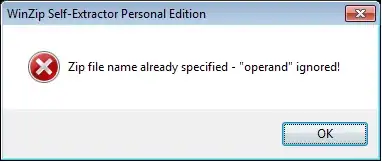
Error Msg

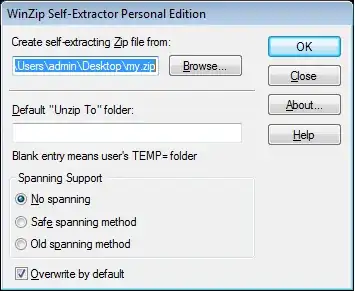
and brings up the below GUI.

GUI

How do I create a executable from a zip file in command line?

ᔕᖺᘎᕊ
  • 6,173
  • 4
  • 33
  • 45
DDK
  • 149
  • 3
  • 8
  • To be clear, you want to have an .exe "open" to you .zip file? If this is what yo're attempting to do I might suggest doing a bit more research on what these extensions actually are. You will be unable to execute (.exe) a file that has been compressed (.zip). The zip is a file container that is unable to run a command besides calling the explorer service so you can interact using the gui. Please explain your intent or desired behavior. – Qwilson Apr 04 '13 at 17:47
  • @Qwilson: You might want to do “a bit more research” on WinZip’s features.  “A self-extracting Zip file is an executable file (.exe) that contains a Zip file and a small program to extract (unzip) the contents of the Zip file.  Users can run (execute) a self-extracting Zip file just as they run any other program: just double click on the .exe file.” -- from [the WinZip Computing Knowledgebase](http://kb.winzip.com/kb/?View=entry&EntryID=179). – Scott - Слава Україні Apr 04 '13 at 18:28
  • @Qwilson: From the Winzip self extractor Gui, If I choose a zip file for "Create a self-extracting zip file from:", and click on OK, it would eventually create a self-extracting zip file with file-type ".exe" with the name of the zip file. I intend to eliminate the manual choose/click thing and automate this process by a batch file. So I go for command line option. The problem is the command line wont create the self extraction file with the parameters passed, instead it brings up the GUI which I am trying to eliminate. My question is, Is there any other way to achieve what I intend ? – DDK Apr 05 '13 at 06:37

2 Answers2

1

Another option is to ditch WinZip.

Using Info-Zip, the unzipper has an UnzipSfx.exe and you can use the following from a command line:

copy/b unzipsfx.exe+myfile.zip myfile.exe

If you want a GUI, Info-Zip also has WiZ. 7-Zip also supports self-extracting files, and is generally better than WinZip in every conceivable way (except that WinZip came first, back in the Windows 95 days, and so it got famous first).

TOOGAM
  • 15,243
  • 4
  • 41
  • 58
0

WinZip offers a command-line add-on for this (free add-on for licensed version). But this only works with WinZip 12.1 and higher.