43

In Thunderbird, there's the option to "Edit As New...".
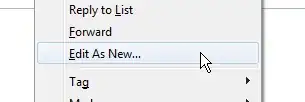
enter image description here

When selecting that option, I can edit the original message and send it like a new message.

How can I do the same thing in Outlook?

Note: This question is about the native Outlook Client (up to Outlook 2019). For the web client, aka "Outlook Web Access", "Outlook on the web", or "Outlook 365", see How do you "Edit As New" in Outlook Online? .

sleske
  • 22,652
  • 10
  • 69
  • 93
Oliver Salzburg
  • 86,445
  • 63
  • 260
  • 306

3 Answers3

46

In Outlook, the functionality is named Resend This Message.
See instructions for different versions of Outlook below.

Outlook 2010

When opening a sent message, you'll find the option in the Move panel under Actions:

enter image description here

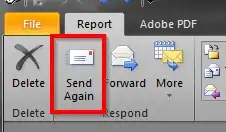
In a received message, you'll find the option in the Respond panel:

enter image description here

Either of these will open the message in a new window where you can edit the message like a new email.

Outlook 2013, 2016, and 2019

In Outlook 2013, 2016, and 2019, the action is available in the Move panel under Actions for both types of messages.

Note that the Actions menu is not available in the main Outlook window, but you must open the message by double-clicking it, and then select the action from the message's own, slightly different, ribbon.

enter image description here

Post169
  • 165
  • 1
  • 10
Oliver Salzburg
  • 86,445
  • 63
  • 260
  • 306
  • Is it just me, or does those screenshots not actually show what the text suggests? – Adam Thompson Mar 23 '15 at 09:27
  • 1
    @AdamThompson: It must be you. It looks fine to me. Anything in particular that doesn't match up from your point of view? – Oliver Salzburg Mar 23 '15 at 09:30
  • 1
    Is there anyway to resend without opening the message? In Thunderbird I could simply right click in the mail list and edit as new. I tried adding the resend button to quick access toolbar but it's still not available outside the message window – phuclv Sep 04 '15 at 09:51
  • 1
    Most shortcuts are indeed a lot easier in Thunderbird... I just press control-E to "edit as new" there. In Outlook, make sure you first open the email in a new window (double click it), only then will these options appear. – Sygmoral Aug 24 '16 at 17:58
  • In O365 I do not find this resend, there is no "action" as written in the answer. – Timo Jan 15 '21 at 08:36
  • Hi @Timo. Oh, dear. I would think, then, that if you specified it was for Office 365 and not for a permanent version, maybe even including a link to this question, you should be justified in asking a new question. – Post169 Jan 15 '21 at 16:05
  • @Post169 thanks, I will try [this](https://support.microsoft.com/en-us/office/resend-an-email-message-acd16ac4-c881-477d-b4aa-36168fa96088) on monday and let you know here my user experience. – Timo Jan 15 '21 at 19:06
  • Microsoft don't make it easy for you, do they. – Kit Johnson Nov 30 '22 at 05:55
2

For Outlook 2011 for Mac:

  1. Navigate to your "Sent Items" folder
  2. Highlight the message you want to "Edit as New"
  3. Click on the "Message" menu item, and select "Resend"
Oliver Salzburg
  • 86,445
  • 63
  • 260
  • 306
EMR
  • 21
  • 2
0

A similar story applies to Outlook 2007:

Open the sent message. Click "Other Actions" in the message's ribbon. Click "Resend this message...".