20

I'm a member of a high-traffic skype group, which is often too much noise for me to concentrate with.

Can I prevent messages to the group from popping up as new notifications?

Brad Patton
  • 10,540
  • 12
  • 40
  • 68
ripper234
  • 11,323
  • 39
  • 89
  • 112

3 Answers3

28

type /alertsoff in skype groupchat.

jeka
  • 281
  • 3
  • 3
  • 6
    Make sure that there is no space before /alertsoff - otherwise, it will be handled as a message, instead as of a Skype command. (telling the whole company, on the group chat, I didn't want to hear from them was awkward... ;) ) – Cedric Oct 07 '15 at 08:56
  • 1
    Does not work in newer versions of Skype: "Invalid command, please try again" – Draif Kroneg Oct 20 '20 at 10:36
25

There is a setting, although I've never used it so far (names might be off due to localization):
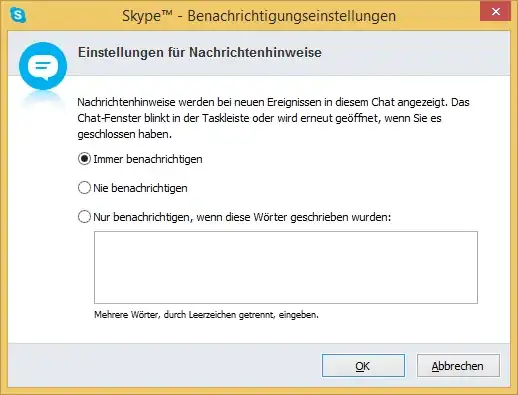
  • Open the conversation/group you'd like to modify.
  • Go to the Conversations menu.
  • Find the Notification Settings....
  • Here you can modify how/if/when to open the specific group or show messages as popups.

Notification Settings window (German version)

Mario
  • 4,266
  • 2
  • 22
  • 22
  • 2
    I never have to google to find this kind of settings in Whatsapp/WeChat/etc... Microsoft has a lot to learn... – Rosdi Nov 10 '17 at 01:31
  • Is this still working in recent versions of Skype on Linux ? I can't find the "conversations" menu and "notification settings" for a specific group.... – Antonello Oct 07 '21 at 12:24
  • 1
    @Antonello Can't check right now but I'm pretty sure they removed this or more specifically never added this to the new/rewritten client. – Mario Oct 08 '21 at 05:21
8

You can issue the following commands in a conversation that:

/alertsoff - Stops annoying popups but still keep you alive in a group
/alertson - Brings back popups

Much more commands in this link

Here is a similar question

Surya R Praveen
  • 181
  • 1
  • 4