1

I am trying to merge a thumbnail-size (104x80) image into an audio file (M4A). I want it to be played in JW Player, but it doesn't seem to support thumbnails. I have tried it in VLC Player, but the image size gets blurred and upscaled.

I am using the following command:

ffmpeg -i image8.jpg -i file.m4a -acodec copy test.mp4

The output of the command:
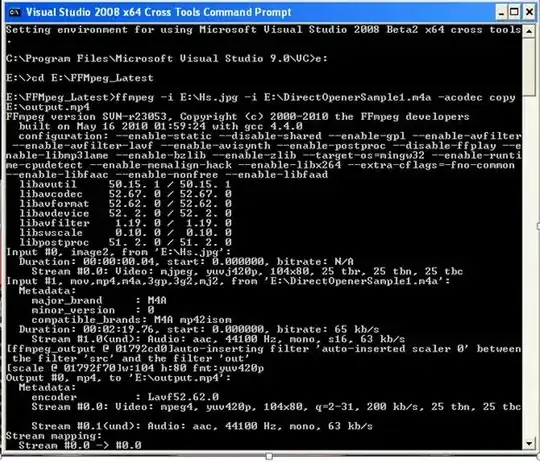
command line output

How can I merge an image into the audio file so that it works in JW Player and isn't upscaled?

Indrek
  • 24,204
  • 14
  • 90
  • 93
vijay
  • 821
  • 1
  • 8
  • 5
  • 2
    It looks like you are able to embed the image in the audio file just fine, but it's the apps you are using that read the audio that don't support it (properly)? Which images are you wanting to show in your question? You seem to have 4, but only 2 URLs are showing (and the first is incorrectly formatted). – MrWhite Apr 12 '13 at 08:41
  • 1
    The *full* commandline output would be preferred... you can dump it to a plaintext file with `ffmpeg -i image8.jpg -i file.m4a -acodec copy test.mp4 2> file.txt`, and then paste it here – evilsoup Apr 12 '13 at 09:22
  • i am trying merge jpeg format image (104x80) in audio file,but image doesn't getting into merge in jw player..when am using vlc player,image gets blurred and upscaled ...can u please tell me how to merge small size image in audio file... – vijay Apr 12 '13 at 09:26

1 Answers1

2

If you were working with MP3, or FLAC, or OGG, or... any other audio format than M4A, the ffmpeg method you are describing would work perfectly well. As it is, for some reason M4A files store the album art in a different way, so you'll have to use a different tool to add in the album art, like AtomicParsley:

AtomicParsley input.m4a --artwork cover.jpg --overWrite

If you are actually trying to create a video by combining the audio and image, then your ffmpeg command should work perfectly well... are you sure it's not just the player software upscaling the video? Try running

ffplay test.mp4

...and see if it comes out the correct size (ffplay is a simple video player bundled with ffmpeg, by default it doesn't do any fancy stuff like upscaling).

evilsoup
  • 13,097
  • 3
  • 59
  • 80
  • i tried using atomicparsley but temp file doesn't create..so can u please tell me any other solution.... – vijay Apr 12 '13 at 10:51
  • @vijay: What's the exact error you're getting? AtomicParsley is a nice program, so you should probably investigate and try to fix whatever problem's preventing it from working. – Karan Apr 12 '13 at 14:57
  • @karan:iam not getting any error ,my issue is image not merging in audio file(m4a) when am playing in my jw player.....can u please tell me how to merge an image in audio file,and the merged image should not upscaled and blurred – vijay Apr 12 '13 at 16:38
  • @vijay: I was talking about your comment above - "i tried using atomicparsley but temp file doesn't create". What does this mean? Do you see a specific error? I'm sure AtomicParsley will do what you want, so perhaps you should look into what's causing problems with it on your PC. – Karan Apr 12 '13 at 16:41
  • @karan :this is the command line output am getting when i using atomicparsley, E:\project\AtomicParsley>atomicparsley E:\project\m4a\DirectOpenerSample1.m4a -- artwork E:\images\images.jpg --overWrite Started writing to temp file. Progress: =============================================>100%| Finished writing to tempfile. After i try to merge image in m4a file using ffmpeg tool ,image gets upscaled and blurred when am playing in vlc player,but it doesnt merge in jw player – vijay Apr 12 '13 at 17:03
  • So what's the problem? You used the overWrite option, which overwrites the source file instead of creating a new file. Seems the operation completed 100%. Did you even test the modified source? – Karan Apr 12 '13 at 17:11
  • yes i tested ,but it seems image gets blurred and upscaled,when am playing in vlc player,i need image size should be same which i merged and also it should be play in jw player,can u pl tell me any solution.... – vijay Apr 12 '13 at 17:17
  • 1
    @vijay If you're using JWPlayer, then the problem is in JWPlayer. Your video is not upscaled in FFmpeg. evilsoup, the OP doesn't want artwork; they want to show a plain slideshow-type video with one image and audio in in the background. – slhck Apr 13 '13 at 09:11
  • @evilsoup:thanks buddy its perfectly working in vlc player:) – vijay Apr 13 '13 at 10:09
  • @evilsoup:its not working in windows xp,can u tell me the command for working in windows xp... – vijay Apr 16 '13 at 11:04