1

Cant get Appache run on my Windows Server 2012 because there is an application already using this port. But which application?

I found out that the Port is used by "system" .. and in this article it says the port is mandatory for WS2012 Essentials. http://www.sbsfaq.com/?tag=windows-server-2012-essentials

So, what are the best practices to cope with this problem ?

Anyon who can help me out ?

Sven Koluem
  • 151
  • 1
  • 2
  • 6

1 Answers1

2

Use this command: netstat -o -n -a | findstr 0.0:80 to check the PID of the process using port 80. If port 80 is free, nothing will appear in result. If any process is running on port 80, you will get its details. enter image description here

Now you can check from task manager the process running under this PID. enter image description here
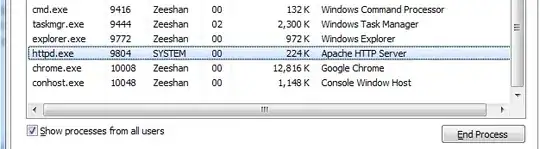
To cope with this problem either:

  1. Kill the process which already uses port 80 if it is unnecessary
  2. Make necessary changes for this other process to shift it to some other port
  3. Run apache (XAMPP) on any other port, except port 80.

To change the port in apache, open httpd.conf file (present in your XAMPP installation directory) and modify this line: Listen 80 to whatever port you find suitable. Usually 8080 is used in case 80 is busy (8080 may be busy as well, you need to test for a port which is free and good to use using the command given above).

Zeeshan
  • 319
  • 1
  • 13
  • It uses Port 443 .. don't know why appache should use 443 and not 80.. ? – Sven Koluem Apr 17 '13 at 16:52
  • 443 is used for https (http secured), 80 is used for http. HTTPS URLs begin with "https://" and use port 443 by default, whereas HTTP URLs begin with "http://" and use port 80 by default. You can edit the line `Listen 443` in your httpd.conf file to a suitable port, and yes, you will need to restart Apache service whenever you make changes to httpd.conf file for the changes to take effect. – Zeeshan Apr 17 '13 at 16:58
  • 18:32:06 [Apache] Port 443 in use by "system"! 18:32:06 [Apache] Apache WILL NOT start without the configured ports free! -- And there is nothing about 443 in httpd.conf – Sven Koluem Apr 17 '13 at 17:07
  • Well, try checking which process is it from the task manager (enable PID column first from View > Select Columns). If it is svchost.exe, right click on it and select "Go to service(s)" option to view the services using it. – Zeeshan Apr 17 '13 at 17:09
  • ok it is pid 4 .. and it belongs to "system" :( – Sven Koluem Apr 17 '13 at 17:17
  • So PID 4 is reserved for your kernel, not any user services. Sorry but I cannot figure out much what could be using 443 from kernel itself. Change the port to 80 or 8080, if using https on 443 is not a compulsion for you. – Zeeshan Apr 17 '13 at 17:28
  • Check if Routing and RAS service is running. It may be using 443 as PID 4. – Zeeshan Apr 17 '13 at 17:35
  • Check: http://superuser.com/questions/121901/is-there-a-way-to-determine-which-service-in-svchost-exe-does-an-outgoing-conn and http://superuser.com/questions/125455/why-is-the-system-process-listening-on-port-443 – Zeeshan Apr 17 '13 at 17:36