3

I bought refillable ink cartridges for my Canon MP550 and generic ink bottles from a Chinese store.

I have so far managed to manually adjust the color options in the printer dialog to match the result that I got from original Canon cartridges and have gotten almost the same look. Screen shot
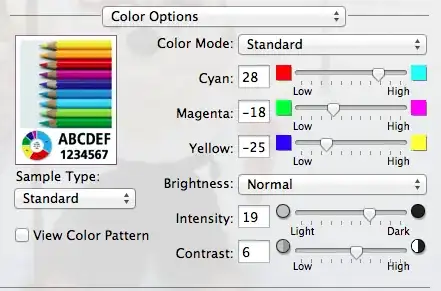
Printer dialog: http://pic.useful.fi/9893b70af285a19c6d0daea230380277.png

However, the ink bottles are running out and the next batch is more likely going to need the same manual adjustment that takes for ages and wastes ink and paper.

Is there a cheap way to calibrate the printer without having to print tens of pages trying to manually tweak the colors?

I've seen some applications that use a test image that can be scanned with a regular scanner to generate an ICC profile, but the ones I found only work with really old Windows (98) and Photoshop. I'm trying to do this with OS X, Ubuntu or if no other option, Windows 8 virtual machine.

Hennes
  • 64,768
  • 7
  • 111
  • 168
dBi
  • 33
  • 1
  • 3

2 Answers2

3

Hmm... if you are going to continue trying to save money on buying from a source you believe to have quality control issues, consider investing in getting a Spyder or other system that can profile your printed paper.

Since it is from a supplier where each mass batch of ink could vary somewhat, then every time you get a new batch of ink, you can re-profile your printer against the inks and the papers.

Note, the profile is per paper x ink x printer combo.

Link to various software solutions:

Open Source Options:

http://www.color.org/opensource.xalter

Paid for Options:

http://www.color.org/profilingtools.xalter

Step By Step using Argyll:

http://www.argyllcms.com/doc/Scenarios.html

Profile Prism Calibration for display/print/scanner:

Howto:

http://www.ddisoftware.com/prism/help/psteps.htm

Software Page:

http://www.ddisoftware.com/prism/

  • 1
    I already looked at that option and I can borrow a Spyder used to calibrate monitors, however the one used for prints is different and costs way too much for just an accurate image sensor. I was hoping there is some way to use the scanner to even a basic job of calibrating as it's got a fairly accurate sensor itself. I wouldn't mind doing fine-tuning by eye. And yes, to anyone else looking at printer calibration, different papers have very different results. – dBi Apr 24 '13 at 19:23
  • What I tried at first was this Photshop plugin that should be able to put out ICC profiles by scanning a printed image: http://blog.tonercartridgedepot.com/2008/07/03/how-to-calibrate-a-photo-printer-at-home/ But couldn't get it to work on a newer Photoshop and Windows or OS X + Wine. – dBi Apr 24 '13 at 19:28
  • If you are going the scanner route, you will need to buy a color target(the ones with the squares), and get the profile building software. That calibrates your scanner. Once you've calibrated your scanner, you can then calibrate your printer via the scanner. – Wing Tang Wong Apr 24 '13 at 19:41
  • Could someone please link to some software that would let me do this? – dBi Apr 25 '13 at 17:47
  • Updated my answer with links. – Wing Tang Wong Apr 25 '13 at 17:53
  • I followed the steps here, as linked: http://www.argyllcms.com/doc/Scenarios.html .. I have a Canon 9000F Mark II that I calibrated with a Wolf Faust IT8 target. This was used to create a profile for my EPSON R2000. The results were great!! I had to tweak some settings, and printed 1300 sqares on the 5x7 paper, but it worked wonderfully! Thanks for the post. – Sean Aitken Dec 17 '16 at 03:28
0

Try the following solution based in Argyll

Better if:

    1. Test patches are scanned with 48bit without color correction and using the scanner profile as reference (example: for Epson PErfection Photo 2400 scanner, profile C:\Windows\System32\spool\drivers\color\per240_r.icm)
    1. Not Override gamut mapping intent (no -Ta -ta) and using rendering intent perceptual when using profile.
    1. Calibrate printer before profiling it
Ξένη Γήινος
  • 2,824
  • 6
  • 28
  • 62
  • As it’s currently written, your answer is unclear. Please [edit] to add additional details that will help others understand how this addresses the question asked. You can find more information on how to write good answers [in the help center](/help/how-to-answer). – Community Jun 08 '22 at 16:56