7

I want to find out if my mother-in-law's computer has DDR3 memory. She is living quite far away, and she is not completly computer illiterate, but downloading, installing and running a program might be too much for her.

Is there an easy way built into Windows to check this? Something I can guide her through on the phone, without going insane? She might have XP or 7.

If I can find out remotely, I can buy the RAM now, and install it on my next visit.
If not, it will take two visits, one to check, one to install.

András
  • 486
  • 3
  • 8
  • 31

5 Answers5

7

I think the easiest way would be to ask her for the model of the computer, either from a sticker somewhere on the computer or by clicking start > right click computer > select properties (that's how I did it in the attached photo). Google the manufactures name and processor type (and model number if you have it).

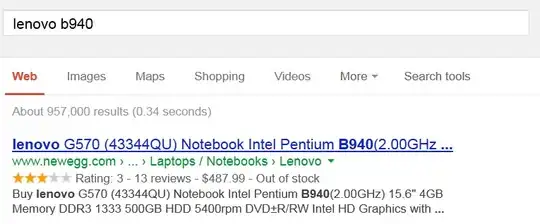
Manufacturer and Processor number should be enough. (for example I did mine: Lenovo B940 google came back with the information in the first hit.)

Step One Step two

Ben Plont
  • 420
  • 1
  • 4
  • 17
5

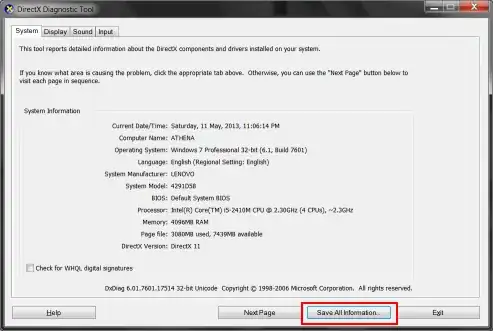
press Win +r

On the dialogue box, type ''dxdiag'' And then press enter.

Your directx UI will open.

enter image description here

Click ok ''save all information'' and save it as a text file on desktop or anywhere u want. This text file is the encyclopedia for your hardware information.

Search for the ''memory'' title in the text file and you'll see what you want

Glorfindel
  • 4,089
  • 8
  • 24
  • 37
  • 1
    I've taken the liberty of adding the kbd tags and a screenshot, as well as fixing up your spelling. However does does *not* mention what type of memory you have, only how much. You might want to read the question more carefully, as well as proofreading your answers. – Journeyman Geek May 11 '13 at 15:12
  • This was the method I used, no other was usable without any installation. Guiding someone to properties is more complicated. – András May 30 '13 at 11:39
  • 15
    This method doesn't answer the main point of your question: what type of ddr is the computer running. – Ben Plont Jun 01 '13 at 04:32
  • It does. I asked for the easiest method, and this plus finding out the memory type from the processor is easier than guiding her through the steps of downloading and installing a program. – András Jul 31 '13 at 10:59
  • Well I must agree with @BenPlont. I go through those steps to check what type of RAM I have and after all I found that it is useless because in fact it doesn't answer that. It shows only how much RAM I have but this is not what I want to check, and not for You were asking. I think that it will be better if this will be unchecked as correct answer. – Rob Nov 01 '14 at 10:15
  • 2
    not working in my case. It's showing nothing related to the RAM type, only "8192MB" – phuclv Jan 27 '18 at 06:22
3

Well if it weren't for the downloading and installing bit, I'd say use Speccy by piriform(the people who make CCleaner), as it has a handy function to post the system specification snapshot with a semi private url.

ghost
  • 69
  • 2
  • I logged into my stackexchange account just to +1 this because of my knowledge of how awesome CCleaner is. Thanks for the tips! – Evan Lynch May 09 '17 at 03:47
3

installing and running a program might be too much for her.

You said might - and if you are going to be her remote IT go to person, you might want to guide her to install teamviewer (or something similar) so you can log onto her system remotely.

It is a free download and use at teamviewer. I have used this with my father-in-law and it was far easier than driving two hours if I really did not have to.

From Teamviewer website:

Control computers remotely via the internet, as if you were sitting right in front of them. Whether you are providing spontaneous support, administering servers or working from your home office, TeamViewer lets you get the job done.

Now you can poke around, install CPUZ and get the RAM data you are looking for.

This can also be handy if some other issue comes up down the road that "guiding over the phone" just won't help.

Carl B
  • 6,660
  • 16
  • 46
  • 66
  • I wanted to install logmein last time I was there, but unfortunatelly I forgot. Guiding her through the install might be too much for me :) – András May 08 '13 at 09:35
1

The easiest method is to download a simple utility to check all system information.

Try CPUID

After you installed it, go to the Memory tab, your see all memory information.

Asad Mukhtar
  • 121
  • 2