41

I'm currently running Ubuntu 9.04. I wanted to swap the stereo channels, but I couldn't find that option in the Volume Control Preferences.

Is there a way to do this without touching any configuration file? (I'm not allowed to log as root in this machine)

Auron
  • 1,017
  • 3
  • 12
  • 15

5 Answers5

44

The PulseAudio way (tested on Ubuntu 10.04, should work on 9.04):

Copy /etc/pulse/default.pa to ~/.pulse/default.pa, and add the following two lines to the end:

load-module module-remap-sink sink_name=reverse-stereo master=0 channels=2 master_channel_map=front-right,front-left channel_map=front-left,front-right
set-default-sink reverse-stereo

Restart PulseAudio by running pactl exit at the command line.

Leave out the second line if you don't want to use the reversed stereo by default. You can switch between reversed and normal stereo output in the "Output" tab in Sound Preferences. If you do have root and want this system wide, you can just add the lines to /etc/pulse/default.pa instead of making a user-specific configuration.

This configuration makes a few basic assumptions: that the card you're reversing the channels of is card 0; that you only have to deal with 2 channels; and that those channels are called front-left and front-right.

If you have a videocard with HDMI out, it is likely the analog out of your motherboard will be card 1, not 0; so master=1. (Front Panel headphones are likely on this analog channel)

For more information, see the PulseAudio documentation for module-remap-sink.

Brian Gruber
  • 556
  • 5
  • 4
  • Initially it seemed to do the trick on 14.04. But after reboot pulseaudio daemon failed to start. had to remove the call to fix it. – Amir Uval Jun 26 '14 at 13:54
  • Works via `pacmd` too (i.e. no need to copy config & restart pulseaudio). – ulidtko Oct 06 '14 at 09:52
  • 1
    If you have more sinks, so you can use `pacmd list-sinks` to display a list of existing sinks and their indexes. than replace `master=0` with the `master=IndexOfTheSinkToSwap` – user1182474 Jul 15 '16 at 08:36
  • 2
    This works perfectly under Ubuntu 16.04 as well. Persists through reboot as expected. – Elder Geek Jul 31 '16 at 16:06
  • 2
    Great answer! Only problem I'm having is that the volume of the remapped sink is based on the base sink. That means if I switch to the base sink and turn volume to 50% the remapped sink will now be able to go up to only 50% volume (it's 100% will be the 'real' 50%). Any way around that? – srfrnk Apr 28 '19 at 06:00
  • If the remapped output is selected, in the beginning of a playback (when I double-click on an MP4 file to open it in VLC), there are two small pauses in audio until it starts playing back smoothly. If I rewind the video back, then it is all right from the beginning. The non-remapped output sounds all right also the first time I open a video in VLC. – Jānis Elmeris Oct 19 '21 at 14:19
  • Worked perfectly for me on PopOS 5.16.11, which derives from Ubuntu! Thanks! – unigeek Apr 29 '22 at 00:10
21

Essentially the same approach as Brian's above, but without touching any configuration file:

pactl load-module module-remap-sink \
    sink_name=reverse-stereo \
    master=0 \
    channels=2 \
    master_channel_map=front-right,front-left \
    channel_map=front-left,front-right

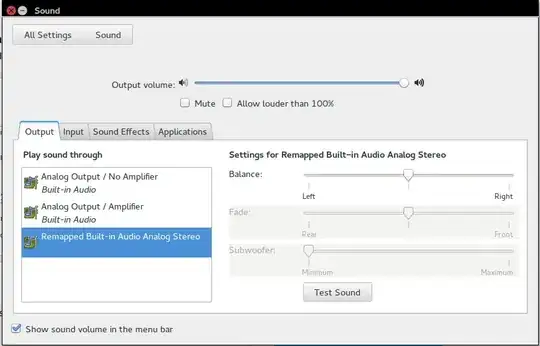
This will create on the fly an additional PA sink with reversed channels. (It will disappear after pulseaudio restart). To switch to it:

pactl set-default-sink reverse-stereo

— OR, you can also switch manually via the sound control panel:

pulseaudio volume control window

Off course it's possible to switch back and forth, e.g. when experimenting.


This way is better if you want to try something out quickly rather than to save the setup permanently.

ulidtko
  • 2,896
  • 24
  • 21
  • `pactl set-default-sink reverse-stereo` failed with `No valid command specified.` on a Ubuntu 12.04. – Auron Oct 06 '14 at 11:41
  • 1
    @Auron works fine on 14.04. – ulidtko Oct 08 '14 at 00:43
  • Hmm, I would have to check it. – Auron Oct 16 '14 at 12:10
  • 1
    @Auron, see update; you can also switch manually via the sound panel. – ulidtko Oct 16 '14 at 13:41
  • 2
    Amazingly, this solution still works as of Ubuntu 19.10. Just that after `pactl set-default-sink reverse-stereo` you have to restart sound-playing applications (like Firefox) so that they pick up the new default on restart. – tanius Feb 10 '20 at 15:17
  • I am streaming my computer audio over bluetooth. When I try this and switch to the new "reversed", the sound doesn't go to my bluetooth device anymore. It seems to me that it works on the computer speakers. though. Any idea on how to make it a universal change, whatever the output device? – Totor Oct 02 '22 at 19:11
  • @Totor not possible. Because this creates a channel-mapping over *one specific sink* ("sink" = "output device"). You can 1) create a reverse-mapped sink for every sink that you already have, it's a trivial iteration script a-la `pactl list short sinks | cut -d\t -f1 | xargs -I{} pactl load-module module-remap-sink […] master={} […]` — or simply 2) just set the sink index you're remapping over correctly in the `master=` option (`master=1` perhaps) – ulidtko Oct 03 '22 at 16:22
7

If you're using ALSA, Add this to your ~/.asoundrc file:

pcm.swapped {
    type         route
    slave.pcm    "cards.pcm.default"
    ttable.0.1   1
    ttable.1.0   1
}

pcm.default      pcm.swapped

Via ALSA FAQ

Sathyajith Bhat
  • 61,504
  • 38
  • 179
  • 264
0

I have the same problem here and the Brian answer works fine on some devices. If you want to invert the stereos of bluetooth devices every time you restart PulseAudio the sound device conected by bluetooth will disconect and after reconecting there is no remaped audio output. Probably a way to reload conected devies without restarting PulseAudio solve this issue.

  • This should be a comment. – Toto Oct 14 '21 at 14:16
  • 1
    This does not provide an answer to the question. Once you have sufficient [reputation](https://superuser.com/help/whats-reputation) you will be able to [comment on any post](https://superuser.com/help/privileges/comment); instead, [provide answers that don't require clarification from the asker](https://meta.stackexchange.com/questions/214173/why-do-i-need-50-reputation-to-comment-what-can-i-do-instead). - [From Review](/review/late-answers/1085066) – Aulis Ronkainen Oct 14 '21 at 14:49
0

For a solution using Pipewire, "Easy Effects" application can be used. First install "Easy Effects" from Flatpak. Then open the application. In the bottom panel, select "Effects", then "Add effect" from the left panel and select Stereo tools to add. Here you can select this tool for "LR -> RL Stereo flip channels". For the sound output, select "Easy Effects sink".

Installing the Easy Effect application

Easy Effect application

  • 1
    Avoid posting answers to old questions that already have well received answers unless you have something substantial and new to add. – Toto Jan 03 '23 at 18:22
  • 3
    I had the same problem, that solution worked perfectly for me using Pipewire, so the solution is new. – Ömer Şayli Jan 03 '23 at 18:32