I used Ubuntu before and now I migrated to Kubuntu. And I'd like to know if there are 'workspaces' in Kubuntu and how I can switch between them with shortcuts.
Asked
Active
Viewed 1.7k times

1 Answers
14
The only difference between Ubuntu and Kubuntu is that Ubuntu uses Unity as the Desktop Environment and Kubuntu uses KDE. Linux allows the user to choose which Desktop Environment to use, you can install Unity or Cinnamon or LXDE or whatever you want on your Kubuntu.
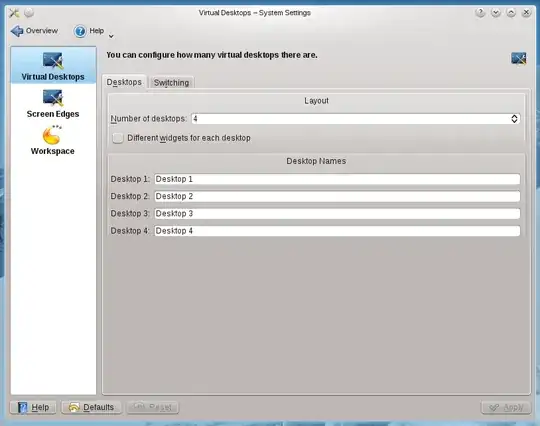
That said, yes indeed KDE (which is what you are using) offers workspaces. You should be able to control their behavior by going into the settings app (or running systemsettings from a terminal) and then
systemsettings -> workspace behavior -> virtual desktops

terdon
- 52,568
- 14
- 124
- 170
-
1What about the keyboard shortcuts for workspaces? I've never been able to figure those out.. – Seth May 17 '13 at 20:55
-
1@seth, they should be on the "Switching" tab. – terdon May 18 '13 at 00:14
-
1Where are shortcuts? – Kangarooo Mar 08 '20 at 19:42
-
1@kangarooo go to system settings. -> shortcuts -> global shortcuts -> system settings. you can find walk Through desktops and change that shortcuts. – Ebrahim Bashirpour Apr 11 '20 at 14:23
-
1in Kubuntu 20.04: shortcuts > global shortcuts > Kwin – Eugenio Jun 05 '20 at 20:30