-4

I would definitely say that this system is 64 bit but the owner says it's 32. The computer is a Dell Optiplex 960 which comes both in 32 bit and 64 bit versions but I installed windows 8 64 bit version and it can run 64 bit programs.
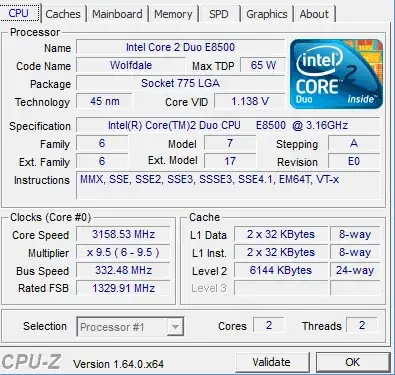
enter image description here

Update

There's Autoit script that checks it, I had to update an older script to make it work

If @CPUARCH = "x86" Then
    $CPUARCH = "32-bit"
Else
    $CPUARCH = "64-bit"
EndIf

If @OSARCH = "x86" Then
    $OSARCH = "32-bit"
Else
    $OSARCH = "64-bit"
EndIf

MsgBox(0, "CPU info", "The CPU is "& $CPUARCH & " and the OS is " & $OSARCH)

I uploaded the compiled binary to sourceforge.

Niklas Rosencrantz
  • 1,021
  • 9
  • 27
  • 52
  • 10
    If you installed a 64-bit operating system you **already** know it's a 64-bit processor. The fact the owner had a 32-bit operating system installed doesn't make him wrong. – Ramhound Jun 02 '13 at 00:53
  • 5
    split the difference - it's a 48 bit system :-) –  Jun 02 '13 at 00:55
  • 1
    The bit-ness of the 'system' depends on both the computer and the OS. It's always been a 64-bit computer... But if it had a 32-bit OS, it was a 32-bit system at that time. – Brian Adkins Jun 02 '13 at 01:53
  • 1
    Try this: http://superuser.com/questions/321988/how-do-i-determine-if-my-windows-is-32-bit-or-64-bit-using-a-command/322007#322007 – MaQleod Jun 02 '13 at 02:28
  • 1
    Just hit the **Windows+PauseBreak** key and you will see if its 32/64bit. – avirk Jun 02 '13 at 02:56
  • @MaQleod That was good. it generated a small .exe that I could verify that both my CPU and my OS are 64-bit. – Niklas Rosencrantz Jun 02 '13 at 07:32
  • @avirk that only tells half the story. You could have a 64-bit capable CPU but only have a 32-bit OS installed, and would only see 32-bit (x86) there. – Austin ''Danger'' Powers Jun 02 '13 at 08:13
  • Why bother asking. If it runs 64bit programs the cpu is definitely 64bit. It is irrelevant if you have a 32bit OS or a 64bit OS. – w4etwetewtwet Jun 02 '13 at 08:16
  • @handuel if it runs 64-bit programs, then it's also a 64-bit OS. – gronostaj Jun 02 '13 at 08:53
  • I have the same processor Core 2 Duo, and this type is x64 as i know – Gio Jun 02 '13 at 15:38

3 Answers3

5

64 bit processor - according to cpu-z it supports EMT64T - this is intel's version of the x86_64 instruction set. Probably had a 32 bit OS pre-installed - I think that was the period of transition between vista and XP, and while vista had proper 64 bit support, XP64 was a mess. There's a lot of systems that can handle 64 bits, but have 32 bit OSes installed.

Journeyman Geek
  • 127,463
  • 52
  • 260
  • 430
1

You could also check CPUWorld: http://www.cpu-world.com/CPUs/Core_2/Intel-Core%202%20Duo%20E8500%20EU80570PJ0876M%20-%20AT80570PJ0876M%20(BX80570E8500).html

Data width  64 bit
ranieri
  • 645
  • 2
  • 9
  • 21
0

I always lookup the cpu on the manufacturers site, it will tell you if it has a 64bit instruction set or not.

for this processor, an intel core 2 duo e8500, its 64bit

http://ark.intel.com/products/33911

it also says on the cpu-z screen that it supports emt-64 which is Intel's version of the amd64 instruction set, as @ranisalt stated.

lots of information here: https://en.wikipedia.org/wiki/X86-64

Jonathan
  • 2,883
  • 1
  • 14
  • 15