1

I read and tested quite a lot, but I still not able to come up with a solution for my problem.

The close solution I found is the second one proposed in article below: How to count number of distinct values in a range?

I'm essentially after finding out how many values are unique in Column A while Column B correspond to a certain value.

Let's imagine the following spreadsheet

COL A      COL B
abc        TRUE
abc        TRUE
bef        TRUE
bef        FALSE
hgf        TRUE
swd        FALSE
rth        FALSE
kjh        TRUE

I'd like to come up with a formula to calculate (not showing) the # of unique values in A which contains TRUE in COL B. So given the example above, I should get 4.

Now, I was expecting the formula below to be in some way helpful

=SUMPRODUCT((A2:A100<>"")/COUNTIF(A2:A100,A2:A100))

once amended with a COUNTIFS, but it clearly doesn't work, and I don't understand why. Also I don't really understand the reason of the initial bit: A2:A100<>""

Andrea Moro
  • 141
  • 1
  • 9
  • Well, aside the fact that I work out on a different solution, no I'm not aware nor I cannot see any option to "accept" my favorite answer. I do normally vote the one that is helpful, but there is not "this is my answer" out of the many. Where is this? – Andrea Moro Jun 14 '13 at 13:41
  • 1
    Silly me. That's the big v sign underneath :))) – Andrea Moro Jun 14 '13 at 13:42

3 Answers3

2

Use a pivot table. No formulas required. Just a few clicks.

Drag column A (called "one" in my sample) to the row labels, drag column B (called "two" in my sample) to the column labels, drag any column into the values area and set the value calculation to "count".

One row above the pivot table, use a simple Count() function to return the count of uniques:

enter image description here

You can filter the pivot table to show only the items with "true" or only the items with "false".

teylyn
  • 22,498
  • 2
  • 40
  • 54
2

Try this "array formula"

=SUM(IF(FREQUENCY(IF(B2:B100=TRUE,IF(A2:A100<>"",MATCH(A2:A100,A2:A100,0))),ROW(A2:A100)-ROW(A2)+1),1))

confirmed with CTRL+SHIFT+ENTER

barry houdini
  • 10,892
  • 1
  • 20
  • 25
0

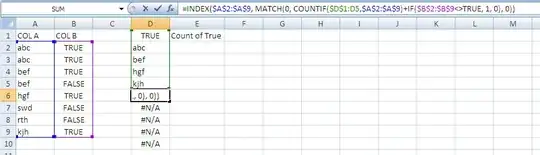
You can use the following formula to list the values from Column A that have "TRUE" in column B.

In Cell D2 enter this array formula with CTRL+SHIFT+ENTER and drag it down to display all the uniques that meet the condition...

=INDEX($A$2:$A$9, MATCH(0, COUNTIF($D$1:D1,$A$2:$A$9)+IF($B$2:$B$9<>TRUE, 1, 0), 0))

Edit* Added a Photo. enter image description here

Scheballs
  • 403
  • 4
  • 11
  • Any reason for that $D1:D1 which is not part of my range? – Andrea Moro Jun 14 '13 at 13:44
  • When you drag the formula down that range (which is the cells above it) is used to identify what has already been returned so it won't return a duplicated value. See the photo I added to my answer if it helps. – Scheballs Jun 14 '13 at 18:10