1

Whenever I'm trying to put my laptop on fullscreen mode with F11, but I don't hold in the Fn key at the same time, it only mutes my laptop, and it's really annoying! I know it's possible to change it, but I can't find out how.

I've looked everywhere, but nothing helps.

I'm using a Windows 8 Toshiba.

I'm not sure about the other details. I guess that "SATELLITE C850D-11F" might help?

dirkt
  • 16,421
  • 3
  • 31
  • 37
  • How do you know it's possible to change it? Maybe there's some way to enable "Fn Lock" (like Caps Lock etc.), but I haven't heard of a laptop where you can change it permanently yet. – gronostaj Jun 07 '13 at 22:49
  • 2
    @gronostaj You can usually change it permamently in BIOS. Works almost always – user 99572 is fine Jun 12 '13 at 13:27

1 Answers1

1

Usually making the F-keys work as F-keys require changing a BIOS setting, as described in these questions:

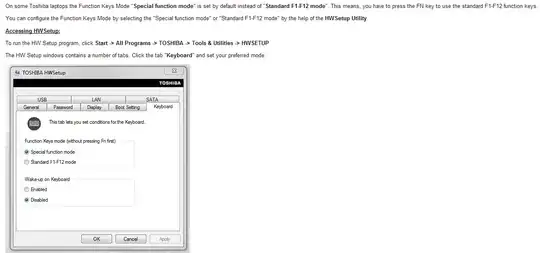
But apparently, at least on some Toshiba notebooks, you can change the F-keys' behaviour directly in Windows, as is described in this Toshiba help article: http://aps2.toshiba-tro.de/kb0/HTD2503B90001R01.htm, and on this website: http://www.ejeindustries.com/support/ToshibaFunctionKeys.html

In case those sites ever go down, here is the screenshot of the Toshiba help article:

enter image description here

You would need to select "Standard F1-F12 mode" in the category "Function Keys mode".

user 99572 is fine
  • 3,397
  • 3
  • 30
  • 43