I'm a big fan of mouse-focus, or "focus follows mouse", and I had this enabled in Mint 14, but when I reinstalled with Mint 15 I can't find the option anywhere. None of the sections in "system settings" has this option, and none of the options under the "preferences" section of the main menu seem relevant. Google yields some forum posts for older Mint versions, and often include hacking around in gconf setting manually. Is there a straight-forward way to enable this in Cinnamon on Mint 15?
Asked
Active
Viewed 1.1k times

2 Answers
11
Open the settings app (run
cinnamon-settings) from a terminal or use the menu.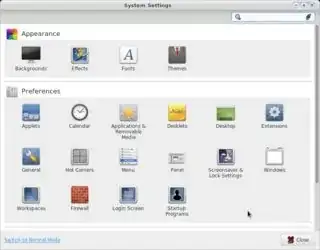
If you have not done so already, switch to "Advanced Mode"
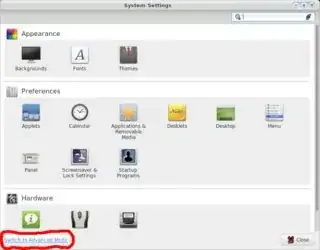
Type focus in the search field at the top
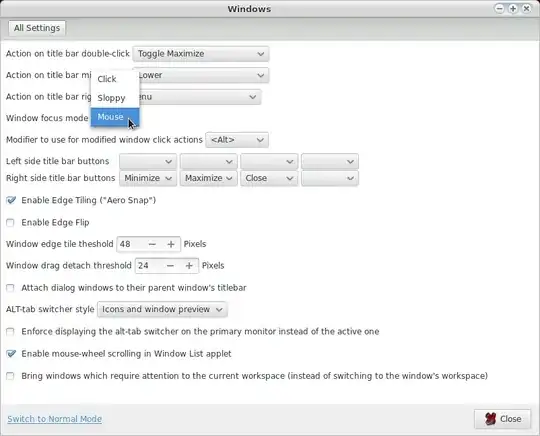
That brings up the "Windows" section, click on it, then select "mouse" from the "Windows focus mode" menu.


-
1Ok, so the problem was, I wasn't seeing the "window" section in the settings manager, but I just noticed the "Switch to advanced mode" button at the bottom and then it shows up. If you want to add that step to your answer I'll accept it. :) – Isaac Freeman Jun 09 '13 at 16:24
-
1@IsaacFreeman ah, sorry, I had already switched, answer modified. – terdon Jun 09 '13 at 16:31
-
For later versions of Cinnamon, searching the settings for ¨focus¨ will reveal the option you want. – Michael Scheper May 20 '17 at 14:32
0
As alluded-to by commenter Michael Scheper, there is no “Advanced Mode” in recent releases (July, ‘23); relevant settings are in the “Windows” widget.

m0rg
- 21
- 3