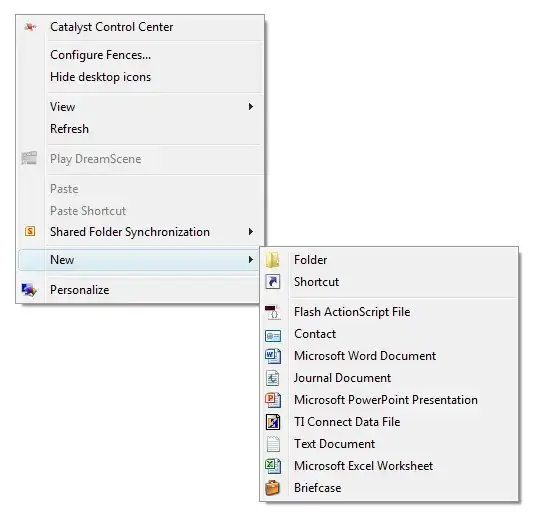
1

I can right click anywhere on my desktop (%userprofile%\desktop) and go to New, and then Text Document to create a new plain text file. But when I try to do the same while viewing C:\ in Windows Explorer all I have under New is the option 'Folder'.

Is this normal behavior in Windows? It has some kind of restriction? Some sort of parental control thing imposed by Microsoft to prevent us kids from killing Windows?

However, if I enter one of the sub-folders and do the same thing there I get the option 'Text Document'.

Also, when in system root (%systemroot%) and I do the same thing there I get the same option to create only a folder. In addition, there is a shield icon over the folder icon indicating that it requires UAC confirmation. The shield is not there while in root of C drive.
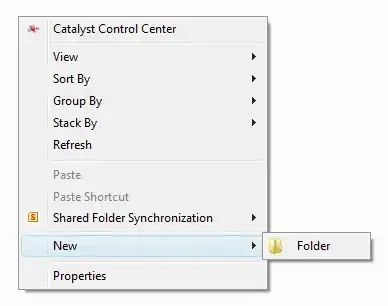
screen1

screen2

screen3

Update:

Right-clicking on an empty area inside the following folders will only show the option to create a new sub-folder inside of it. No other option will be shown.

  • C:\
  • C:\Windows
  • C:\Program Files
  • C:\Program Files (x86)

The only way around it seems to be to create the text file in a different location where the context menu works as expected, e.g. on the desktop, and then move it to the root of C. Alternatively you can create the file directly in root of C by using the command line tool.

C:\>copy con testfile.txt
This is just a test file.
^Z
        1 file(s) copied.

C:\>
Samir
  • 20,527
  • 74
  • 166
  • 226
  • I'm unsure of the cause, but have you tried any of the multitude of possible fixes spread all over a Google search yet? – panhandel Jun 14 '13 at 19:24
  • I have seen the other question about a [similar problem](http://superuser.com/questions/439005/new-word-document-missing-from-right-click-context-menu). That guy was missing the 'New Word Document'. I don't see how the two relate to each other. On my menu, to create a new Word document the option is called 'Microsoft Word Document'. But I'm talking about the regular plain text document (Notepad) here. Anyhow... out of desperation I tried running the command `winword.exe /r` as suggested but that didn't do anything. It brings up a Office 2010 install window and I think it runs a repair. – Samir Jun 14 '13 at 19:27
  • @panhandel More importantly, is this normal Windows behavior? I.e. do you have the New Document option when you do the same on your computer? – Samir Jun 14 '13 at 19:28
  • I do have it in the root of C:\, and any other folder I've thought to try in (windows 7 x64), but I meant Google hits (http://goo.gl/fe2ZN) from ITauthor, PCWinTech, and Doztech to name a few. Not specifically Superuser questions. This seems to plague most Microsoft OS's and there are lots of registry fixes floating around. Just curious what you've tried is all. – panhandel Jun 14 '13 at 19:35
  • @panhandel Okay, Google says I should [check this out](http://answers.microsoft.com/en-us/windows/forum/windows_7-desktop/new-text-document-shortcut-missing-from-the-right/022309a6-cd08-41df-8e55-95e83397ae73). The accepted answer there was to verify that `NullFile` value exists in `HKEY_CLASSES_ROOT\.txt\ShellNew`. If it's not there one is supposed to create it. Mine is there. So what now? – Samir Jun 14 '13 at 19:35
  • @panhandel This seems like a good question for Microsoft. Yes, I know how to "google". I seem to have found the "article" you are referring to over at ITauthor but failed to [provide a link](http://www.itauthor.com/2009/04/09/restoring-vistas-missing-text-document-shortcut/) to. It actually redirects to [Vistax64](http://www.vistax64.com/tutorials/154554-new-context-menu-restore-default-menu-items.html) website. I have downloaded the Reg file and I am exporting my win registry right now. I will try merging this reg file, but I want to play it safe and have a backup of my own reg file. – Samir Jun 14 '13 at 19:49
  • 1
    The issues you are referring to though seem to be of a more general and overly annoying nature. I.e. you either have it! Or you don't! You either have the Text Document option or you don't! It's system wide! But in my case, it's a more funny nature, like "you have it here but you don't there". It's as if Windows is messing with me. I have never ever had the issue of "missing text document option". Ever! So I don't know how common this problem is... I have never seen it, and I have had Vista since before the SP1 came out and have seen some nasty bugs like kernel memory leaks. – Samir Jun 14 '13 at 19:54
  • I'm not making a dig at your skills or intelligence, nor did I see the need to link every referenced search result if you had been down the registry edit path; just avoiding unnecessary wrong answers. – panhandel Jun 14 '13 at 19:58
  • @panhandel Alright, cool. But the thing is I just merged `Restore_Text_Document.reg` with my registry and the problem remains. I even took the time to crash Explorer (by ending its process) and then start it up again, just to make sure the changes are loaded. To no avail. I will try a reboot right now. Hopefully it will appear then. – Samir Jun 14 '13 at 20:02
  • Alright, so merging Restore_Text_Document.reg and rebooting didn't do a thing. Any other bright ideas? Could this have anything to do with local security settings (secpol.msc)? I had SFC trying to repair that file without success the other day. – Samir Jun 14 '13 at 20:14
  • From notes on that Vistax64 site, it appears the standard "New" context menu only contains "Folder" for protected paths/directories (C:\, C:\Windows, C:\Program Files, C:\Program Files(x86)). I've turned my attention to how to get around that! – panhandel Jun 14 '13 at 21:11
  • @panhandel I didn't see any mention of that on the Vistax64 page I link to above. Where did you see this note? Can you please provide a link? I have checked Program Files and Program Files (x86) and what you say is true. I already know about C:\ and C:\Windows (or %systemroot%). But I thought you said you had these options on your system?... didn't you? Let me guess... you didn't check it? :) – Samir Jun 14 '13 at 22:51
  • I do have these options in all folders, but it is a work machine with group policies, so I am thinking one of those will be the key to making all the "new" context menu items available in every folder. And the note under the first example [here](http://www.vistax64.com/tutorials/69837-new-folder.html) talks about the protected folders. – panhandel Jun 15 '13 at 00:29
  • @Sammy: Yes this is normal behaviour and it's due to UAC. If you want to override it you'll have to either turn UAC off or take ownership of those folders (neither are recommended). I don't know what Group Policy panhandel's PC is set to use that allows full access to the New menu without doing either of those two things. – Karan Jun 15 '13 at 01:15
  • @Karan Are you saying that it's possible to override this through Group Policy and still keep UAC enabled? – Samir Jun 15 '13 at 12:09
  • @panhandel Can you confirm that UAC is enabled (or disabled) on your work computer? – Samir Jun 15 '13 at 12:10
  • @Sammy: I was assuming that panhandel's employer wouldn't be so stupid as to disable UAC completely, nor tinker with permissions on system folders. Since he suggested that a Group Policy might be responsible for him seeing the full "New" menu, I was simply stating that I am unaware of any such policy. – Karan Jun 15 '13 at 15:27
  • My UAC was off completely (we use an alternate A/V) and with it on "default" I see the same differences in the "New" items as the OP. I hate it when the answer is "No" :( – panhandel Jun 15 '13 at 17:15

0 Answers0