Some times my video card driver (Intel GMA X4500HD) crashes and gets restarted automatically. But more often (almost every time I watch a flash-powered online video for a period of time) it just gets slower and slower and extremely slow until I restart my computer. This looks like a resource leak in the video driver code and I'd like to try restarting it alone without restarting the whole system. How do I restart it (or cause it to crash immediately to be restarted automatically by the OS) manually?
Asked
Active
Viewed 4.5k times
18

-
Maybe I dont understand something, so I'll put this as a comment, but I think u can go device manager, select the card, go to it's properties, and update driver. Select choose from installed and select the one you want. Seems easy – MegaBluejay Nov 16 '16 at 06:50
4 Answers
18
- Get the file:
devmanview.exefrom Nirsoft, move it to..\windows\system32\and run it. - Get your device name by opening
devmanview.exe: right mouse click and selectPropertieson your video device. - Copy "DEVICE NAME" to clipboard for use in the script: for example: "NVIDIA GeForce GTX 260" or "AMD Radeon HD 7900 Series" Open notepad and copy paste this code:
@echo off
echo.
echo *** Restarting GPU
timeout /t 2 /nobreak >nul
devmanview.exe /disable_enable "NVIDIA GeForce GTX 260"
echo.
echo *** DoNe
timeout /t 2 /nobreak >nul
taskkill /f /IM explorer.exe
explorer.exe
Remember to change "NVIDIA GeForce GTX 260" to your Graphics card name taken from ..\windows\system32\devmanview.exe
Save the notepad file as a nameyoulike.bat .
Double click to reboot your GPU and driver.


-
3This is the only one that worked for me-- I couldn't figure out how to download devcon. I suggest you provide a link to devmanview.exe, and also list the step open "devmanview.exe" to get the device name. – MattPark Dec 10 '13 at 02:08
-
-
Awesome, thanks! I had this in Windows 8.1 with World of Tanks and a NVIDIA GeForce GTX 880M and it's much nicer than restarting Windows. – Gonfi den Tschal Jan 02 '15 at 15:38
-
Wow, it actually works, thanks! N.B.: It also kills of Firefox on my system. – Dexter Mar 29 '15 at 21:10
-
11
Use the Devcon tool from Microsoft.
Using DevCon, you can enable, disable, restart, update, remove, and query individual devices or groups of devices.
To list display devices use the following command:
devcon listclass display
To restart a device use the command:
devcon restart "class id"
Example:
devcon restart "PCI\VEN_115D&DEV_0003&SUBSYS_0181115D"

stderr
- 10,264
- 2
- 32
- 49
-
-
-
2@DBX8 Isn't it up to me to rate the answer based on my own opinion? I don't think it's worth a 1GB+ download to restart a graphics driver if you can do it with a smaller utility. – Maciej Swic May 23 '14 at 07:34
3
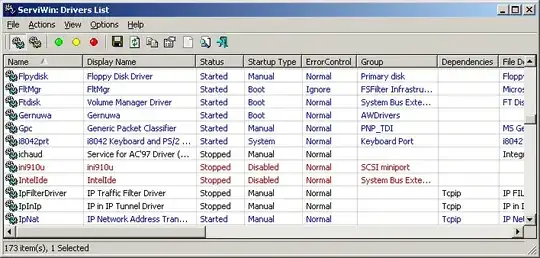
- ServiWin allows you to easily stop, start, restart, pause, and continue service or driver

Homer Simpsons
- 332
- 1
- 9
-
Looks great but doesn't work. Absolutely nothing happens when I click to restart or stop. – Ivan Jul 07 '13 at 22:12
-
-
1
You can restart it using device manager
- go to start menu
- search for device manager
- find display adapters
- choose your card right click and choose disable
- the screen will be restarted and the size of the screen will be very small
- right click and enable it

Eyad Essa
- 11
- 1