23

I was successfully able to create a PGP Key using Seahorse in Ubuntu's Passwords and Keys (13.04). I was also able to create a revocation certificate, if needed in the future, using the terminal in Ubuntu.

My problem concerns doing this on a Windows machine (and Mac). I downloaded Gpg4win and used Kleopatra to create a PGP Key. I am however unable to find a way to create a revocation certificate for the key I generated.

I would appreciate some direction with this issue.

rahi
  • 1,387
  • 1
  • 8
  • 19
  • You can create a certificate using the same commands like you did in Ubuntu - all you might have is add `gpg.exe` to your path variable or use the full path of the executable. If you're using the same key on both machines, you can copy the revocation certificate; it will be the same anyway. – Jens Erat Jul 27 '13 at 18:32
  • Thank you Jens. Please pardon my newbieness, but I don't know the click path in Windows to get the "Terminal" window. Do I just run command prompt and enter `gpg --output revoke.asc --gen-revoke mykey`? – rahi Jul 27 '13 at 23:56
  • Yes, the terminal is called command prompt in windows. You can type `gpg ...` if `gpg.exe` is in your path, otherwise you'll have to call it using `C:\Program Files\...\gpg.exe ...` (fit to your install directory). You will realize that you've got to do this when executing `gpg` fails. – Jens Erat Jul 28 '13 at 09:34
  • Thank you Jens. `gpg --output revoke.asc --gen-revoke mykey` worked. Adding it in the answer below. – rahi Jul 28 '13 at 14:46

3 Answers3

15

Slightly modified answer by Jens Erat on Ask Ubuntu, plus information from comments above.

--

If you're fine with using the command line, this is easily done using gpg --gen-revoke using Windows Command Prompt.

On Windows, if you do not change anything else, the revocation certificate is stored in revoke.asc in your home directory (C:\Users\Name), and you should replace mykey by your key id.

gpg --output revoke.asc --gen-revoke mykey

Remember to store it in a safe place, for example by printing it to a QR code or something similar.

Just in case if you're wondering on how to get the keyID of a key in the Command Prompt, (I ran into this :), It's the last 8 characters of your public key, which you could easily get printed by using the following commands.

gpg --fingerprint

OR

gpg --list-keys
rahi
  • 1,387
  • 1
  • 8
  • 19
9

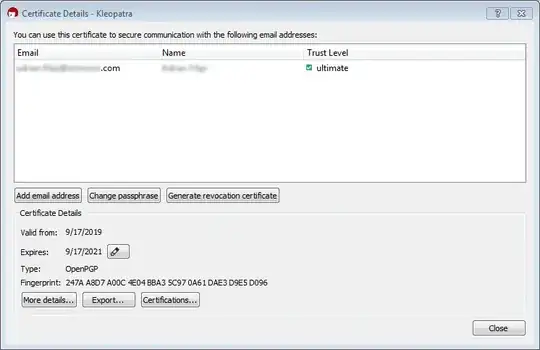
In Kleopatra, right-click on your key and click on Details. There will be a button called Generate revocation certificate.

Andrew Keeton
  • 2,871
  • 4
  • 27
  • 28
3

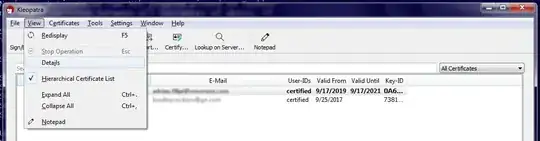
Under current versions of gpg4win, you can simply select the key, then open the "View" menu and select "Details".

View Details Menu

Then use the "Generate revocation certificate" button.

Details Window

ubergeek
  • 46
  • 1
  • Would you have a screenshot to share by chance? I'd be happy to make yours the accepted answer. Merci. – rahi Sep 17 '19 at 21:25
  • Then what? This answer seems incomplete. After clicking the "Generate revocation certificate" option Additional prompts appear. – StatsStudent May 20 '21 at 05:34