10

I'm (as far as I know) not currently using any graphically intensive applications that needs the discrete GPU, but the keyboard icon that signifies that the discrete GPU is being used is flashing on and off (though staying on most of the time). I've enabled the optimus tray icon, and it also flashes between black-and-white and colors.

Is there a way to list all the applications currently using the discrete GPU?

Hennes
  • 64,768
  • 7
  • 111
  • 168
Hubro
  • 5,716
  • 14
  • 61
  • 87

3 Answers3

6

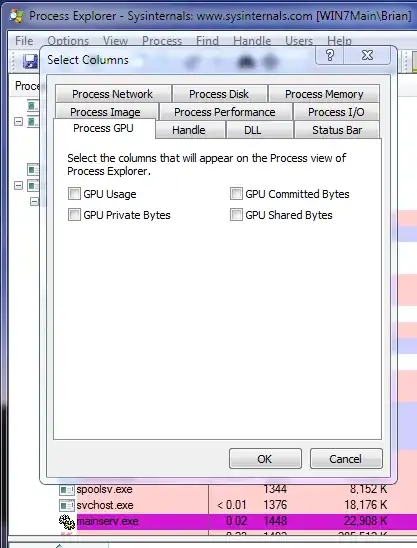
Process Explorer can show GPU usage. It is not shown by default, right click the columns and select "Select Columns" then use the dialog that comes up to add them. While it won't show which GPU, the process using the most GPU resources is likely on the discrete one.

A common task that uses the GPU is DWM (Desktop Window Manager).

enter image description here

Brian
  • 8,896
  • 23
  • 37
  • Cool beans v15 does it. A pic via the web http://www.ozone3d.net/public/jegx/201107/process_explorer_gpu_usage.jpg One person there also indicated "process hacker 2" has it now too. – Psycogeek Aug 07 '13 at 02:35
  • Both my GPUs are getting similar usage so this doesn't really help – niico May 02 '23 at 21:07
1

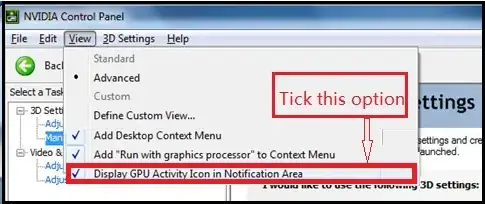
Follow these steps. You don't need additional software other than your own nvidia display driver.

enter image description here

enter image description here

Uğur Gümüşhan
  • 1,356
  • 2
  • 15
  • 32
0

You've probably figured this out by now, but the icon changes colours regardless of the chips performance status. If you left-click the icon a notification will pop up listing all applications currently running on the NVidia GPU.

doggyTourettes
  • 196
  • 1
  • 5