3

I discovered that the Guest account on my computer has Administrator rights. Yep, my kids are much clever than I thought…Unfortunately I am unable to remove admin rights from Guest account.

Any ideas how to get back to “standard user” rights? (Windows 7 Enterprise)

Hennes
  • 64,768
  • 7
  • 111
  • 168
Asagi
  • 31
  • 1
  • 1
  • 2
  • What makes you think it has admin rights? By default, unless you specifically changed something, the built-in guest account does not have administrator rights. – nhinkle Aug 06 '13 at 19:44
  • Delete the profile simple solution why are you unable to remove the permission it was added after all – Ramhound Aug 06 '13 at 21:38

2 Answers2

7

Should work on any version of Windows, since NT, 2000... to Windows 8.1, and in any flavour (Pro, Home, Ultimate, Server... etc), whether you try it in local or remote (telnet, SSH... etc) access.

Note that on your specific language localization, the name of the user and/or group could differ. Example for spanish Windows:

net localgroup Administradores /del Invitado
Sopalajo de Arrierez
  • 6,603
  • 11
  • 63
  • 97
3

(Make sure you are logged in as an administrator, not the guest account or a user account.)

Go to start > run >> and type in lusrmgr.msc and hit enter.

run

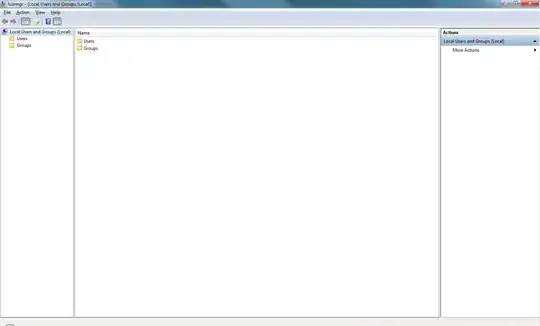
You should see something like this

lusrmgr initial screen with users and groups

In the list of options, select guest and double click it.

lusrmgr screenshot

Select the Member of tab.

lusmgr guest member of

There you should be able to ascertain what groups Guest belongs to.

Alternatively, you can select groups in the left hand navigation bar and see all users that belong to a particular group.

kush
  • 381
  • 3
  • 11
  • This won't work on home editions FYI – nhinkle Aug 06 '13 at 20:11
  • That's frustrating, @nhinkle. How do I manage users in home editions of Windows 7? – kush Aug 06 '13 at 20:39
  • 1
    you can still use `control userpasswords2` to change group membership. For more advanced things like enabling/disabling accounts you'd have to use `net.exe` - specifically `net user`, `net accounts`, and `net localgroup`. – nhinkle Aug 06 '13 at 20:46
  • 1
    @Asagi If a post answers your question, please mark it as the correct answer by clicking the checkbox beside it. This will let other people know your question is answered. – Kendall Frey Aug 07 '13 at 19:41