1

I have a Windows XP Embedded machine which runs a remote desktop server. For some reason, if the physical ethernet connection drops out, it appears to log off the current user.

Is there any way to prevent this from happening?

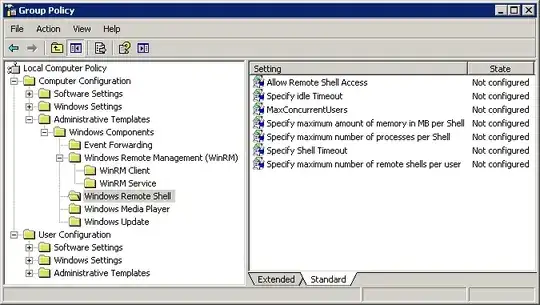
[Edit] I've tried looking at group policies but don't appear to have matching options. I'm fairly sure Windows Remote Shell isn't the same thing is it?

enter image description here

Jon Cage
  • 2,499
  • 11
  • 38
  • 47

1 Answers1

0

When the network connection drops, the RDP session becomes 'disconnected'.

Check local (or domain, if one one) policies (gpedit.msc) and examine how the RDP session timeout options are set.

Specifically check out these policy branches:

  • Computer Configuration\Policies\Administrative Templates\Windows Components\Remote Desktop Services\Remote Desktop Session Host\Session Time Limits
  • User Configuration\Policies\Administrative Templates\Windows Components\Remote Desktop Services\Remote Desktop Session Host\Session Time Limits

For example, if "Terminate session when time limits are reached" is enabled, and "Set time limit for disconnected sessions" is configured (especially if set to a low value, like 1 min.), then after being in a "Disconnected" state for that amount of time the session will be ended:

If you enable this policy setting, disconnected sessions are deleted from the server after the specified amount of time. To enforce the default behavior that disconnected sessions are maintained for an unlimited time, select "Never". If you have a console session, disconnected session time limits do not apply.

You may want to look into configuring the time limit policy as "Never", so that it maintains the disconnected session indefinitely.
Ƭᴇcʜιᴇ007
  • 111,883
  • 19
  • 201
  • 268
  • I don't appear to have any matchig policies (see my updated question).. – Jon Cage Aug 15 '13 at 09:47
  • Could this explain it? http://support.microsoft.com/kb/555218 – Jon Cage Aug 15 '13 at 10:09
  • I've tried registering all .dlls which look like they could be to do with RDP or Term Services but that made no difference - I still don't see those options in GPEdit.msc – Jon Cage Aug 15 '13 at 14:31
  • hmm, perhaps the Embedded XP image didn't have all the policy bits and pieces installed when applied (or hasn't been updated since). If you run `RSOP.msc`, does it show you any values for those policies? – Ƭᴇcʜιᴇ007 Aug 15 '13 at 15:00
  • That's entirely possible. Running RSOP.msc gives me a 'Group Policy Error': RSoP data is invalid. Likely causes are data is corrupt, data has been deleted or data has never been created. – Jon Cage Aug 15 '13 at 16:29