Google chrome is an Excellent browser but the Bookmarks interface is more difficult than Mozilla Firefox. There is no Separator. It maybe not a big problem for many users, but when they have too many Bookmarks, it'll be a problem to separate them.
How can I add Separators to Google Chrome Bookmarks Bar?
Asked
Active
Viewed 3.8k times
45

Amirreza Nasiri
- 2,940
- 10
- 34
- 48
-
just add any site to the bookmark bar then right click and edit the name to a | and set the url to nothing - or make it as i do keep your bookmarks bar organized in folders and subfoldes like a Application Menu Bar with Submenues – konqui Aug 11 '16 at 18:14
-
`It maybe not a big problem for many users`, well, I don't care about the majority. I am also a user. The Chrome developers did not implement the handy [keyword feature](http://superuser.com/a/1114254/169199) of Firefox either. Why not learn from good examples? Instead they give us crutches again. – Avatar Nov 07 '16 at 15:12
4 Answers
66
Unfortunately, Google decided that implementing bookmarks separators in Chrome isn’t worth the UI complexity it would add.
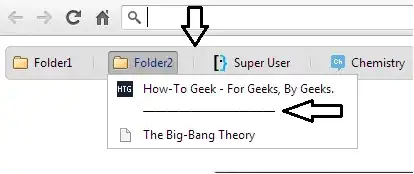
But you can do some tricks to get around this. For example, navigate to the site http://separator.mayastudios.com/. This site gives you the possibility to add vertical and/or horizontal separators by dragging a specially-crafted link to your bookmarks bar.

Rory O'Kane
- 758
- 1
- 7
- 19

stderr
- 10,264
- 2
- 32
- 49
-
-
2
-
I only use Chrome on an offline computer so I cant test it. Is this "trick" just adding another bookmark with a line as the name? – Superole Jan 22 '15 at 12:51
-
The mayastudios horizontal separator seems to be broken. Just rename a link to "----------" and position as required. Copy the Bookmark for extra separators. – user1491819 Sep 15 '15 at 01:46
-
@user1491819 I just tried the horizontal separator and it seems to work fine for me – Michael Bray Sep 15 '15 at 11:45
-
You can additionally replace the URL by "-" without the quotes, so you don't end up on that site by mistake. – binaryanomaly May 07 '16 at 10:17
-
1If you’re wondering how that horizontal separator works, bookmarked links are displayed with the [favicon](https://en.wikipedia.org/wiki/Favicon) (icon in the tab list) of the page they link to. That “me” link links to the page it’s on, and that page has a favicon with a picture of a vertical line. So if you bookmark that link and delete its name, only the vertical line favicon will be visible. Similarly, the vertical separator links to a page with a blank favicon, and the bookmark name is “───────────” (a series of [em dashes](https://en.wikipedia.org/wiki/Em_dash)). – Rory O'Kane Feb 01 '18 at 17:33
3
Or use this little simple 'drag and drop' solution: https://chrome-bookmarks-separator.gasoline.nl/

Marc
- 31
- 2
-
Welcome to SuperUser. This looks like a good solution, but can you expand your post to describe the steps to implement it? Simple as it may be, a good [answer](http://superuser.com/help/how-to-answer) includes specific instructions ([not just links](http://meta.stackexchange.com/questions/8231/are-answers-that-just-contain-links-elsewhere-really-good-answers/8259#8259) to them) and an explanation as to how or why the answer addresses the OPs question. Thanks for contributing. – I say Reinstate Monica Nov 18 '16 at 23:01
-
Please read [How do I recommend software](https://meta.superuser.com/questions/5329/how-do-i-recommend-software-in-my-answers/5330#5330) for some tips as to how you should go about recommending software. You should provide at least a link, some additional information about the software itself, and how it can be used to solve the problem in the question. – DavidPostill Nov 29 '16 at 13:20
1
Another way around it is to:
select to add a bookmark manually [add page...] in the manager page
enter "---------" or "|" in the "name", and some form of URL for the URL

CAtoOH
- 21
- 2
-
1While it is a nice idea this leaves a blank icon on the bar as imaged [here](http://i.stack.imgur.com/VKaKX.png) – Burgi Aug 11 '16 at 19:40
-
1The 'blank' icon had not been stated, or suggested, as a deal breaker. The original post was asking for a way to see a separation between links. The submitted response does that without adding a link to another site, as the accepted answer does. – CAtoOH Aug 15 '16 at 17:14
-
1This is still a better solution for horizontal separators since it doesn't need to point to a specific URL. In my case, I just used a 'about:blank' for the URL and can live with the blank icon. – Shiyaz Jul 06 '17 at 10:07
-3
The sites separators do work, click the horizontal link and it'll change the top drag seperator from horizontal to vertical. These arent bookmarks that take you to sites, theser are just separators. It's really not worth the trouble as google said, just use folders.

Kayge
- 7
-
2In fact it worth and I think this is a really useful feature google don't care about. Separators are used by many people. – Amirreza Nasiri Feb 10 '16 at 11:37