20

Does Windows 7 reuse process IDs?

The reason I ask this question is due to my experience that Windows XP and Linux never seems to generate process IDs higher than 20–30k. However, my Windows 7 machine will reach IDs as high as 5–10k or so within a few hours after a reboot, which is my normal experience from the past. The next morning I check and some processes are 250k or higher, which is not.

I activated the security auditing feature to log process creation and termination. Nothing is generating hundreds or thousands or processes. Only 513 of these events are registered for a 24 hour period, yet hundreds of thousands of process IDs have been used, it appears.

I tried a search for my question and one of the suggested questions previously asked pointed to a Mark Russinovich's marvelous blog. But this article, while very interesting reading, has left me puzzled.

slhck
  • 223,558
  • 70
  • 607
  • 592
isildur
  • 265
  • 2
  • 9

2 Answers2

23

From my testing it appears that you have one false assumption, PID numbers are not given out in sequential order. This is very easy to prove, do the following command from the command line. It should open 3 copies of notepad.

notepad & notepad & notepad

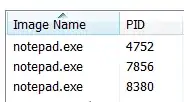
On my machine here are the PID's of the 3 copies that where all opened at the same time.

enter image description here

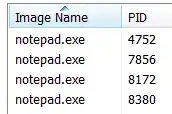
As you can see the PID's jump around a lot, If you open them up one at a time you will also see that the next PID is not always larger than the previous one. For example I opened up a 4th copy of notepad and got this

enter image description here

So it appears that Windows 7 will just pick a random unused PID every time it starts a process, so there very well could have a PID reused throughout the running of windows without a reboot.


I wrote up a simple powershell script (requires v2 or newer, see this answers edit history for a C# version) to prove it for sure

$h = new-object 'System.Collections.Generic.HashSet[string]'
do {
    $proc = Start-Process 'notepad' -PassThru
    $id = $proc.Id
    Stop-Process $id
} while ($h.Add($id))
$count = $h.Count
Write-Host "Took $count PIDs to hit a duplicate, the duplicate was $id."

Running the program 10 times it always took between 134 and 147 launches of notepad for the same PID to be re-used (Why is this number so small? GO-GO Gadget Birthday Problem!)

terdon
  • 52,568
  • 14
  • 124
  • 170
Scott Chamberlain
  • 30,694
  • 7
  • 96
  • 109
  • 5
    Windows NT makes it even faster because [PIDs are always multiples of four](http://blogs.msdn.com/b/oldnewthing/archive/2008/02/28/7925962.aspx). – u1686_grawity Aug 25 '13 at 19:28
  • Thanks Scott. Is there a shell script/utility that could track all processes PID numbers and log it to a file with the name of the process they were assigned too? – isildur Aug 25 '13 at 20:10
  • 1
    You could, but I don't see the usefulness of it. Are you just wanting to track every processes started or do you really care about the PID? – Scott Chamberlain Aug 25 '13 at 20:40
  • At this point, I just want to know what process(s) is being run so many times that it pushed the process id numbers into the 500k+ range. Perhaps a process is spawning processes even. This is just a basic win 7 desktop, antivirus and firefox, a game or two and we do not do much else on it. Thanks for the replies. – isildur Sep 01 '13 at 15:52
  • So I removed an old utility that indexed disk drives using batch files that someone had written years ago and it turns out this was the culprit generating such high PID numbers. Now the same machine has ran for weeks and the highest PID number to date is 12252. – isildur Mar 26 '14 at 14:19
  • An interesting thing is that in Windows 10 this behavior changed. On Windows 7 and 8.1 the above ps script returns a duplicate in about 2 seconds after about 110-130 process starts/stops. On Windows 10 it keeps going and going, usually incrementing the PID by multiplies of 4 and sometimes by jumping up or down by thousands. I stopped it at 221896 after a few minutes. – Tom Andraszek Dec 07 '18 at 00:29
1

I ran a test for an hour and in that time 302 processes exited. Of those, 70 had a PID in common, so I would say the PID gets reused frequently.