4

Is there any way to save a report of the errors that Windows found and fixed in a USB key? Windows presented me this dialog, btw that is not resizable:

Checking Disk Removeable Disk (F:) - Some problems were found and fixed.. Some problems were found and fixed.

When I open the details there is a long list of files with issues:

Some problems were found and fixed (details) .

Some problems were found and fixed (details)

But there is no option to save a copy of the details to a text file. I could click Close and hope a report is saved somewhere but I'd like to be sure since there could be no going back.

I tried various text scraping tools such as NirSoft's SysExporter but it didn't recognize the details pane of the dialog so it couldn't extract what I need. Tried several others but no luck.

Any advice how to proceed?

CLARIFICATION: This scenario occurred automatically when I inserted one specific USB key into my computer, Windows prompted me that the key contains errors and would I like it to scan the key. I did not initiate this. I did not request a scan of the key using any tool like chkdsk or perf mon.

Glorfindel
  • 4,089
  • 8
  • 24
  • 37
JohnC
  • 671
  • 6
  • 17

4 Answers4

2

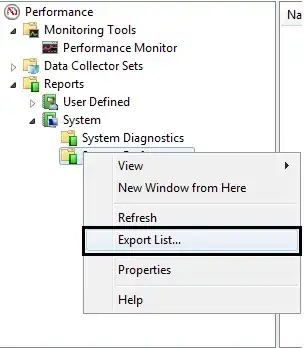
Use the Windows Performance Monitor for this. (See image below).

enter image description here

For open the monitor, open the run box (press + R), type perfmon and hit Enter.

For save reports, right click.

enter image description here

stderr
  • 10,264
  • 2
  • 32
  • 49
  • Please explain this answer in more detail as I don't see how it applies to my scenario. When I follow these steps I get a tiny text file that contains exactly this "Name Date\n". – JohnC Aug 26 '13 at 11:07
0

If you had started this from an admin "command prompt" you would have had a scroll bar. chkdsk /x /r f:

Try this: Left click next to just to the left of the "V" in volume. then

open notepad

cybernard
  • 13,380
  • 3
  • 29
  • 33
  • I updated my question to clarify that I did not start anything from the command prompt and did not run chkdsk. – JohnC Aug 26 '13 at 13:59
0

A report is saved somewhere, and the report is copy pastable too.

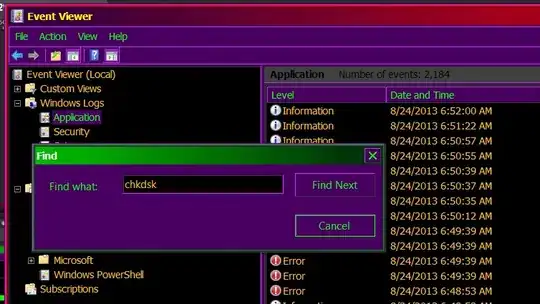
Go to the event viewer %windir%\system32\eventvwr.msc /s

check1

Select the application logs

check2

Bring up menu item Action, Find

check3

Type in chkdsk to find chkdsk entries

check4

When you find what your looking for double click on it, or Right click Properties And as you can see , the event viewer allows text selection, and copy paste.

http://www.sevenforums.com/tutorials/96938-check-disk-chkdsk-read-event-viewer-log.html

Psycogeek
  • 8,945
  • 6
  • 51
  • 74
  • Thanks for the suggestion to check in event viewer. All I did was insert a USB key, so it is not "chkdsk" but something else that I need to search for. Any suggestion what event is triggered by inserting a USB key and that causes a disk check? I did try a search for "chkdsk" but it didn't return any recent results. – JohnC Aug 26 '13 at 13:58
  • @JohnC There is one more thing at the link itself. – Psycogeek Aug 26 '13 at 15:03
  • 1
    Two actually if you count "Event Viewer | Find 'wininit'" and PowerShell "get-winevent". Neither one turned up anything to correspond to the auto USB key scan from the weekend. – JohnC Aug 26 '13 at 20:51
0

Run this powershell script to output all checkdsk entries from Eventlog into a text file:

get-winevent -FilterHashTable @{logname="Application"; id="1001"}| ?{$_.providername –match "wininit"} | fl timecreated, message  > DRIVELETTER:\chkdsk.txt
magicandre1981
  • 97,301
  • 30
  • 179
  • 245