24

Here's my problem: In a .txt file, I need to find and replace thousands of instances of syntax like this:

(see (a053007djfgspwdf))

or

(see (a053007djfgspwdf) and (a54134xsedgeg))

or

(see (a053007djfgspwdf), (a9554xsdfgsdfg) and (a54134xsedgeg))

There is a lot of variety between the beginning (see (a and the ending )) text strings. Can this be set up in Notepad++ using regex? If so, how would I do that? Thanks!

user
  • 29,449
  • 11
  • 99
  • 144
Michael Tuck
  • 241
  • 1
  • 2
  • 3

5 Answers5

26

Sorry folks, I just find other answers complicated. (No disrespect intended towards the original posters.)

As this always shows up as the first search result, I'll add this in:

  1. Open the search/replace dialog (CTRL+F then the replace tab)
  2. Tick "Regular Expression" down the bottom
  3. Use .* as the wildcard

For example, I wanted to remove all instances of abp="1314", abp="1313", abp="1312" etc (basically the numbers are all different, which is why you want a wildcard to get rid of them).

In the replace dialog:

Find in what: abp=".*"
Replace with:

(You're replacing anything within those quotes with nothing to get rid of it)

Source: https://www.organicweb.com.au/17226/general-technology/notepad-wildcard/

techraf
  • 4,852
  • 11
  • 24
  • 40
SweetSuzie
  • 261
  • 3
  • 2
18

Yes it can! Notepad++ has a RegEx search mode that you can select for all of your RegEx replacement needs.

The example below is a basic replace for anything between (see (a...)) with the exception of a line break. You may need to modify the RegEx or write your own to fit your needs. Here's a great place to help you along with experimenting.

RegEx: \(see \(a.+\)\)

Matched strings:

(see (a053007djfgspwdf))
(see (a053007djfgspwdf) and (a54134xsedgeg))
(see (a053007djfgspwdf), (a9554xsdfgsdfg) and (a54134xsedgeg))


Replace (see (a...)) with replacement

one.time
  • 693
  • 6
  • 13
  • Thanks! It found the instances of the first example **(see (a053007djfgspwdf))** but not the others. Still, a great start. I will play with it to see what else I can do. If you have further suggestions, I would very much appreciate it. Thanks again. – Michael Tuck Aug 27 '13 at 23:49
  • Did you click *Replace All* or continue clicking on *Replace* to cycle through matches similar to using *Find Next*? Does the text you're looking for only start with `(see (a` and end with `))`? If you have strings that end with a single parentheses, you can turn the last `\)` into the capture group `(\)|)` to match strings ending with `))` "or" `)`. – one.time Aug 28 '13 at 00:08
  • Tried a few replaces, then Replace All. After that, the search string found nothing. The text for all is: **(see a** _varied text_ **))** No strings with single parenthesis except perhaps typos. – Michael Tuck Aug 28 '13 at 01:20
  • I updated my answer with an alternative RegEx `(\(see \(a|\(a)([^\)]+)\)(\)|)` that will match on the strings in your question. – one.time Aug 28 '13 at 01:22
  • LOL you updated your answer while I was editing my response. I'll try the new one. – Michael Tuck Aug 28 '13 at 01:23
  • No joy. The edited example in the original response (screenshot) gets no results, and the \(see \(a|\(a)([^\)]+)\)(\)|) from the edit beneath the screenshot gets an invalid response result. – Michael Tuck Aug 28 '13 at 01:31
  • Using the RegEx provided in the answer `(\(see \(a|\(a)([^\)]+)\)(\)|)` I'm able to match the strings using your question's criteria. Do your strings differ from *(see (a...))*, *(see (a...)*, *(a...))* and *(a...)*? – one.time Aug 28 '13 at 01:40
  • Hmmm. With the string in your above comment, it finds PART of the text strings. For example, it finds the portion highlighted: **(see (a98798lkjlkj)** and (a09709sdgsdg)) – Michael Tuck Aug 28 '13 at 01:49
1

As some of these were too in depth for me to understand, let me show you what I did after reading all of these solutions and more to finally get a better understanding. (this is a simple approach, might not be the best)

I wanted to remove all of my figure elements on the whole web page. Figure 2.1,Figure 1.1,ect.

It was:

<p class="td1-content b8"><span class="stepNumber">2.  </span>Select Memo from the toolbar<br><b>Figure 2.1</b></p>

I wanted it to end up:

 <p class="td1-content b8"><span class="stepNumber">2.  </span>Select Memo from the toolbar</p>

But each

had a different Figure number, so I used this in sublime text 2.

  1. ctrl H
  2. click the ".*" symbol on the bottom right of Sublime text 2, (regex)
  3. typed <br><b>Figure.*</b>
  4. replace with: -left blank

This replaced all of my instances with figures in it. notice I used .* where the numbers would of been. Hope this helps.

Jim Schwetz
  • 13
  • 1
  • 5
1

Try this pattern: \(see \(a(.*)\) and make sure you have ". matches newline" unchecked and "wrap around" checked.

ethmz
  • 396
  • 1
  • 4
  • 16
0

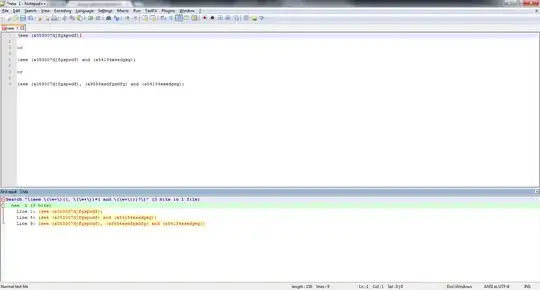
The exact regex you'd need is:

\(see \(\w+\)((, \(\w+\))*( and \(\w+\)))?\)

For example:

enter image description here

On selecting Find All in Current Document, the result would be:

enter image description here

You can simply use Replace as per your necessity instead.

If you want to include the a as well in the regex, you can use:

\(see \(a\w+\)((, \(a\w+\))*( and \(a\w+\)))?\)
Roney Michael
  • 1,056
  • 1
  • 14
  • 22