7

I would like to add an empty markdown file to the "New" context menu in Windows 8. I see at least two solutions to this problem, but neither of them work for me.

Is this possible? FWIW, a markdown file is a just a plain text file with a .md extension.

First try

I made a .reg script as shown here.

Windows Registry Editor Version 5.00

[HKEY_CLASSES_ROOT\.md\ShellNew]
"NullFile"=""

But, even after a restart, I don't see markdown under the "New" context menu. Here is my registry after running this script, which seems correct.

my registry after running script

Second try

I also tried new menu editor as shown here. This works in general, but the .md extension doesn't appear in left pane.


Update 1

ShellNewHandler shows the markdown extension. Do I have to somehow add a template file?
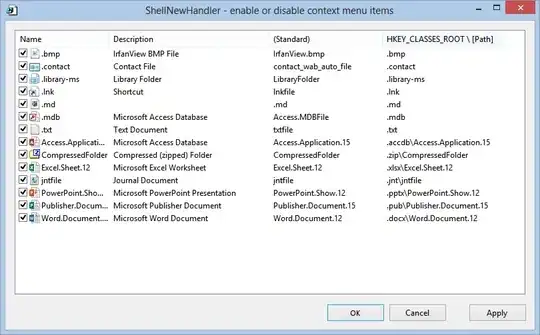
ShellNewHandler screen capture

Richard Herron
  • 1,137
  • 2
  • 17
  • 44

1 Answers1

6

You need to add some more registry keys:

Windows Registry Editor Version 5.00

[HKEY_CLASSES_ROOT\.md]
@="markdown"

[HKEY_CLASSES_ROOT\.md\ShellNew]
"NullFile"=""

[HKEY_CLASSES_ROOT\markdown]
@="Blank Markdown file"

@=markdown points to the new registry key, whose default value ends up being the description and name of the new file.

You may also need to add the following to set the icon (but I think it is optional):

[HKEY_CLASSES_ROOT\markdown]
"DefaultIcon"="%SystemRoot%\system32\imageres.dll,-102"

Finally, from ShellNewHandler you may have to:

  1. uncheck .md
  2. apply
  3. check .md
  4. apply
Leftium
  • 9,209
  • 9
  • 48
  • 79
  • Thanks, that does it. This was driving me _crazy_. I just waited a few minutes and the registry "fixed itself" and "Blank Markdown file" appeared in the "New" context menu. It took the default text editor icon (Vim, which is what I associate with .md files) without the "DefaultIcon" bit. Thanks! – Richard Herron Sep 03 '13 at 16:54
  • After using this method when going to the "New" context menu, markdown files are called "MD FIle". Is there a way to rename this to e.g "markdown file"? https://i.imgur.com/fqkZFls.png – Arete Apr 14 '17 at 13:54
  • This worked for me. The icon is just the default icon for Markdown files, so the second part is not needed. – endolith Jun 29 '21 at 14:53