14

On platter drives, when it is time to dispose of them, a degaussing takes care of the data and in most cases erases the factory pre-recorded servo tracks rendering the drive useless.

What does one do to an SSD to get the same data destructive and rendered useless assurances?

EDIT:

Would taking it out of the case an microwaving it do the trick?

Carl B
  • 6,660
  • 16
  • 46
  • 66
  • 3
    There's a great answer on securely erasing SSDs [here](http://security.stackexchange.com/a/5665). – Bob Sep 01 '13 at 15:02
  • @Bob - that seems to reaffirm my concern. There are a lot of "ifs" and "assumptions" – Carl B Sep 01 '13 at 15:08
  • 1
    On the other hand, your degaussing would effectively permanently destroy a HDD. You could physically destroy both HDDs and SSDs for a similar effect. – Bob Sep 01 '13 at 15:15
  • @Bob but this would have to be time effective as mass amounts of SSDs replace platters, more sensitive info is stored and a guaranteed method of making them unusable and data free is needed. I do not want a sledgehammer and x amount hours to destroy 100 SSDs. there must be a better, faster way. – Carl B Sep 01 '13 at 15:19
  • 1
    As I suggested in my answer, you *could* incinerate them. That's quite efficient, though you would need the equipment to do so safely (I *guess* you could also douse them in gas and set them on fire, but there's some concern for the safety of humans - especially with possible toxic gasses released). – Bob Sep 01 '13 at 15:22
  • 1
    > The National Security Agency (NSA) requires that SSDs be disintegrated to a 2mm or smaller particle using a NSA/CSS evaluated Disintegrator. – Bob Sep 01 '13 at 15:24
  • 6
    @techie007 not *quite* the same - this one is about possibly destructive erasure for permanent disposal, while the other is about wiping with the intention of further use. – Bob Sep 01 '13 at 16:20
  • I guess it depends on the value of the data on the drive. In most cases, you can probably just send it to an electronics-recycler to be torn apart and recycled. You can often also take it out to a land-fill and bury it (unless you’re afraid that an archaeologist might dig it out and attempt to read it a few hundred years in the future—assuming of course that the have an IDE/SATA controller). I you have state secrets or something, then just place in an [industrial shredder](http://images.google.com/images?sout=1&q=industrial+shredder). – Synetech Sep 02 '13 at 16:33
  • 2
    @Bob is correct. Voting to reopen. – bwDraco Sep 03 '13 at 02:59

7 Answers7

9

With any device, completely physically destroying it would work. For example, dumping a load of thermite on top, or throwing it into an incinerator. Unfortunately, unlike HDDs, drilling a couple of holes randomly likely won't work - but if you can locate the flash chips, you can smash those up.

Apart from that, SSDs all (to the best of my knowledge, though it is difficult to confirm without testing) implement the ATA secure erase command (or its SCSI equivalent), which can be sent to cause the firmware to erase all data.

Bob
  • 60,938
  • 25
  • 191
  • 216
  • 9
    It would not be ecologically wise to incinerate and I can't store thermite at the house anymore...not after the last incident...jk – Carl B Sep 01 '13 at 15:23
  • @CarlB At this point, you're effectively asking me (or someone else) either to say "yes, you can use your HDD degausser on them", or "here's an exact equivalent for a SSD". Such a device (or concept) simply **does not exist**. If you want to be 'environmentally friendly', take them apart, recycle the case, and incinerate the PCB. If you want to be fast, incinerate the whole thing. If you want both, pay someone else you can trust to do the first. Your only other possible option is, say, running a large current through it. That's not exactly reliable, though. – Bob Sep 01 '13 at 15:27
  • Actually, IIRC HDD degaussing units rely on rapidly fluctuating magnetic fields. I wonder if a more powerful field could induce a large enough current to destroy a SSD? Anyway, that is not currently commercially available (and may not even be feasible - it was just a random suggestion). – Bob Sep 01 '13 at 15:30
  • 1
    If you trust the ATA secure erase command to do what it says it does ... – LawrenceC Sep 01 '13 at 16:37
  • @Bob - Just put it next to one of the coils at your local cyclotron. ;) (I've heard that Bulova once had to honor a warrantee replacement for one of their Accutron "magnetic proof" watches that was placed next to one and was pretty much fused.) – Joe Sep 02 '13 at 20:18
  • 1
    I vote for disassembling the thing and smashing all chips with a good ol' **hammer**. And then recycle the case. – Vorac Sep 20 '13 at 15:37
  • If you intend to use secure erase, you need to _test it prior to using the drive for the first time_ to store the sensitive data. Fill the drive with non-sensitive but recognizable data, such as JPEG images of kittens, run secure erase, and then attempt to recover data from the drive with a data recovery tool. If you get any pictures back, the implementation is flawed (or you didn't actually run secure erase). This doesn't completely save you though; I've managed to brick one drive by repeatedly running secure erase on it. Be prepared to physically destroy the drive(s) anyway. – Michael Hampton Dec 26 '13 at 01:35
4

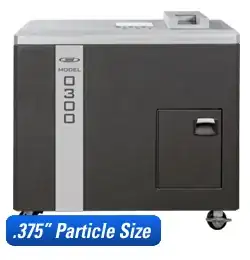
I found a couple of solutions that are destructive to .375 particle size. The "Crushers" are not cheap, but if info destruction is required, this looks like a way to do it without setting the drives on fire.

This looks like it will do for a desk top situation with low volume SSD- Hard Drive Crushers - CUI / Commercial Use.

crusher

And this one is more costly, but at .375 particle size:

crusher2

Carl B
  • 6,660
  • 16
  • 46
  • 66
  • 2
    Wow that's impressive, 9 second cycle. It would suck if the form factor of ssd changed though... – 50-3 Dec 26 '13 at 05:36
2

To avoid RSI, fumes or electric shocks, I suggest buying a blender to shred the cards.

These are always fun: What Happens When You Blend A PS2 Memory Card?

Funny yes. But considering the cards are too small for normal office shredders - probably the practical solution.

LateralFractal
  • 262
  • 1
  • 9
2

With solid state drive you need to invoke a Secure Erase command in the disk controller or ATA Secure Erase command. Now in theory this will be "secure" and you wouldn't be able to recover the data after that. This however is not always the case as discussed over on the security SE ATA security erase on SSD

Kingston has published an article on the subject as well "SSD Data Wiping: Sanitize or Secure Erase SSDs?"

Now as Bob said "With any device, completely physically destroying it would work" this is and will always be the only way to guarantee that the device will be permanently inoperable with no chance of data recovery. Now like you said not all of us have access to thermite however that shouldn't stop you from going over the top to destroy it. You could use electrolysis you could use a microwave or you can use the age old technique of getting a hammer and converting your storage device into dust.
Discalmer: Great fun the first time you do it but gets tiring on your 5th device

50-3
  • 3,939
  • 4
  • 21
  • 28
0

Option 1 - Run 12V instead of 5V by fiddling with the wiring from the PSU to the drive. Simply replace the 5V with 12V and watch it smoke.

Option 2 - Microwave.

Burgi
  • 6,493
  • 14
  • 39
  • 52
  • 1
    Wouldn't your option 1 just melt the control board but not actually affect the storage chips? – Burgi Mar 09 '16 at 10:22
  • I have ran 12V onto 3-5V Atmel chips with no ill effects. However -12V sent schrapnell at the ceiling and sparks at me. – Vorac Sep 04 '20 at 01:13
0

Well I don't know about pc but I'm sure there is an equivilent. On mac you can boot up on the recovery HD or the disc/ USB you used to install your os and you say erase all data then erase free space. After you have "erased" everything the data is still there it's just made "available" and will be gone once you write over it. So in mac you say erase free space and set the slider to most secure them hit the go button and wait.

  • 1
    I'll say it again: software overwriting cannot be guaranteed to work on SSDs, due to how they work. – Bob Sep 04 '13 at 02:28
  • @brom954 - the challenge, as Bob has stated, is software solutions are not rendering the drive useless. There are areas on the disk that hold data that may not get touched - the provisioning area for one. – Carl B Sep 04 '13 at 06:01
-2

Just take apart the case, and drill through or smash each of the memory chips, for, as noted in https://security.stackexchange.com/questions/12503/can-wiped-ssd-data-be-recovered "standard utilities for sanitizing individual files were highly unreliable on SSDs: often a large fraction of the data remained present somewhere on the drive. Therefore, you should assume there is no reliable way to securely erase individual files on a SSD; you need to sanitize the whole drive, as an entire unit."

K7AAY
  • 9,512
  • 4
  • 33
  • 62
Cal
  • 1