-2

I'm using Windows 8, 32 bits. It has a memory limitation of 4GB RAM on x86 systems. My PC has 6 GB of RAM. In order to bypass this limit, I have installed 3rd-party software called PatchPAE2 that lets me use all my RAM.

Is this software really working? If so, how can I be sure that my OS actually found 6 GB RAM and is actually letting me use my whole memory?

  • uhm, tagged windows 7 and using windows 8? Which one is the typo? And why not use win 7 64 bits ? – Hennes Sep 07 '13 at 19:25
  • sry Me.hennes .. actually wanted TO tag Windows 8 Bt this program didnt let me to it asked for reputation points .. i Have just logged in Here to Gatter some Knowladge about PC hardware | and now waiting for the Answer :) if anyone going to explain That to me :) – Razib Ahmed Sep 07 '13 at 19:31
  • 3
    I retagged it as windows-8. Same question though, why not use win8 64bits. No need for external programs. – Hennes Sep 07 '13 at 19:35
  • PAE2 is a trick that gives you an extra bits. http://en.wikipedia.org/wiki/Physical_Address_Extension Your better off getting an 64 bit OS, in my opinion. – cybernard Sep 07 '13 at 19:38
  • 1
    Aside from the old favourite "I installed the wrong version" there really is no reason to be messing around with hacky programs and a 32-bit version of Windows. Bite the bullet and reinstall with 64-bit. We have no way of knowing exactly what that program may (or may not) actually do and I personally have no way or reason to try and find out. 64 bit offers better memory support and support for the extra registers that offer better processor performance. – Mokubai Sep 07 '13 at 19:42
  • thanx that was Pretty Helpful.. bt is PAE2 really Works?? thus It gives me and Extra Bits?? and How could a soft Give me extra bits to Use More Mamory?? i dont knw is my question is complicating?? :P – Razib Ahmed Sep 07 '13 at 20:20
  • 2
    "Microsoft Windows implements PAE if booted with the appropriate option, but current 32-bit desktop editions enforce the physical address space within 4 GB even in PAE mode." (source: http://en.wikipedia.org/wiki/Physical_Address_Extension#Operating_system_support) – That Brazilian Guy Sep 07 '13 at 20:45
  • 32-bit CPUs can use more than 4GB of RAM, they just can't address more than 4GB at a time. PAE helps get over this. Windows 8 always has PAE enabled, but the 4GB RAM limitation is artificially set by MS, and you're not allowed to use more than 4GB due to [licensing issues](http://www.geoffchappell.com/notes/windows/license/memory.htm) (rather than technical). So by using that hack you are actually breaking the agreement you have in place with MS to use Windows 8. :) – Ƭᴇcʜιᴇ007 Sep 07 '13 at 21:59
  • How much memory does your BIOS detect? – David Schwartz Sep 08 '13 at 05:43
  • well 6Gb is in Use right Now, my os just saying i dont knw Is it true or not – Razib Ahmed Sep 12 '13 at 18:42

3 Answers3

3

First thing you should know is: Use Windows 64 bits instead. As many comments state, you should install Windows 8 64 bits, because it has native support for up to 512 GB RAM, better memory support and management, better performance (for more memory setups), and you will be able to use 64 bit software, and not depend on 3rd-party solutions that could be a new possible source of bugs.


In order to inspect how much phisical installed memory your system possess, the easyes way in Windows 8 is to use either:

  • System Information

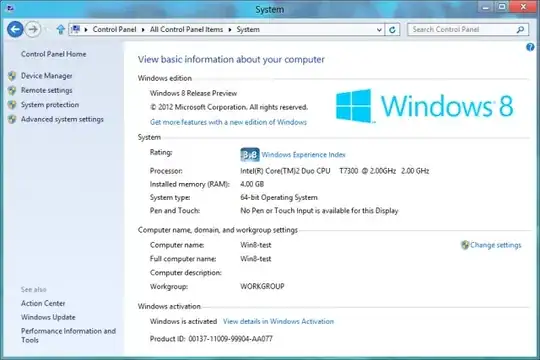
Press winkey and pause/break and check the "installed memory" value on the "System" section

enter image description here

  • Task Manager

Press CTRL, ALT and DELETE simultaneously. Click on the "Performance" tab and check for the "Memory" value.

enter image description here

That Brazilian Guy
  • 6,834
  • 10
  • 64
  • 102
1

A 32 bit operating system can address 2^32 bits, or roughly 4GB. The often quoted 3.25 - 3.5GB is an over simplification of how the rest of the computer and operating system allocate additional resources.

Physical Address Extension certainly does work, and has been used by various operating systems for years. Generally at the server level OS and not consumer.

With PatchPAE2, the software seems rather obscure. It is using concepts that should work from what I can gather, and there is a version for Windows 8.

As far as stability and ease of use goes though, I would personally opt for a true x64 operating system.

Austin T French
  • 10,505
  • 27
  • 42
0

Run Resource Monitor of Windows to see if the RAM is fully used:

enter image description here

I used a bootloader to bypass the Memory Limit of 32Bit client Windows version and this works as you can see in the picture.

magicandre1981
  • 97,301
  • 30
  • 179
  • 245