I constantly split my terminal windows accidentally by pressing Cmd+D (it's so close to Cmd+F). I have no idea how to undo this. Any ideas?
Asked
Active
Viewed 8.9k times
93

-
See also [How do I disable Cmd-D in Terminal?](http://apple.stackexchange.com/q/254222/60079). – sds Mar 28 '17 at 14:36
1 Answers
119
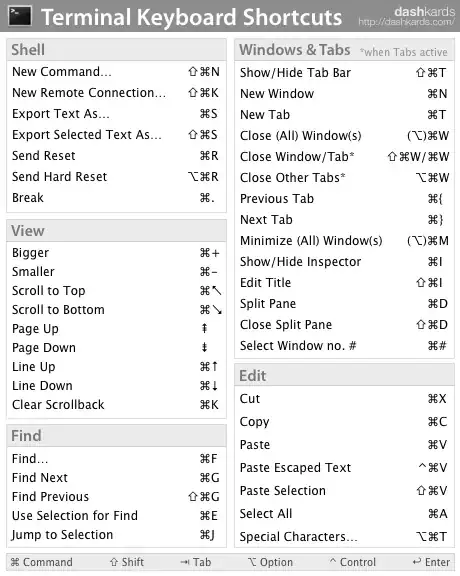
To undo the split, press Shift+Cmd+D (you can also do it from the View > Close Split Pane menu option).
If you wish to reassign the keyboard shortcut for View > Split Pane (Cmd+D) to something else to prevent anything from happening when you accidentally press Cmd+D, you can do it by going to System Preferences > Keyboard > Keyboard Shortcuts, adding the Terminal.app and entering the menu title (Split Pane) with a different shortcut.
Terminal keyboard shortcuts (from dashkards):
Also see:
Apple - Create keyboard shortcuts for applications

M K
- 2,744
- 2
- 15
- 20
-
2I'm on Sierra and they changed the keyboard settings. Not sure how to do this – Joe Heyming Jan 31 '18 at 21:54