When I start OneNote 2013, this window pops up in the background. How do I prevent this?
(I do want to use the keyboard shortcuts, but I just don't want this window to open.)
When I start OneNote 2013, this window pops up in the background. How do I prevent this?
(I do want to use the keyboard shortcuts, but I just don't want this window to open.)

I was annoyed by this and I somehow managed to get what I want after trying all kind of combinations of settings. Now when I start my computer I can use the shortcuts (Windows + S) without having the window to pop-up. It doesn't even pop-up when I use the shortcut or start OneNote. Looks like I got rid of it for good!
I think the steps that got me to where I am now were


You can read a little more about it here: http://winsupersite.com/office-2013/office-2013-tip-disable-send-onenote-tool
However, here is the short version:
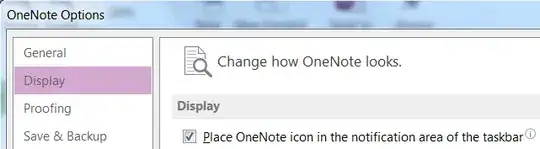
Just navigate to File, Options and then display in OneNote. Then, uncheck the option titled “Place OneNote icon in the notification area of the taskbar.”

It's counter intuitive, but if you check the "start with OneNote" box it will NOT start with OneNote and will stop bothering you.
To use Winkey+s you will have to open OneNote and use it from there to activate this functionality.
I hope someone has a better solution :)

If I am reading correctly you want to use the keyboard shortcut to open the main window of OneNote.
The command is Flag + Shift + N

Open OneNote, go to the File menu, select Options, then untick the option that says "Place OneNote icon in the notification area of the taskbar".

check the box Start with ONE NOte on the pop that bothers you and then exit it. it will not bother you again when you restart ONE NOTE. Hope it will helps you. !

Thanks! above description works! (one more thing though). First I did the settings as described in the article. now keyboard shortcut to open oneNote is:
shift+windows+n
it opens oneNote! no pesky send to oneNote first! It also re opens last note! (ctrl+n while in oneNote to open new tab).
slightly different key press to get used to, but it works fine! (reminds me of how now in windows 7 vs xp, used to shutdown windows with windowsKey>u>enter to shut down, but in windows7 its Windows>Right>enter, and you can set it to sleep mode etc. takes getting used to but whatever it works!).

