97

I recently moved to OS X and I find the system "Russian Phonetic" layout unsatisfying (it's not the one that I'm used to). How can I create a custom layout?

I've read about Ukelele, but the layout I created and copied to Library/Keyboard Layouts doesn't show up in Keyboard Preferences.

I'm using OS X 10.9 Mavericks. I searched for solutions in internet, but most of them were outdated.

mik01aj
  • 1,524
  • 1
  • 12
  • 16
  • Which layout did you use before MacOS? Paul Gorodyansky's? Would you mind sharing your Ukelele layout? – davidair Dec 27 '15 at 17:50
  • See here: https://www.dropbox.com/sh/tiu46g3qpgtb6sv/AADd0ltEnnmNTbv1BGNRDlxXa?lst – mik01aj May 11 '16 at 06:25
  • 2
    https://github.com/tekezo/Karabiner-Elements – emj365 Aug 29 '17 at 19:37
  • 10.9 and later seem to be using a different keyboard layout file type; Ukelele broke for me with that upgrade as well. I lost mu customized OCS keyboard - OCS uses some odd cyrillic characters in odd places. – aramis Jan 17 '18 at 04:41
  • A recent guide on using Ukulele to create an [IPA](https://en.wikipedia.org/wiki/International_Phonetic_Alphabet) keyboard layout can be found at https://suragch.medium.com/how-to-make-a-custom-keyboard-for-mac-os-c9f607428372 – cachius Jun 14 '23 at 16:58

4 Answers4

92
  1. Open Ukelele and choose File > New From Current Input Source. In new versions of Ukelele, it also assigns a new ID to the keyboard layout automatically.
  2. Edit the keyboard layout.
  3. Save the keyboard layout to some temporary location like the desktop. (Saving directly to /Library/Keyboard Layouts/ fails silently.) You can use either of the two formats. The iOS-style popovers shown when holding keys only work with the bundle format. The single XML file (default) format is simpler though. When using XML, make sure that the file is saved with a .keylayout extension.
  4. Move the keyboard layout to /Library/Keyboard Layouts/. Keyboard layouts in ~/Library/Keyboard Layouts/ can't be selected in password dialogs or on the login window.
  5. Restart the computer. Logging out and back in is not enough.
  6. Enable the new keyboard layout from System Preferences.

To apply changes to a keyboard layout, run sudo touch /Library/Keyboard\ Layouts/ and restart.

See https://web.archive.org/web/20151030180252/http://osxnotes.net/keylayout-files-and-ukelele.html for more information.


Update (October 2015): There is a new version of Ukelele (3.0.0) that includes the option to install the layout from within the app. I still needed to go to system preferences to activate it, but did not need to go through the command line at all.

johan
  • 263
  • 2
  • 12
Lri
  • 40,894
  • 7
  • 119
  • 157
  • 1
    Thank you! I have one important note, though: XML files saved by Ukelele need to have `.keylayout` extension. This way it worked :) – mik01aj Oct 29 '13 at 00:09
  • Using the bundle format allows one to put an .icns icons file inside the bundle (same location as .keylayout) and an icon of choice can appear next to the input source. (Ukelele can add an icon to the bundle through the menu. You do need an .icns). – ebukva Jan 23 '14 at 04:24
  • 1
    You can also add an icon for an XML keylayout file by for example saving the icns file as `/Library/Keyboard Layouts/My Keyboard Layout.icns`. – Lri Jan 26 '14 at 09:25
  • instead of saving it somewhere and moving it manually, you can start ukelele as root so that it can directly save to /library/keyboard layouts – Rayjax Oct 24 '14 at 09:22
  • I also had to edit the `.keylayout ` file directly to change `name` attribute in line 5. Before this it wouldn't show in System Preferences, probably because it had the same name as an existing layout. Nobody else encountered this? o_O – frnhr Jul 10 '15 at 14:45
  • @frnhr Yes I encountered the same surprising behavior. – WestCoastProjects Sep 10 '15 at 21:05
  • You should move your update to the top of the answer... I went through all the steps before realizing there was a much simpler way -_-. Either way, thanks! – loeschg Mar 20 '17 at 22:43
  • The link is broken – paper1111 Apr 20 '17 at 13:06
  • 1
    Somehow the system-wide install with Ukulele failed in my case. Instead I copied the whole bundle to /Library/Keyboard\ Layouts and then ran `sudo touch /Library Keyboard\ Layouts`. No need to restart or relogin. – Richard Möhn Aug 18 '18 at 07:07
17

Creating the keyboard layout file

I too used Ukelele to generate a keyboard layout. You can then export the .bundle or .keylayout file and copy it to /Library/Keyboard Layouts.

sudo cp KeyboardLayout.keylayout /Library/Keyboard\ Layouts/

If you want to have the icon for the keyboard bundled in one file Ukelele offers an export to Bundle option. So in this case copy the .bundle file instead. Alternatively, you can keep the icons separate and copy them with the same name to the same folder.

sudo cp KeyboardLayout.icns /Library/Keyboard\ Layouts/

After a reboot you can add the input source in System Preferences->Keyboard->Input Sources menu. Probably available under Others or the language if you attached a language to the keyboard in Ukelele.
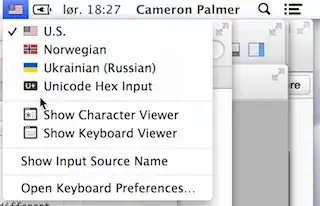
Input Source Menu

How to create an .icns file

mkdir layout.iconset

Then add the following PNGs to the folder:

# All sizes necessary
icon_16x16.png
icon_16x16@2x.png
icon_32x32.png
icon_32x32@2x.png
icon_128x128.png
icon_128x128@2x.png
icon_256x256.png
icon_256x256@2x.png
icon_512x512.png
icon_512x512@2x.png

You don't need all these, but this is the official list. Some are redundant in pixel count, but indicate density.

iconutil --convert icns --output layout.icns layout.iconset/

Example project on GitHub

My Ukrainian-Russian project on GitHub is a demo that is currently working on Mavericks 10.9.5.

10

Ukelele might work for you, just be warned that it seems to be rebinding keys at the software level (rather than hardware level), so you'll probably start running into issues like some apps not recognizing modifier or special key rebindings, not being able to use it in password dialogs, etc.

If you're looking for a more robust solution, check out Karabiner.

Senseful
  • 4,150
  • 10
  • 37
  • 46
  • Karabinier is also better because you don't have to copy configuration file, it is directly working. And you can enable it at starting in misc / system default configuration – bormat Oct 03 '18 at 04:41
-1

Use older stable Ukelele version 1.8.4... No restart necessary

I have OS X 10.10.5 (Yosemite). Ukelele's current version did not work even after I tried several other suggestions. Finally I uninstalled the current version and installed the older stable version (1.8.4). After that it worked just fine. No restart was necessary. Just save the new layout within Library/Keyboard Layouts. Then open keyboard preferences, input sources. Add by clicking the +, and you should see the new layout in 'Others'.

Ƭᴇcʜιᴇ007
  • 111,883
  • 19
  • 201
  • 268