4

Of late, I've noticed that many web sites seem to be using light grey text for many sections of their sites. Some such sections include - the text (link, usually) that shows in the status bar at the bottom of the browser when you hover the mouse over a link on their page, the indicator text in form fields to be filled in (e.g. the word "email" in the email address field), and many other elements on the page.

That light grey makes it much less readable.
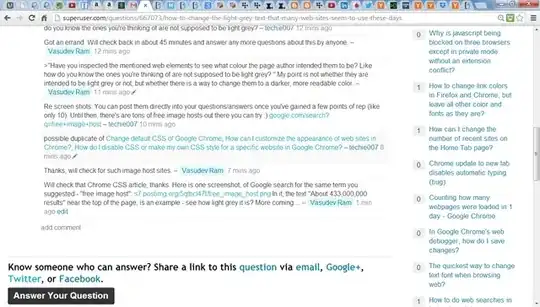
enter image description here

Not sure whether is a new trend, or something to do with my browser settings (I haven't changed them lately, AFAIK), or Google Chrome, which is my browser. This is on Windows 7 running on a Dell Vostro laptop. I added the info about the laptop because I suspect the problem may even be due to my hardware settings, since I found the default brightness to be too high after I bought it, and changed it via Control Panel.

Would like to know what are some of the things I can check or change to solve this.

Thanks.

Ƭᴇcʜιᴇ007
  • 111,883
  • 19
  • 201
  • 268
Vasudev Ram
  • 103
  • 3
  • 4
  • 11
  • Can you provide a screen shot of what you're talking about? But based on what you're suggesting, these are the normal colours chosen by the authors. IE: The text colour in your browser's status bar won't/can't be controlled by a web page. Chrome likes to use a grey on a grey for that. The "Watermarking" of web form fields _is_ usually/often done in light grey, so you know it's not actual (black) text. So these are unrelated things, most of which you have little or no control over. – Ƭᴇcʜιᴇ007 Oct 29 '13 at 20:27
  • How can I provide a screenshot here on SuperUser.com? Is there any site like pastebins, but for images? I had checked for that some time ago but it did not work. Please suggest one if you know, and I'll use it to provide a screenshot. – Vasudev Ram Oct 29 '13 at 20:32
  • @techie007: I did realize that some of them are things that neither the web site creators nor I may have control over. But there are other web page elements that are in light grey, other than the status bar text and what you call the "watermarking" of web form fields. Anyway, thanks for the info given so far. – Vasudev Ram Oct 29 '13 at 20:34
  • >"there are other web page elements that are in light grey". E.g. sometimes just parts of the main text on the page are in light grey. – Vasudev Ram Oct 29 '13 at 20:35
  • Have you inspected the mentioned web elements to see what colour the page author intended them to be? Like how do you know the ones you're thinking of are not supposed to be light grey? – Ƭᴇcʜιᴇ007 Oct 29 '13 at 20:36
  • Got an errand. Will check back in about 45 minutes and answer any more questions about this by anyone. – Vasudev Ram Oct 29 '13 at 20:36
  • >"Have you inspected the mentioned web elements to see what colour the page author intended them to be? Like how do you know the ones you're thinking of are not supposed to be light grey? " My point is not whether they are intended to be light grey or not, but whether there is a way to change them to a darker, more readable color. – Vasudev Ram Oct 29 '13 at 20:37
  • Re screen shots: You can post them directly into your questions/answers once you've gained a few points of rep (like only 10). Until then, there's are tons of free image hosts out there you can try :) https://www.google.com/search?q=free+image+host – Ƭᴇcʜιᴇ007 Oct 29 '13 at 20:38
  • possible duplicate of [Change default CSS of Google Chrome](http://superuser.com/questions/52967/change-default-css-of-google-chrome), [How can I customize the appearance of web sites in Chrome?](http://superuser.com/questions/339474/how-can-i-customize-the-appearance-of-web-sites-in-chrome?rq=1), [How do I disable CSS or make my own CSS style for a specific website in Google Chrome?](http://superuser.com/questions/266816/how-do-i-disable-css-or-make-my-own-css-style-for-a-specific-website-in-google-c) – Ƭᴇcʜιᴇ007 Oct 29 '13 at 20:40
  • Will check that Chrome CSS article, thanks. Here is one screenshot, of Google search for the same term you suggested - "free image host": http://s7.postimg.org/5qtbcl47f/free_image_host.png In it, the text "About 433,000,000 results" near the top of the page, is an example - see how light grey it is? More coming ... – Vasudev Ram Oct 29 '13 at 20:47
  • Another screenshot - this is of this same question we are discussing: http://s15.postimg.org/pi339bj2z/my_question_grey_text.png See the light grey text of the question/comment posting times, like "11 minutes ago"? hard to read from normal distance from the screen. – Vasudev Ram Oct 29 '13 at 20:52
  • Saw that a related question link you gave mentions Greasemonkey. Will check that. – Vasudev Ram Oct 29 '13 at 20:53
  • Anyway, thanks for all your help, Will check suggestions and then get back. – Vasudev Ram Oct 29 '13 at 20:53
  • Even better example screenshot - Dropbox datastore API: http://s24.postimg.org/8ugtk71sl/dropbox_datastore_api.png Hope that illustrates the problem better. Most of the main text is light grey. – Vasudev Ram Oct 29 '13 at 21:43

1 Answers1

2

If you have trouble viewing grayed out text you could try extensions for chrome that convert the page into high contrast scheme which would make it easier to read the text. You could try High Contrast or Hacker Vision.
Though these extensions might radically change your viewing experience you should get accustomed to it fairly quickly, also they are easier on the eyes.

Shekhar
  • 5,009
  • 4
  • 33
  • 49