1

Possible Duplicate:
ATI Radeon 5770 Eyefinity - 3 monitors

How to setup Eyefinity to support three monitors on HD 5700/5800 series card?

Monitors are connected the following way: DVI-DVI-DisplayPort

Currently driver does not allow me to do this. If I click on the third monitor to extended it, I get message to disable other one.

Message:
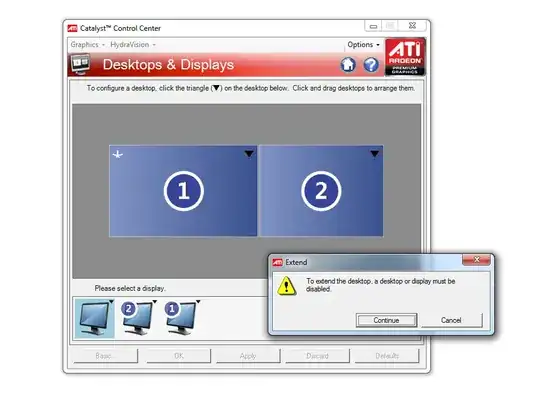
alt text

I am using DisplayPort adapter to DVI, so I do not have native displayPort monitor. Might be that a problem?

Peter Stegnar
  • 599
  • 3
  • 8
  • 18
  • 2
    What kind of adapter do you have? Apparently you need an active one, as explained here: http://www.tomshardware.co.uk/forum/page-272593_15_0.html – Snark Nov 06 '09 at 13:10
  • Verly likely passive I have this adapter: http://www.manhattan-products.com/en-US/products/8102-displayport-adapter – Peter Stegnar Nov 06 '09 at 13:12

1 Answers1

2

To establish Eyefinity on three monitors you can only do this to use DisplayPort connection. You can connect on DisplayPort only a native DisplayPort monitor or DVI/HDMI/VGA monitor with ACTIVE DisplayPort adapter.

Picture of active adapter.

alt text

All credits should go to the Snark, since he gave the crucial hint.

Peter Stegnar
  • 599
  • 3
  • 8
  • 18
  • Are anyone knows where to order this adapter (to Europe)? – Peter Stegnar Nov 06 '09 at 13:50
  • ATI Response: Currently you must have a Display Port monitor with no adapters. Passive adapters do not work. Active adapters are being tested and some are working, once testing is complete a list of Active adapters should be available online. – Peter Stegnar Nov 06 '09 at 20:44
  • 1
    Here's the list of approved dongles: http://support.amd.com/us/eyefinity/Pages/eyefinity-dongles.aspx – Kevin Driedger Mar 22 '12 at 13:04