I have Libreoffice and I want to export a long calc sheet to a pdf document with the fit-to-page function from the page preview in the file menu but it doesn't seems to work. I want to fit my sheet up to 2 pages because it's unreadable otherwise. When I export the sheet it gives only one page and the sheet is unreadable.
Asked
Active
Viewed 2.8k times
15

-
(knowing it isn't what you asked) in Excel, I would configure the page settings and probably preview the pages before exporting. Maybe something similar exists. – Doktoro Reichard Oct 31 '13 at 19:52
-
In openoffice there is a function fit-to-page in the page preview. But it doesn't work? – Micromega Oct 31 '13 at 20:14
-
1It's working, at least for me. Try to upload example `.ods`. What version of LibreOffice? You may look at [bugzilla](https://wiki.documentfoundation.org/BugReport). – week Oct 31 '13 at 21:15
-
Could you please describe step-by-step what did you try. There are different fit-to-x options that may affect only the page display, not the print layout, and different LibreOffice version which offer different features. – tohuwawohu Nov 01 '13 at 09:20
-
Was my answer helpful for you? – tohuwawohu Nov 14 '13 at 09:07
-
@tohuwawohu:No,what is the sheet tab? AFAIK my question is very accurate. BTW. I use Linux version. – Micromega Nov 14 '13 at 10:06
-
Linux of Windows doesn't differ in this point. Regarding the Sheet tab, i've highlighted the dropdown where you can select the scaling mode. In your case, select the third option (**Fit print range(s) on number of pages**) and set the page number to `2`. This should give a PDF output scaled to two pages. I've emended my answer. – tohuwawohu Nov 14 '13 at 10:11
-
If there's still an issue with the answer (point missing, not clearly explained), please feel free to add a comment. – tohuwawohu Nov 14 '13 at 13:12
-
Thank you. It works but only after a reboot. – Micromega Nov 18 '13 at 13:31
-
http://stackoverflow.com/questions/19940236/how-to-generate-pdf-from-a-libreoffice-calc-sheet-fitting-the-page-width – Ciro Santilli OurBigBook.com Mar 10 '16 at 16:44
1 Answers
26
You can't use the page preview options to scale the PDF output. Output scaling has to be done using the Sheet properties in the Page Style dialogue (Select the Menu Format -> Page... -> Sheet Tab).
There, you have different options to make the Calc output fit to a certain number of pages. In the following screenshot, the Scale options are highlighted, especially the Scaling mode ComboBox:
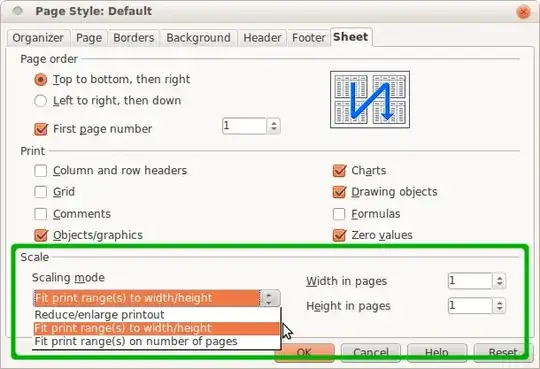
To scale the PDF output to two pages, just select the third option (Fit print range(s) on number of pages) from the Scaling Mode ComboBox and set the page number to 2. This should give a PDF output scaled to two pages:


tohuwawohu
- 10,303
- 1
- 35
- 63