7

Is it possible to create numbered lists in OneNote that have subsections?

Ex:
1. Section
1.1 Subsection
1.2 Another Subsection

miguelarcilla
  • 275
  • 3
  • 7

2 Answers2

6

I was able to figure this out for you.

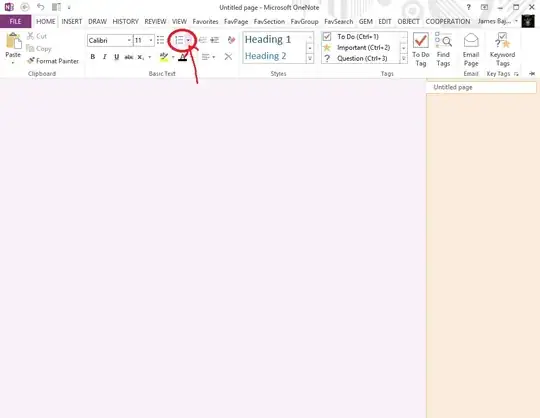
Click Home

enter image description here

Click the little arrow to choose numbering style
enter image description here

Click Customize numbering

enter image description here

Choose the Sequence style and the Format
enter image description here

Type your content then press Enter then Backspace then Tab
enter image description here

Choose format for next section

enter image description here

To create a sub-section to the sub-section, press Enter then Backspace then Tab

enter image description here

Continue the sub-section.

enter image description here

To go back to the previous section, from the content line press Enter then Backspace twice
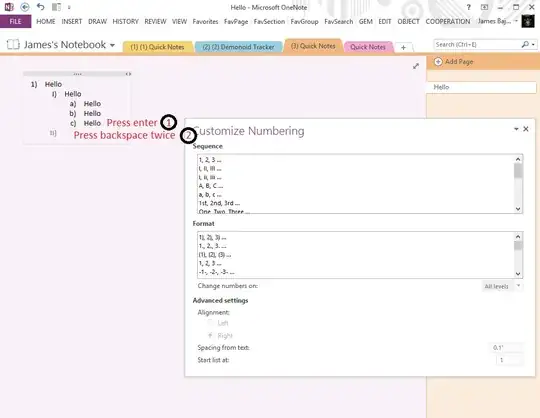
enter image description here

Continue that section then to return to previous section, from content line press Enter then Backspace twice
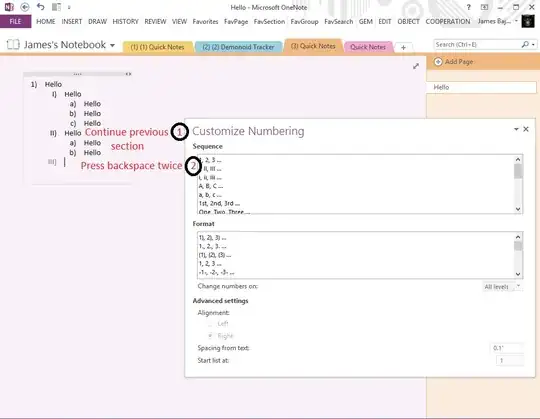
enter image description here

To go back to first section press Backspace twice again
enter image description here

Continue your section from there

enter image description here

As far as changing the numbering to 1.1, 1.2, 1.3, etc. I don't think you can. You have to choose from the predefined formats. You can choose what number to start at though from the last option on the Customize numbering window. I tried changing it to 1.1 and 1.2 but it doesn't stick
enter image description here

jmc302005
  • 731
  • 4
  • 9
  • you can do the same process for as many subsections as you want. so you can do 1. main I. subsection A. sub-subsection. as much as you like. it will keep track of all of the numbers as you backspace to continue in a previous section. – jmc302005 Nov 04 '13 at 11:41
  • I think I understand what you're saying, but I can't seem to recreate it. – miguelarcilla Nov 05 '13 at 01:58
  • How do I choose my numbering style, then, to create 1.1, 1.2, 1.3 etc? – miguelarcilla Nov 05 '13 at 01:58
  • I changed my answer above to make it easier for you to understand. – jmc302005 Nov 05 '13 at 11:43
  • 1
    Thanks :) I already understood the lists, but I was looking for a way to get the 1.1, 1.2 style sublists. I guess there isn't really a way yet then – miguelarcilla Nov 06 '13 at 00:45
  • Yeah I haven't come across a way to do a custom format. On the bright side though between the sequence and format options provided there are plenty to choose from. – jmc302005 Nov 06 '13 at 01:12
  • 1
    This shouldn't be an accepted answer, unless it says at the top that it can't be done. I followed all the steps and found out the very end, you couldn't do what the OP asked. – Steve3p0 Nov 12 '21 at 13:17
2

As of 2021, it cannot be done. One can customize the format of the individual levels, but including numbers from higher levels (like 2.1.3.4) is not possible to do in OneNote on any platform.

seanahern
  • 121
  • 3