7

I have a laptop that is a couple years old, and noticed a port on the side that I don't recognize. It is small and looks like a USB mini jack, and has a symbol next to it that looks like a computer monitor with two bars next to it.
enter image description here

Does anyone know what this port is, and what's it's for?
  • It looks like displayport. Only about 80% sure though. – Jon Nov 04 '13 at 15:31
  • @chipperyman573 Displayport is bigger, I thought. And wouldn't it have that funky "+P" logo? –  Nov 04 '13 at 15:32
  • 1
    I would guess, that it is bespoke to the laptop. Did the laptop come with any external devices? It looks likes a USB 2.0 Type B... Any way, telling us the make and model will help :)... Although it really does look like a VGA port! – Dave Nov 04 '13 at 15:33
  • @DaveRook No, not that I'm aware of. My first thought that it was maybe a Mini DisplayPort, but I think those are [less wide and the corners are sharper](https://en.wikipedia.org/wiki/File:Mini_DisplayPort_on_Apple_MacBook.jpg). –  Nov 04 '13 at 15:36
  • 8
    Have you looked at the user manual or on the manufacturer's web site? If you give us the brand and model might help us find it. – CharlieRB Nov 04 '13 at 15:37
  • @CharlieRB I should have looked there first. It's a Mini-VGA port. –  Nov 04 '13 at 16:36
  • 4
    This question appears to be off-topic because it is a "guessing-game" type question. See meta.superuser.com/a/6074/23133 – Ƭᴇcʜιᴇ007 Jan 31 '14 at 21:13

3 Answers3

5

I found it in the manual (laptop is a Lenovo U510). I should have looked there first!

It is a Mini-VGA port.

enter image description here

2

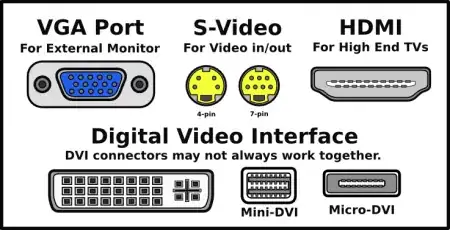
This is a Mini-DVI port. Here is a drawing of some common display port types:

Display interface connections

Source

Daniel Andersson
  • 23,895
  • 5
  • 57
  • 61
John
  • 1,423
  • 7
  • 10
1

It is a mini VGA port. Even looking at the connectors you can see it could fit.

Dave
  • 25,297
  • 10
  • 57
  • 69