0

Simple question: What's the quickest way to get an en dash (–, Unicode U+2013 EN DASH) in Windows? Note that this question is for all programs, not just Microsoft Word.

Even better if it can be copied to the clipboard as a pure Unicode character, with no formatting information (typeface, etc.) so that when I paste it into Word or Excel or other rich text editors, it doesn't carry its format with it.

slhck
  • 223,558
  • 70
  • 607
  • 592
Geoff Olynyk
  • 63
  • 1
  • 1
  • 5
  • 1
    Is this relevant? http://stackoverflow.com/questions/826986/how-to-make-a-custom-keyboard-layout or http://windows.microsoft.com/en-us/windows-vista/create-your-own-keyboard-layout My google search was `custom keyboard mapping` – MonkeyZeus Nov 08 '13 at 16:57

2 Answers2

1

Get autohotkey and use hotstrings.
Replace say -- with an en dash, the way word does.
Here is the script:

::--::{Asc 0151}

Yeah. Its that short. Works in my notepad on Windows 7.

PS:You can compile the script into standalone EXE with icon of your choice if you want to redistribute.

tumchaaditya
  • 3,752
  • 5
  • 39
  • 57
0

Answering my own question with my current unsatisfactory solution.

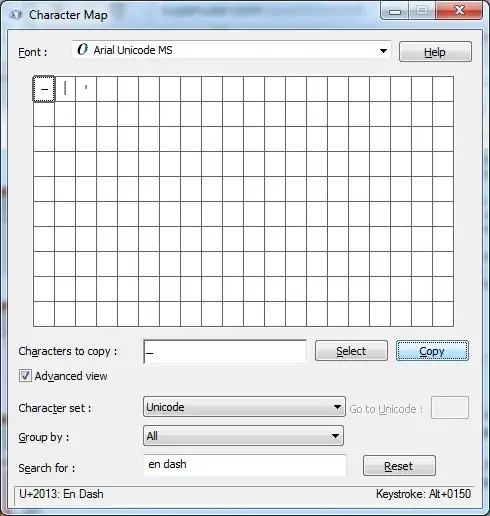
Right now I open character map with a keyboard shortcut (Ctrl-Alt-M), type "en dash" into the advanced-mode "Search for:" field, then click Select, and Copy. It's very slow, and if the character map is on a particular font, it will also carry formatting information with it.

Screenshot of Windows Character Map showing an en dash

Geoff Olynyk
  • 63
  • 1
  • 1
  • 5
  • 1
    In your own image bottom right: Press ALT + 0150 on the Numeric keypad – Mattias Åslund Nov 08 '13 at 17:05
  • @MattiasÅslund I just tried it in Notepad and it doesn't work. I use a laptop that doesn't have a square numeric keypad though, only the numbers above the alphabet keys, maybe that's why? – Geoff Olynyk Nov 08 '13 at 17:09
  • 2
    Yes, but it should work if you use the fn-key to put the keyboard in numeric mode. – Mattias Åslund Nov 08 '13 at 17:21
  • For those numpad codes to work, you need to [enable `EnableHexNumpad`](http://superuser.com/questions/13086/how-do-you-type-unicode-characters-using-hexadecimal-codes). And you have to press the + on the numpad and the leading 0 as well. – Oliver Salzburg Nov 08 '13 at 18:22