14

I'm writing a small application in VB.NET that will enable me to easily create a user "Windows 7 account" with a password, instead of going through the control panel.
The problem I'm having is that when I create a batch file in VB.NET using UTF-8 encoding, it doesn't write å ä ö as it's supposed to.
I have tried all encodings I can find, but am unable to get it working.

If anyone has an idea of why I'm getting this, please let me know.

Henke
  • 813
  • 1
  • 8
  • 20
kagstrom2100
  • 183
  • 1
  • 1
  • 7
  • try posting on stackoverflow.com and show your script. – Toby Allen Nov 13 '13 at 11:34
  • 1
    @Toby Allen Well it's not really a programming question but a question about encoding text, the same problem occurs when I create a .bat file the "normal" way. – kagstrom2100 Nov 13 '13 at 11:37
  • Related. • [What encoding to get Å Ä Ö to work](https://superuser.com/q/675369) • [Using UTF-8 Encoding (CHCP 65001) in Command Prompt](https://stackoverflow.com/q/57131654) • [How to use unicode characters in Windows command line](https://stackoverflow.com/q/388490) • [chcp 65001 and a .bat file](https://stackoverflow.com/q/32182619) • [Making Swedish characters show properly in Windows Command Prompt](https://stackoverflow.com/q/2660264) – Henke Jan 31 '23 at 15:55

2 Answers2

13

Edit: I was wrong ;)
cmd.exe does accept UTF-8 but you need to be sure to save it without the BOM at the beginning of the file.

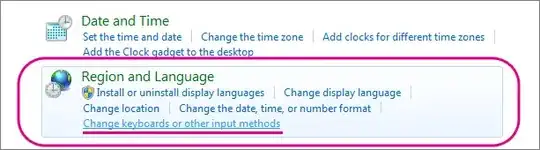
Here is a second test. You can use chcp 65001 at the beginning of your batch-file.
enter image description here


A batch file can not be of type UTF-8. It needs to be ASCII. Cmd.exe just doesn't accept another format. I did a small test and you can use your characters but it needs some work.

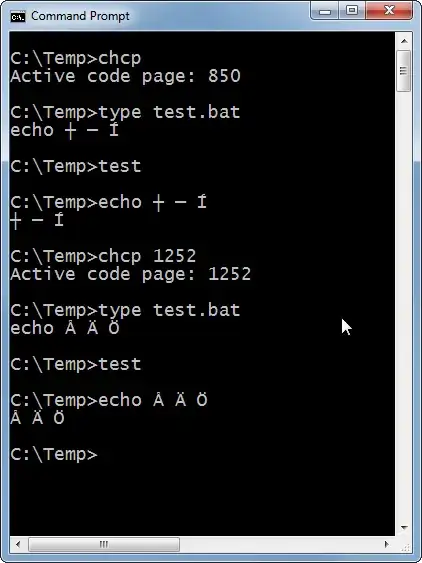
Make a file test.bat with echo Å Ä Ö. Save it with format ANSI/ASCII. Open a cmd.exe and make sure your cmd.exe uses Lucida Console (to display the Unicode characters).

When you type the file it will show characters as the old DOS-characters. You can see a translation chart here.

When you switch to a "Windows Ansi"-code page (i.e. West European Latin) with chcp 1252 the characters are displayed correctly. If they also get transferred to their respective utilities depends on that utility.

But why are you creating a batch-file for this? Can't you just code it in VB.net?
cmd.exe


Edit 2#:

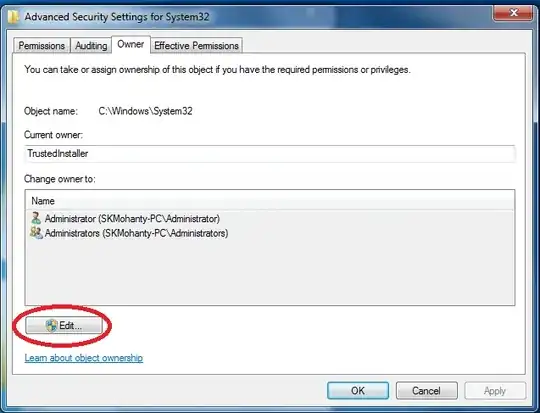
This is how you set Lucida Console in cmd.exe:
Lucida Console


The BOM are 3 characters at the beginning of a UTF-8 file. (\xEF\xBB\xBF).
In VB.net you would create a file without a BOM like this:

Dim utf8WithoutBom As New System.Text.UTF8Encoding(False)
                                                  '^^^^^'
Using sink As New StreamWriter("Foobar.txt", False, utf8WithoutBom)
    sink.WriteLine("...")
End Using
Rik
  • 13,159
  • 1
  • 34
  • 41
  • Hi and thanx for the answer. In my vb.net application I'm trying to create a .bat file with the commands: net user "username" net localgroup administratörer "type" /add The reason i have to use the Swedish word adminstratörer instead of administator is beause localgroup won't take the English translation as a group. – kagstrom2100 Nov 14 '13 at 09:10
  • Just thought going through a .bat-file was a bit much when you could do this straight from VB.net. Like [here](http://bytes.com/topic/visual-basic-net/answers/371016-create-windows-user-account). Lots of examples in [Google](https://www.google.com/search?q=vb.net+add+user+windows) too. So no need to create a .bat as middle-man. And with those examples you could feed the Unicode-name directly to the Windows-function. (Unless you need to run the .bat at a different time separate from your VB.net app for some reason?) – Rik Nov 14 '13 at 09:31
  • Well I have been looking for a way to do this in VB.net on Google for days, though I haven't found any way do do it. I already tried the example you linked and it didn't seem to work. How do I make sure that the .bat file doesn't use BOM? Also what is Lucida Console? The only info I could find about it is that it's a font. When I try the exact thing you did in the second example/image I get this http://i.imgur.com/6sh20j0.jpg – kagstrom2100 Nov 14 '13 at 09:36
  • I added to my answer to include `Lucida Console` and file-creation without `BOM` (Edit #2, at the bottom). But does creating this user via `net user` work on the command-prompt? And what does not work if you create it via VB.net? For this we would need some example-code (or a separate question) because this should work. (BTW you linked my image, not yours, i think, in your comment) – Rik Nov 14 '13 at 10:41
  • So I changed it to Lucia Console and not it seems to work. Though I need the script to run on other machines too and the Lucia console is only saved on the machine i changed it on right? I made a separate question for how to do this in VB.NET instead here http://stackoverflow.com/questions/19974473/making-a-windows-user-using-vb-net P.S Yes creating a user in command-prompt does work and yes I accidentally linked the wrong image :P – kagstrom2100 Nov 14 '13 at 11:11
  • Actually for the batch file the font wouldn't be that important (it's only for display on screen). The .bat should just run fine on the other machines **without** setting the `cmd.exe` to `Lucida Console`. (You would need the chcp 65001 though). Does your .bat do the correct job now or do you still have troubles with it? – Rik Nov 14 '13 at 11:31
  • Yeah, I know that the font doesn't affect if the command works or not. Yes as far as I can tell it's working right now. I'll implement it into my application, I'll post again if I get any more problems! Thanx man :D – kagstrom2100 Nov 14 '13 at 11:47
  • Tested some more now by creating a .bat file using VB.NET Here is the code My.Computer.FileSystem.WriteAllText(CurDir() + "\adduser.bat", "chcp 65001" + Environment.NewLine + "net user " + UserBox.Text + " " + PaswordBox.Text + "/add" + Environment.NewLine + "net localgroup " + UserType + " " + UserBox.Text + " " + "/add " + Environment.NewLine + "pause", False, utf8WithoutBom) Though the CMD window opens for a split second, which would indicate that it cannot read the text. – kagstrom2100 Nov 14 '13 at 12:12
  • Do a `type adduser.bat` on the `cmd.exe`. What do you get? Are there unreadable characters on the first line? And you didn't use `StreamWriter` but `My.Computer.FileSystem.WriteAllText`. Maybe `My.Computer.FileSystem.WriteAllText` doesn't do the non-BOM thing. so rewrite it to use `StreamWriter` like in my example. – Rik Nov 14 '13 at 12:19
  • You could also try `My.Computer.FileSystem.WriteAllText(CurDir() + "\adduser.bat", Text, False, Encoding.ASCII)`. See [here](http://forums.asp.net/t/1169840.aspx?Three+hex+characters+being+saved+at+beginning+of+text+file+with+WriteAllText). Not sure if it keeps the utf-8 characters but you can try ;) – Rik Nov 14 '13 at 12:27
  • let us [continue this discussion in chat](http://chat.stackexchange.com/rooms/11491/discussion-between-kagstrom2100-and-rik) – kagstrom2100 Nov 14 '13 at 12:47
  • NB: doing `chcp 65001` followed by `ping 127.0.0.1 -n 2 | find " = "` will cause your computer to hang; I think the character set affects `find` (as the ping without this filter works perfectly) – JohnLBevan Apr 16 '15 at 16:34
  • 2
    @JohnLBevan Yeah, you're right. Apparently `find` doesn't handle UTF-8 input not too well. But you can use `findstr`. Like this: `ping 127.0.0.1 -n 2 | findstr /C:" = "` – Rik Apr 16 '15 at 19:01
  • The link http://academic.evergreen.edu/projects/biophysics/technotes/program/ascii_ext-pc.htm has since become broken. Alas, I was not able to find a good replacement. :-( – Henke Jan 17 '23 at 16:29
  • 1
    @Henke That's what the Internet Archive project is for :) (WaybackMachine) See https://web.archive.org/web/20160126172420/http://academic.evergreen.edu/projects/biophysics/technotes/program/ascii_ext-pc.htm – Rik Jan 17 '23 at 20:21
4

The thing that fixed this for me was to save the file as UTF-8 without BOM and using this code

@echo off
chcp 65001
net user Linus /add
net localgroup Administratörer Test/add

The thing I didn't use before was @echo off so that and using chcp 65001 is what fixed it! Thanx too Rik for all the help :)

kagstrom2100
  • 183
  • 1
  • 1
  • 7