0

I booted using the Windows XP install CD but after setup loaded all the drivers, when it tries to load Windows XP setup, it gives the blue screen and says there is some problem with the hard drive and I should chkdsk /f it first. So I go to my BIOS and change the hard disk interface from AHCI to IDE and now I am able to continue with the setup.

  1. What is the difference between AHCI and IDE, and why does it matter for Windows XP installs? Windows 7 CD seems to reach the installation start screen just fine.

With HDD interface changed to IDE, I can reach the point where I can choose the drive in which to install windows, it shows me the two partitions in the drive (C and D) as well as their size, but it says it cannot determine the file format (although I know both are ntfs). If I try to delete the C partition or try to install windows on it, it simply tells me that Windows cannot be installed.

  1. I am almost certain the hard disk is about to fail but for the time being, is there any thing that can be done to install Windows XP on it and use the hard disk for as long as it works?

What I have tried:
I can boot the computer using a live USB of puppy linux. I can mount the C or D partitions, but it takes a lot of time, and it also shows me an error that says it could not mount using ntfs-3g and will be using the default ntfs drivers, which made the c and d partitions mount as read-only. Trying to see the partitions using gparted also takes a very long time. fdisk -l does show me all the attached disks and partitions as well, but it also takes a long time.

I booted the computer using NTFS4DOS which was on an old cd I had, called Ultimate Windows Boot Disk (or something, I think it was called UBCD). I tried chkdsk from here, but it just shows me some errors and does not perform chkdsk.

--- Edit ---
Thanks for the replies
I opened up the laptop and now I can see that removing the hdd is fairly easy and it looks like if I buy a new hdd I should be able to replace it myself
However one thing is still bothering me
I initially thought that the hard disk would contain everything from the memory device to the required controller circuit and interfaces for the motherboard
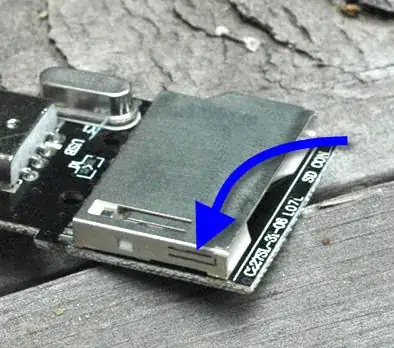
But now that I have opened up the laptop I see that the hard disk is not directly connected to the motherboard but is connected to another circuit board, which is then connected to the motherboard
Here's a picture (the thing I'm talking about is in the rectangular box):
enter image description here
Is there any way I can make certain that the problem is with the HDD and not with something else, before buying a new HDD? I do not have another laptop to test it out so software solutions I can try out using this single computer would be more helpful.

UPDATE:
I also tried out Seatools for DOS from Seagate and both it's short and long tests fail on the harddrive.

Also, the Blue screen error I mentioned before, if it's relevant:
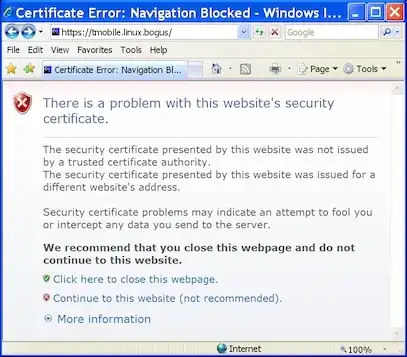
enter image description here

UPDATE 2:
Here are the error messages from Windows XP setup
enter image description here

enter image description here

user13267
  • 1,481
  • 7
  • 27
  • 56
  • note- this isn't important but re UBCD there is UBCD and UBCD4WIN – barlop Nov 14 '13 at 12:41
  • the exact error message is important. particularly as even if it's gibberish, somebody may have found the way to address it. So the exact error, exact wording is important as it is googlable. perhaps you got downvoted for that reason. Also, your subject isn't that good but don't worry about that yet. Try to include the exact error in your question. You could take a photo of it on your phone and link to it here. – barlop Nov 14 '13 at 12:42
  • Replace the HDD now. Even if you manage to install OS on this one, it's a ticking timebomb. – gronostaj Nov 14 '13 at 13:06
  • @barlop: Which error message did you mean? Te bluescreen or the windows setup error message? I have a picture of the blue screen but it basically just says to check the hard drive. I do not have th exact error message for the windows setup screen though – user13267 Nov 14 '13 at 13:20
  • please see my update to the question – user13267 Nov 14 '13 at 14:11
  • @user13267 well, besides replacing the hdd, if you want to try with the hdd, then delete the partition and try to setup. or perhaps before deleting the partition, try fixboot and fixmbr, from the xp recovery console off the cd, and see if setup runs. I found a few links when I googled your error message, and they suggested those two things (but if you want to be extra safe then replace the hdd or at least don't put important data on it. but if you want to be curious, then try those things.They don't obligate you to continue using the hard drive) You can be curious(so, trying things) and safe. – barlop Nov 14 '13 at 14:11
  • Put the hard drive in another laptop and run Seatools on it. If that also fails then you can be damn sure that the hdd is bad. not that you need to be damn sure! but you can be with that test. – barlop Nov 14 '13 at 14:15
  • Hard drives always slot in and out, don't worry about changing the hard drive, it is trivial to change. It's not as complex as you think. It's glorified lego. It may look a bit trickier because of unnecessary screws. Like the hard drive secured in a box. What model of laptop is it? you can look it up.. or try the notebook forum site , and for your make, there is a subforum on it SPECIFIC to your question of how to remove the hard drive from your make of laptop http://forum.notebookreview.com/. – barlop Nov 14 '13 at 14:18
  • If I try to delete the partition, I get a similar (same? I've forgotten so not exactly sure now) error to screen shot #4; in any case it does not let me delete the partition from the location shown in screen shot #3 – user13267 Nov 14 '13 at 14:18
  • let us [continue this discussion in chat](http://chat.stackexchange.com/rooms/11493/discussion-between-barlop-and-user13267) – barlop Nov 14 '13 at 14:18
  • I've found out how to remove the hard drive, replacnig it is not a big deal, but as shown in the picture #1, there is another circuit board between the HDD and the motherboard. So I want to make sure there's nothing wrong with anything else besides the HDD first, before buying another HDD – user13267 Nov 14 '13 at 14:19

1 Answers1

1

I am almost certain the hard disk is about to fail but for the time being, is there any thing that can be done to install Windows XP on it and use the hard disk for as long as it works?

You need to replace the HDD. The HDD is encountering errors which is the reason you have witnessed the behavior you described.

What is the difference between AHCI and IDE, and why does it matter for Windows XP installs? Windows 7 CD seems to reach the installation start screen just fine.

Windows 7 supports AHCI mode by using a generic driver. Windows XP does not have this generic driver and requires you to supply specific chipset drivers.

Research Source 1

Research Source 2

I strongy suggest you stick to Windows 7 for those reasons. Windows XP in a very short amount of time will not be supported by Microsoft.

I also tried out Seatools for DOS from Seagate and both it's short and long tests fail on the harddrive.

This proves your HDD should be replaced. There is nothing you can do at this point in order to use the HDD.

Ramhound
  • 41,734
  • 35
  • 103
  • 130
  • please see my update to the question – user13267 Nov 14 '13 at 13:33
  • @user13267 - Your update simply confirms what I said. The HDD needs to be replaced. The fact Seatools is failing the hdd on both short and long tests means the hdd should be replaced. – Ramhound Nov 14 '13 at 13:41
  • what about that thing between the HDD and the motherboard? I want to confirm that replacing the HDD will work, before going out to buy a new one – user13267 Nov 14 '13 at 13:52
  • @user13267 - If you want to confirm you can replace the HDD in your laptop I would check the manual for your laptop. In general if you can disconnect the HDD then you can replace. – Ramhound Nov 14 '13 at 14:32