Is there any free application for downloading an entire site installable on Mac OS X 10.6?
Asked
Active
Viewed 1.3e+01k times


8 Answers
54
You can use wget with it's --mirror switch.
wget --mirror –w 2 –p --HTML-extension –-convert-links –P /home/user/sitecopy/
man page for additional switches here.
For OSX, you can easily install wget(and other command line tools) using brew.
If using the command line is too difficult, then CocoaWget is an OS X GUI for wget. (Version 2.7.0 includes wget 1.11.4 from June 2008, but it works fine.)

CousinCocaine
- 139
- 8

John T
- 163,373
- 27
- 341
- 348
-
I need software man, don't want use wget – Am1rr3zA Nov 08 '09 at 20:07
-
36wget is software, and it's the most flexible. – John T Nov 08 '09 at 20:09
-
7wget is brilliant software, it's a one-stop-shop for any downloading you might fancy. – Phoshi Nov 08 '09 at 20:15
-
ok then Tanx for your answer – Am1rr3zA Nov 08 '09 at 20:17
-
4Wget is great. I use `wget --page-requisites --adjust-extension --convert-links` when i want to download single but complete pages (articles etc). – ggustafsson Feb 04 '12 at 15:05
-
1as of v1.12, --html-extension was renamed to --adjust-extension – Rog182 Jan 15 '15 at 04:58
-
@JohnT Does `wget` files downlaod all CSS/JS/Images and fonts too? – Volatil3 Nov 12 '16 at 14:40
-
@Volatil3 yes, it does. – CodeBrauer Dec 23 '16 at 17:35
-
Note: you can install `wget` by running `brew install wget` – Janac Meena Mar 05 '20 at 20:42
-
As of version 1.2 `--HTML-extension` has replaced by `--adjust-extension` – Ghasem Sep 08 '22 at 18:52
25
I've always loved the name of this one: SiteSucker.
UPDATE: Versions 2.5 and above are not free any more. You may still be able to download earlier versions from their website.

Grzegorz Adam Hankiewicz
- 1,118
- 1
- 8
- 23
-
-
Ditto! this thing works, has a nice gui and is easy to configure.... – Brad Parks Aug 11 '14 at 01:58
-
1
-
2@JohnK looks like they changed policy for 2.5.x and above, but earlier versions are still available for free from http://www.sitesucker.us/mac/versions2.html. – Grzegorz Adam Hankiewicz Sep 17 '14 at 17:46
-
2@GrzegorzAdamHankiewicz is right, you can download 2.4.6 free from their site here - http://ricks-apps.com/osx/sitesucker/archive/2.x/2.4.x/2.4.6/SiteSucker_2.4.6.dmg – csilk Apr 11 '17 at 04:25
-
1
4
HTTrack: http://www.httrack.com.
Found in macOS Homebrew.
Provides ports to Windows, Linux-es, and macOS. Command-line utility on (seemingly?) all OSes, GUI options on some.

Johnny Utahh
- 581
- 7
- 23

MicTech
- 10,328
- 5
- 45
- 55
3
SiteSuuker has already been recommended and it does a decent job for most websites.
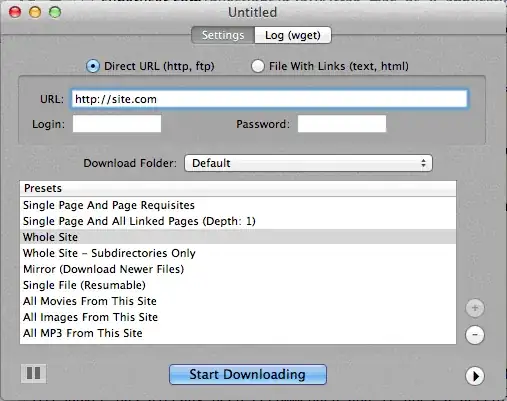
I also find DeepVacuum to be a handy and simple tool with some useful "presets".
Screenshot is attached below.
-

PKHunter
- 215
- 2
- 8
2
http://epicware.com/webgrabber.html
I use this on leopard, not sure if it will work on snow leopard, but worth a try
1
A1 Website Download for Mac
It has presets for various common site download tasks and many options for those who wish to configure in detail. Includes UI + CLI support.
Starts as a 30 days trial after which is turns into "free mode" (still suitable for small websites under 500 pages)

Tom
- 409
- 4
- 11
- 24
1
pavuk is by far the best option ... It is command line but has an X-Windows GUI if you install this from the Installation Disk or download. Perhaps someone could write a Aqua shell for it.
pavuk will even find links in external javascript files that are referenced and point these to the local distribution if you use the -mode sync or -mode mirror options.
It is available through the os x ports project, install port and type
port install pavuk
Lots of options (a forest of options).

Simon Sheehan
- 9,114
- 12
- 52
- 71
-4
Use curl, it's installed by default in OS X. wget isn't, at least not on my machine, (Leopard).
Typing:
curl http://www.thewebsite.com/ > dump.html
Will download to the file, dump.html in your current folder

Fred
- 136
- 2
-
Main problem with that is that that's downloading **the homepage**, not the entire website. – Phoshi Nov 08 '09 at 21:58
-
-
2Last I checked, `curl` doesn't do recursive downloads (that is, it can't follow hyperlinks to download linked resources like other web pages). Thus, you can't really mirror a whole website with it. – Lawrence Velázquez Nov 09 '09 at 00:05
-
Well, then do a quick script to get the links, we are in command line land right? Otherwise, just use a tool with a graphical front end. – Fred Nov 09 '09 at 00:54
-
A quick script, I dare you ;-) Last time I checked, `curl` also didn't even download the media embedded within that single web page. So: I'd love to see that script that, for a single page, 1) fetches all images etcetera and 2) rewrites the HTML to refer to those local copies... ;-) – Arjan Nov 10 '09 at 16:32
-
2(And its name *is* cURL... I think John T's edit were really improving your answer.) – Arjan Nov 10 '09 at 22:04
-
There is no difference, and it's a erroneous way to write. Although often used in marketing and so on. It's a name, so I suppose the correct way would be to capitalize the first letter. Look up the man page in a terminal and you see what I'm talking about, it's either curl or Curl. But what are you arguing about here, something of substance? I think not. – Fred Nov 10 '09 at 23:04