17

I wanted to know if there is a way to split stereo into two mono wav files. My first guess was

ffmpeg -threads "16" -i "$2" -map 0:1:1 "$3"

because my example video has the following informations:

Audio
ID                                       : 2
Format                                   : AAC
Format/Info                              : Advanced Audio Codec
Format profile                           : LC
Codec ID                                 : 40
Duration                                 : 39mn 0s
Bit rate mode                            : Constant
Bit rate                                 : 256 Kbps
Channel(s)                               : 2 channels
Channel positions                        : Front: L R

So I have this one audio stream with two channels and want two mono channels. At first I tried it with map_channel, but that didn't do the trick instead I was getting an error message:

Syntax error, mapchan usage: [file.stream.channel|-1][:syncfile:syncstream]

So I have tried it again with the above mentioned code and at least ffmpeg did something, but the outcome was not what I expected, instead of breaking it down into two mono wav files, the outcome was:

info.system.container = WAVE
info.system.size = 449413166 Bytes
info.system.size = 428.59 MiB
info.system.playtime = 2340.69 s
info.audio0.codec = PCM
info.audio0.desc = 
info.audio0.format_endianness = Little
info.audio0.format_sign = Signed
info.audio0.format_resolution = 16 bits
info.audio0.samprate = 48000 Hz
info.audio0.channels = 2

again with two audio channels, so where did I go wrong?

Oliver Salzburg
  • 86,445
  • 63
  • 260
  • 306
sebastian
  • 301
  • 1
  • 4
  • 8

2 Answers2

28

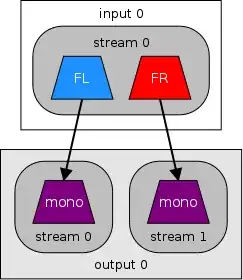
Using ffmpeg there are several methods that I know of to go from stereo to two individual mono files, or two mono streams in one file:

stereo to 2 mono outputs

stereo to 2 mono outputs

-map_channel option

ffmpeg -i stereo.wav -map_channel 0.0.0 left.wav -map_channel 0.0.1 right.wav

pan audio filter

ffmpeg -i stereo.wav -filter_complex \
"[0:0]pan=1|c0=c0[left]; \
 [0:0]pan=1|c0=c1[right]" \
-map "[left]" left.wav -map "[right]" right.wav

stereo to 2 mono streams

channelsplit audio filter

stereo to 2 mono streams

This will create one output file that has two individual mono streams:

ffmpeg -i input.m4a -filter_complex channelsplit out.mka

Also see

llogan
  • 57,139
  • 15
  • 118
  • 145
  • Thank you, I have found my flaw. When I was using `-map_channel`I didn't use single dots but instead I used double dots, so it's no wonder it didn't work. Now it works! – sebastian Dec 10 '13 at 08:22
  • 1
    lets presume I have a file with 6 channels in one stream, how do I know which channel is which? When I have 2 channels its easy, its always 0.0.0 left and 0.0.1 right. I have looked up in the ffmpeg documentation and it says `-layouts`but there is no example how it works. I have tried it and the message I get is `Missing argument for option 'layouts'` what argument is ffmpeg expecting? – sebastian Dec 10 '13 at 11:18
  • @sebastian You want to make six mono output files from the six channel input? – llogan Dec 10 '13 at 18:16
  • I have two or three clips which have 5.1 surround sound and of course after I use map_channel on all six of them I can't tell which map_channel belongs to which position, here is an example: `Audio ID : 2 Channel(s) : 6 channels Channel positions : Front: L C R, Side: L R, LFE` , but I think I already have found a solution for this problem. – sebastian Dec 11 '13 at 09:52
  • @sebastian What is your solution? – llogan Dec 11 '13 at 18:58
  • This should be accepted answer, @sebastian – mmdemirbas Jul 10 '17 at 10:13
2

You should use channelsplit filter for that. -map can not do this. For example:

ffmpeg -i in.mp3 -filter_complex channelsplit out.mkv

Check link to documentation that I've provided.

ptQa
  • 2,079
  • 15
  • 14