0

I sometimes have big files (like the Bitcoin blockchain or a virtual machine disk image) that I want to copy to a flash drive so that I can move it to another computer. My flash drive is a SanDisk Cruzer, 32GB NTFS.

Now, everything starts off fine...20 MB/s...then 15 MB/s... Now,
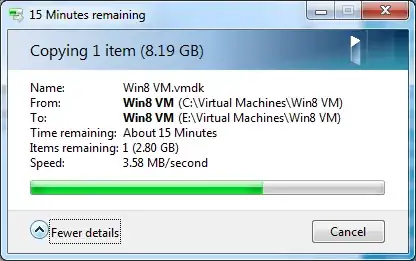
Screenshot 3.58Mb/s

This gets really annoying, really quickly.

I've seen explanations as to why this happens, but how about how I can keep my transfer speed consistent? Should a find a program, that, say, copies the file in little chunks, one at a time?

Chenmunka
  • 3,228
  • 13
  • 29
  • 38
Austin Burk
  • 67
  • 1
  • 9
  • 2
    And what was that explanation? What USB do you have? USB1, 2 or 3? Without knowing that we don't know the max speed you could get. Furthermore... Windows always starts off with buffering the file transfer and after the buffer is full it drops. If that's your problem there is nothing you can do (besides switching off the buffer but that leaves you with a slow copy speed right of the bat). – Rik Dec 09 '13 at 19:10
  • USB 2.0 , SanDisk Cruzer 32GB. I'm not looking for a solution that would only fit that specific flash drive though, or else it would be a bit to specialized for SE, wouldn't it? – Austin Burk Dec 09 '13 at 20:16
  • Well, You would think 3,58MB/s is slow for a USB2.0 device. I take it it is connected directly to the PC and not via a hub. Theoretically USB2.0 is 60MB/s but it hardly ever goes over 35MB/s in practice. But a lot of USB sticks (unlike the USB-harddisks) get stuck under the 5MB/s. Sandisk is among those. Look up your stick on [this site](http://usbspeed.nirsoft.net/usb_drive_speed_summary.html) and you see some tests. (1/2) – Rik Dec 09 '13 at 20:51
  • (2/2) Besides that... It is best to copy large chunks instead of small chunks. (but you're already copying a large file). You might want to try a different copier (but i doubt it will help much). You could try [Teracopy](http://codesector.com/teracopy). It will give you right away an idea of the speed of the whole copy. – Rik Dec 09 '13 at 20:53

3 Answers3

2

Buy a faster flash drive. What you are seeing is about right. For this drive, the write speed is about 18MB/s but the erase speed is about 3.25MB/s. So the more erasing that needs to be done while writing, the slower it's going to be.

David Schwartz
  • 61,528
  • 7
  • 100
  • 149
1

Maybe (external) eSATA could be faster, and not much more expensive.

Or if you are copying the same file again and again (maybe with changes every time) you could use rsync --inplace (or maybe use Unison) and only copy the differences? (assuming read speeds are much higher than write speeds, which might not be true).

I also wonder about the speeds using a normal copy as opposed to using a block copy utility like "dd" (a UNIX utility... I don't know what Windows might have)

Of course the best solution might be to get a data cable between the two hosts you are coping files between.

9mjb
  • 374
  • 3
  • 10
  • Thank you, those are some pretty decent ideas. Go upvote David and Daniels' answers as well, one's pretty informative and one's pretty funny. I'd upvote you but I have no karma ATM. – Austin Burk Jan 14 '14 at 00:45
0

to keep the file transfer speed consist, you meust make sure of three things.

  1. Computer condition: Your computer must be in good condition. You are not supposed to use to much CPU. While connected your phone requires enough power going through USB plug. Also, your harddrive may defect.

  2. Your phone condition: Your phone must have enough charge and is not supposed to be overused. Also, your sd card or internal storage should be in good condition. Your phone's micro 5 pin plug may be checked as well.

  3. USB cable condition: Your USB maybe internally burnt or have other cause of defect, your USB cable may need to be replace in cirtain period of time. It may also be scratched alot.

many more reason can be the cause of problem. However, above solution will fix about 99% of all problems.

Daniel
  • 1