If I go to Device Manager and click on the device I am trying to connect, the device properties does not always (almost never) list the actual device name and model. Is there any way to identify unidentified devices for which I will later find drivers for on Google?
Asked
Active
Viewed 771 times
1


-
possible duplicate of [identify components at laptops](http://superuser.com/questions/71132/identify-components-at-laptops), [Is there a utility or a method to easily determine what an “unknown device” is in Device Manager?](http://superuser.com/questions/291607/is-there-a-utility-or-a-method-to-easily-determine-what-an-unknown-device-is-i), [Hardware ID on Device Manager](http://superuser.com/questions/40208/hardware-id-on-device-manager) – Ƭᴇcʜιᴇ007 Dec 11 '13 at 15:56
2 Answers
4
You want to get the PCI vendor and product (device) ID numbers from Device Manager, and do a search on that. Sometimes hardware is too esoteric for even this to work, but it's helpful in most cases.
"8086" is Intel, by the way.
This is assuming it's a PCI device. USB devices have a vendor and device ID as well.
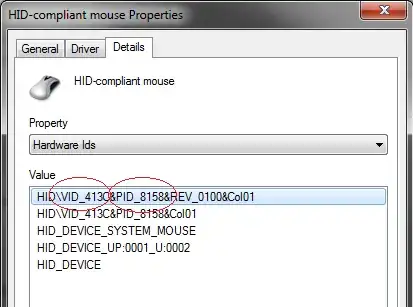
There's a couple of other buses such as SMBus and UMBus. Some hardware is reported by ACPI or not on a bus - things like this may not be possible to identify. Keep in mind it's possible some "devices" in Device Manager are not real devices at all, such as VPN adapters and most of the Non Plug and Play devices.
If you have a Linux boot disk handy, you can boot it up and then execute the lspci and lsusb commands which usually give you pretty good information.

LawrenceC
- 73,030
- 15
- 129
- 214
-
Looking up the hardware ids on google did the trick. No lspci for windows? – TheOne Dec 11 '13 at 16:12
-
Nope though there may be an equivalent Windows GUI utility out there I'm unaware of somewhere. – LawrenceC Dec 11 '13 at 16:13
0
Try this website, it might be helpful:
With the device and vendor ID you should be able to find a driver.

A32167
- 182
- 3