0

I'm using Windows Seven and I'm using two screens, most of the time I get my vision tired when I'm reading because of the lof of white screen. I'd like to know if there is some software that creates a filter in front of the image being exposed by the screen.

When windows asks for administrator permission, it does something like that. The reason for me wanting a software that does that is that I need the transition to be fast, doing it on the buttons of my screen would take a lot of time and configuring Windows to gray won't work because a lot of stuff won't darken (pages in PDF's made with scanned images for example).

Red Banana
  • 807
  • 2
  • 9
  • 19
  • 3
    [F.lux](http://justgetflux.com) is a good solution for the first paragraph. I wasn't able to understand the second. – Jon Jan 01 '14 at 02:45
  • 1
    Does http://justgetflux.com/ qualify? – Daniel Beck Jan 01 '14 at 02:45
  • @chipperyman573 The second paragraph is really not important. I just wanted to provide it to avoid questions like: "Why don't you use your screen buttons?" and such. – Red Banana Jan 01 '14 at 02:46
  • Oh ok. Try flux out, it automatically adjusts brightness to be best for your eyes based on the time of day. It's really useful – Jon Jan 01 '14 at 02:47
  • @all no, f.lux doesn’t qualify because it automatically adjust the screen rather than providing hotkeys to adjust brightness, contrast, and gamma manually. – Synetech Jan 01 '14 at 03:03
  • @Synetech Yes. But it's a cool tool too. I've [found some alternatives](http://alternativeto.net/software/f46lux/). – Red Banana Jan 01 '14 at 03:05
  • @GustavoBandeira, what kind of video-card do you have? I use ATI Tray Tools for my old ATI card and have set up some hotkeys to adjust brightness, contrast, and gamma, and I’ve also set up a few different color profiles (really dark, dark, normal, bright, really bright) and assigned them hotkeys so that I can switch to them as desired. It also supports multiple monitors. In addition, laptops usually have a hotkey that can be used to adjust the brightness of the back-light. Your video-card drivers will probably have color-adjustment hotkeys, but if not, there are programs and scripts to do it. – Synetech Jan 01 '14 at 03:07
  • @Synetech Nvidia GTX460. – Red Banana Jan 01 '14 at 03:07
  • `Yes. But it's a cool tool too. I've found some alternatives.` It is and I’ve used it ever since David Suzuki did a documentary about how blue-shift colors interfere with circadian rhythms, but that’s not what you’re looking for (according to the question you posted). – Synetech Jan 01 '14 at 03:08
  • related: http://superuser.com/questions/308415/ – Jay Wick Jan 03 '14 at 00:48
  • For the record, f.lux does include hotkeys now to adjust the color levels as well as temporarily disabling it. – techturtle Jan 03 '14 at 17:49

1 Answers1

1

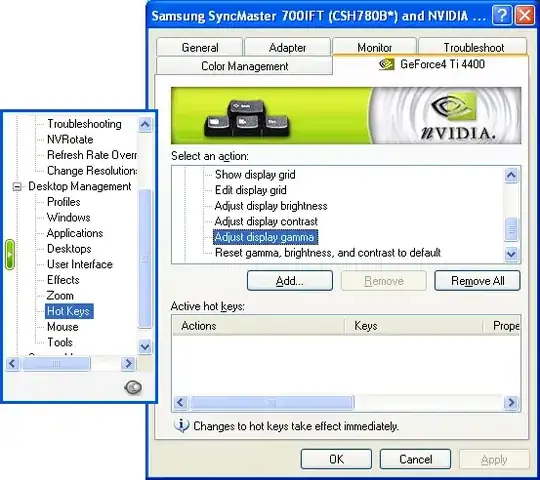
First, check your video-adapter’s drivers/control-panel for built-in settings. Like most GPU manufacturers, Nvidia has provided the ability to assign hotkeys to color profiles (figure 1) and likely continues to do so (figure 2).

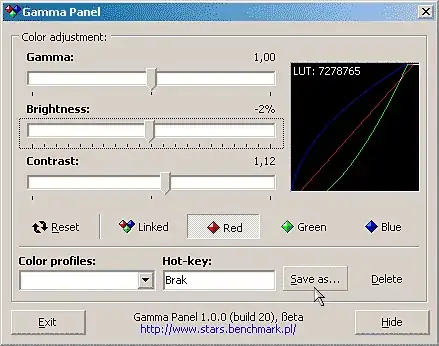
If not, then there are third-party programs and scripts that can be configured to adjust brightness, contrast, and gamma with hotkeys and/or assign hotkeys to color profiles. One such (free) program is Gamma Panel (figure 3).

(Incidentally, there is a blog post which mentions how you can adjust color of an Nvidia system by manually calling the functions in NvCpl.dll. You could easily assign the commands to standard Windows shortcuts and assign hotkeys to them; unfortunately the post and comments indicate that it only works/worked in Windows XP.)


Figure 1: Nvidia color-profile hotkeys in Windows XP

Nvidia control-panel in Windows XP showing hotkeys for color-profiles

Figure 2: Nvidia color-profiles in Windows 7

Nvidia control-panel in Windows 7 showing color-profiles

Figure 3: Gamma Panel

Screenshot of Gamma Panel

Synetech
  • 68,243
  • 36
  • 223
  • 356