1

When I opened the terminal today on my MacOS laptop I got a last logged on message and on my line where I can type it says JohnBatasiPhone:~ AlbertRenshaw$

I don't know anyone named "John Batas"... and none of my iPhone devices have that name. I am Albert Renshaw, but what does the JohnBatasiPhone mean? Does my computer have a security breach?

I literally know nothing about terminal so I had a hard time even wording the title to this question (If anyone wants to edit it to contain the proper words it would be much appreciated).

When I type HostName, the output is johnbatasiphone.att.net.
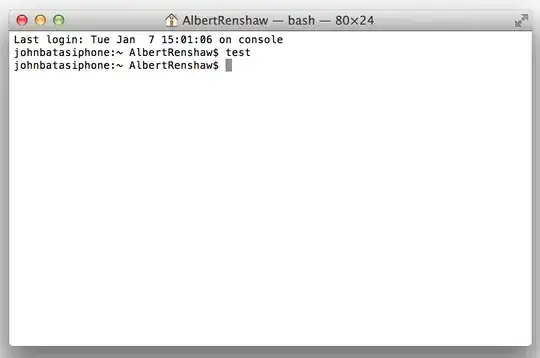
enter image description here

Albert Renshaw
  • 131
  • 1
  • 6
  • 1
    It means that someone set your hostname to that. Perhaps the network you are on thinks that he used to own this computer? In any case, you're on the wrong site here. – bmargulies Jan 09 '14 at 22:02
  • What does `echo "$PS1"` print? – Keith Thompson Jan 09 '14 at 22:02
  • @KeithThompson "\h:\W \u\$" – Albert Renshaw Jan 09 '14 at 22:04
  • @bmargulies But I'm on my home network, How can someone change my hostname? And ah, you're right... this isn't really a programming question I've just realized... got carried away haha! – Albert Renshaw Jan 09 '14 at 22:05
  • @KeithThompson typing in `HostName` returns `johnbatasiphone.att.net` – Albert Renshaw Jan 09 '14 at 22:06
  • @bmargulies Do you know how to "migrate" a question from SO to super user? – Albert Renshaw Jan 09 '14 at 22:08
  • @AlbertRenshaw: It's about the behavior of the shell, which one could argue is relevant to programming. I'm not sure of the exact guidelines in this case, though. – Keith Thompson Jan 09 '14 at 22:08
  • The [Apple site](http://apple.stackexchange.com/) might be a better fit than SuperUser, since it's an iPhone problem. Did someone else own the phone before you did? Check the Bluetooth settings; the host name might be tied to that. – Keith Thompson Jan 09 '14 at 22:11
  • This question appears to be off-topic because it is about iPhone; it should be on http://apple.stackexchange.com/ – Keith Thompson Jan 09 '14 at 22:11
  • @KeithThompson There isn't actually any iPhone in question... this is all on my laptop. No iPhones near here haha! But my personal iPhone (which isn't even connected to the laptop right now) was bought brand new! – Albert Renshaw Jan 09 '14 at 22:12
  • Ok, but it's still Apple hardware judging from the image. Looks like MacOS issue. The question is, how did the hostname get changed? – Keith Thompson Jan 09 '14 at 22:15
  • @KeithThompson Yes, that is the question! – Albert Renshaw Jan 09 '14 at 22:16
  • 1
    You can flag your own question for moderator attention and ask to have it migrated to the Apple site. (I've voted to close it as off-topic with the same suggestion, but flagging might get faster results.) – Keith Thompson Jan 09 '14 at 22:20
  • As [XWaveX](http://stackoverflow.com/users/3178834/xwavex) commented when this question was on Stack Overflow (the comment wasn't propagated), this looks like a duplicate of http://superuser.com/q/357159/92954 (I don't have enough rep here to vote to close as a duplicate). – Keith Thompson Jan 09 '14 at 22:49
  • @terdon Thankyou :) This was originally on StackOverflow, we just had it migrated to here! Glad to know it would work on both sites! +1 – Albert Renshaw Jan 09 '14 at 23:35
  • AlbertRenshaw I realized when I saw the time of migration and comments which is why I deleted my comment to @KeithThompson. Yes, this type of question is quite welcome here and at [apple.se] and even on [unix.se]. I have voted to close this since it is a duplicate of the [question](http://superuser.com/q/357159/92954) Keith found (thanks Keith!). – terdon Jan 09 '14 at 23:39
  • @terdon: I can't take credit for finding the duplicate, that was XWaveX. – Keith Thompson Jan 09 '14 at 23:50

1 Answers1

2

It's your host name. You can change it by typing

sudo scutil –-set HostName new_hostname

in terminal where new_hostname is your preffered name.

enedil
  • 155
  • 8
  • How did my host name get set to this though? It wasn't this a week ago :o – Albert Renshaw Jan 09 '14 at 22:13
  • Oh, I don't know. Is it an enterprise computer? – enedil Jan 09 '14 at 22:14
  • Nope! Just a personal computer... bought it NEW about a year ago! I'm also connected to my home network (WiFi does NOT have a password though). In any event... do I have to worry about a security breach, or is this just a neighbor messing with me? – Albert Renshaw Jan 09 '14 at 22:15
  • @AlbertRenshaw: A neighbor would have to break root on your personal computer to change the hostname. The `.att.com` suffix makes me think that you were reassigned an IP address that someone else had used, but I'd be surprised if that affected the machine's actual hostname. You need advice from MacOS experts. – Keith Thompson Jan 09 '14 at 22:18
  • If you connected the computer to a different LAN, then the DHCP/DNS server for that LAN might have been confused, and assigned your computer the name for the last device with that IP. This name might stick around in your computer, so even though you are on your home LAN, the name from the previous connection is what Terminal shows. – Kent Jan 09 '14 at 23:29
  • 1
    @AlbertRenshaw. If you open `Console.app` and do a search on `hostname`, any changes to it should have been logged in there. You might be able to work out which LAN you were connected to from the date stamp. For peace of mind, etc. – Deditos Jan 10 '14 at 21:36
  • Another answer to a similar question, with a (new to me on OSX) command, ipconfig: http://superuser.com/a/701290/202319 – Kent Jan 14 '14 at 01:18