27

I have a NodeJS server running on my local machine for development purposes. By default, it uses port 1337. (I've tried a handful of other ports such as 8080, 1234, 9000, 9090, 65432 et al).

I can successfully connect to this NodeJS server from Chrome, Firefox, and Opera. But, when I try to connect with Internet Explorer 11, I see "This page can't be displayed" (see image).
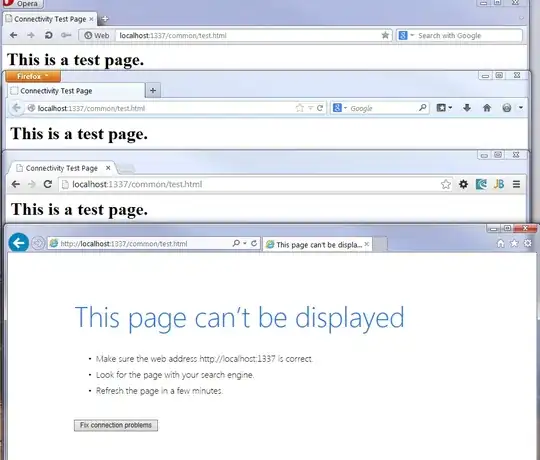
enter image description here

I've tried a variety of "solutions" and viewed several questions/answers on this site. None of them have worked. Including:

  • I've tried 127.0.0.1
  • I've disabled "Protected Mode" and "Enhanced Protection Mode."
  • I've added "localhost" to the Intranet Zone and Trusted Zone.
  • I've disabled "Friendly HTTP messages" hoping to see more detail.
  • I've tried using my machine name and DNS name.
  • I've tried creating a manual entry in my hosts file for "localhost" and even "thisismyfrigginpc" using my IPv4 address.

The only success I've had is when the server runs at port 80 (http://localhost:80/ or http://localhost). However, I can't develop on port 80 for a variety of reasons. I need to test my code on localhost+port (some port, any port other than 80 and 443).

Questions and answers that don't help:

Please Help!

BTW, Running Windows 7 Enterprise 64-bit. Corporate deployment, but I have admin rights. Network configuration is pretty standard DHCP with no NAT and no Proxy.

UPDATE

On recommendation from @codenoire, I installed Fiddler to see the request/response. Below are the raw request and response from IE-to-Fiddler-to-server-to-Fiddler:

Request

GET http://localhost:1337/common/test.html HTTP/1.1
Accept: text/html, application/xhtml+xml, */*
Accept-Language: en-US
User-Agent: Mozilla/5.0 (Windows NT 6.1; WOW64; Trident/7.0; rv:11.0) like Gecko
Accept-Encoding: gzip, deflate
Connection: Keep-Alive
Host: localhost:1337

Response

HTTP/1.1 200 OK
Set-Cookie: _session=WRuVLmrXMtjnDJY8;expires=Wed, 15 Jan 2014 23:19:16 GMT;path=/;domain=;httponly
Content-Type: text/html;charset=utf-8
Last-Modified: 1389818856000
Date: Wed, 15 Jan 2014 22:19:16 GMT
Connection: keep-alive
Content-Length: 128

<html>
<head>
    <title>Connectivity Test Page</title>
</head>

<body>

<h1>This is a test page.</h1>

</body>

</html>

Result
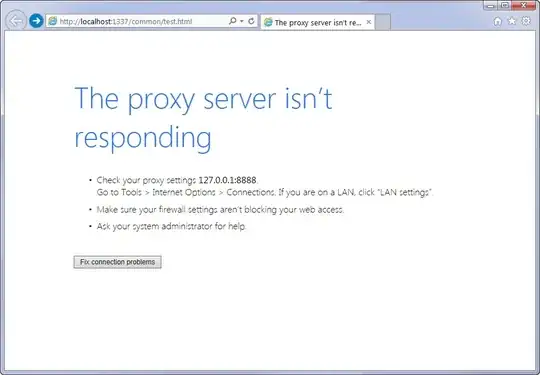
enter image description here

Update 2014-01-17

I've tested this scenario on "clean" non-corporate Windows 7 installations with IE 11. The results are identical to my standing observations. This means that any configuration made by a corporate image of Windows can be eliminated as a cause. Also, the network configuration is fairly "vanilla."

Update 2014-01-21

I've tried the Internet Explorer "emulation" ideas. I created a key, "iexplorer.exe" as both DWORD and QWORD values (individually) with the values 8000, 8001, 9000, 9001, 10000, and 10001. After each, rebooted and tested again. All of these attempts produced the same results. As an aside, we need to test this code in IE11. The various compatibility code and tricks don't actually help us in the long run.

Update 2014-01-22

Fired up a XAMPP Apache server on port 1337. IE connects to it just fine. So, there is something about the NodeJS response that IE doesn't like and the other browsers seem to handle well. We will be investigating our NodeJS code to see what exactly it happening in the headers/content to see if anything is out of line.

Update 2014-01-27: Resolution

I just wanted to document the results. The original response included Content-Type: text/html;charset=utf-8 and based on the correct answer, it should be: Content-Type: text/html; charset=utf-8 with a space between the type and the charset.

Here are the results:
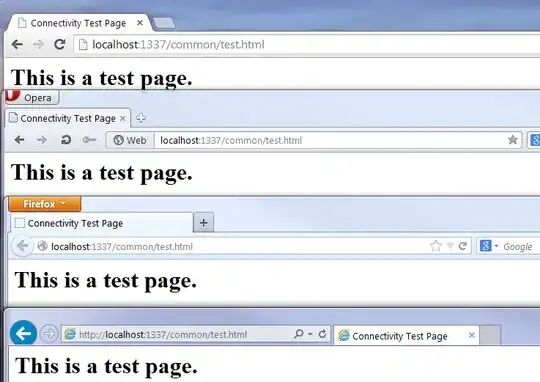
enter image description here

Raw Response:

HTTP/1.1 200 OK
Set-Cookie: _session=EshWS7xDnCeV9pXS;expires=Mon, 27 Jan 2014 18:49:21 GMT;path=/;domain=;httponly
Date: Mon, 27 Jan 2014 17:49:21 GMT
Last-Modified: 1389818856000
Content-Type: text/html; charset=UTF-8
Content-Length: 128
Connection: keep-alive

<html>
<head>
    <title>Connectivity Test Page</title>
</head>

<body>

<h1>This is a test page.</h1>

</body>

</html>

Thanks to @harrymc for uncovering the answer.

mawcsco
  • 873
  • 2
  • 8
  • 22
  • 2
    Vote Up for screenshots. – Oxymoron Jan 15 '14 at 20:40
  • first off, undo most of the stuff you have tried, especially the addition to the Intranet zone. if you are going to add it to a zone, use Trusted sites. – Frank Thomas Jan 15 '14 at 20:48
  • @FrankThomas Thanks for reminding me. I did try that with no success. I've edited my question to reflect that. – mawcsco Jan 15 '14 at 21:07
  • Could you please post your bind-settings? – Vanadis Jan 21 '14 at 15:50
  • @Vanadis bind-settings? Can you clarify? – mawcsco Jan 21 '14 at 16:27
  • @mawcsco somewhere in the configuration should be a directive on which ip-adress and port the service is listening. For example 127.0.0.1:80. – Vanadis Jan 21 '14 at 17:04
  • @Vanadis service? bind settings? Are you speaking of the NodeJS server? It's not a service. There is no "configuration" only code. The server is listening to a port and does not restrict itself to an IP address. – mawcsco Jan 21 '14 at 20:12
  • Is there a way you can test your IE11 on a different website/server that is talking on port 1337? – Steve Jan 22 '14 at 08:11

4 Answers4

9

The WWW3 article Setting the HTTP charset parameter specifies :

Content-Type: text/html; charset=utf-8

This defines Content-Type as having a blank before charset.

I know that you have already found out that this is indeed the problem, so the source of the problem is some very unimaginative programming by Microsoft or by some middle-man proxy.

harrymc
  • 455,459
  • 31
  • 526
  • 924
  • 1) Using the machine name does not fix the situation. 2) I've already used Fiddler and included the results in my post. 3) Wireshark+pcap can't capture on localhost. I used RawCap+Wireshark and the results were identical to Fiddler. – mawcsco Jan 22 '14 at 15:17
  • By identical, I meant that the decoded packets looked pretty much the same. – mawcsco Jan 22 '14 at 15:54
  • I haven't "given up" on Fiddler. It works fine and I get the same "results": Chrome, Firefox, Opera connect fine, IE doesn't. I've posted the raw, decoded request response and everything looks normal/proper and yet IE fails to display the page. – mawcsco Jan 22 '14 at 16:58
  • What advice is that? I've already tried the machine name. My post says that. The Fiddler Root Certificate is only needed to make SSL connections; I'm have no need for that (and I fail to see how this would even help.) I've already tried Wireshark, it doesn't reveal anything new. Fiddler successfully showed that the server request/response is fine, which I deduced by seeing every other browser working fine. ONLY IE is behaving differently. – mawcsco Jan 27 '14 at 15:08
  • Yeah, "grasping at straws" is exactly how this feels. I'm at my wits end. UAC is already disabled, no help there. I'm looking into the charset space issue, but I have no idea how I'm going to futz with that. I'm looking into it. – mawcsco Jan 27 '14 at 16:43
  • Turns out, you're right on the Content-type charset issue. Holy frickin hell, IE! Change that to be your official answer and I'll give you the bounty. – mawcsco Jan 27 '14 at 16:49
  • You are now in a position to file two bug reports : 1) NodeJS for omitting the blank, 2) Microsoft for not accepting without a blank. – harrymc Jan 27 '14 at 18:31
  • The RFC doesn't mention a space. http://www.w3.org/Protocols/rfc2616/rfc2616-sec3.html#sec3.7 specifies transfer-coding = "chunked" | transfer-extension transfer-extension = token *( ";" parameter ) Parameters are in the form of attribute/value pairs. parameter = attribute "=" value attribute = token value = token | quoted-string – nwahmaet Oct 20 '14 at 13:57
  • No, Internet Explorer doesn't care, at all, about the blank. You can tweak the header with Fiddler for any site and see that this is the case. You can also return the exact response using Fiddler's AutoResponder and find that it works. The most likely explanation is that he failed to properly disable Enhanced Protected Mode, which results in the *exact* behaviors described with and without Fiddler. – EricLaw Nov 03 '14 at 20:41
  • You said "Decoded" twice above. Was the content in question compressed using HTTP `Deflate` by chance? If so, dupe of http://stackoverflow.com/a/26723126/126229 – EricLaw Nov 03 '14 at 21:23
  • @EricLaw: The word decoded above had nothing to do with Deflate. Did you downvote this answer and what for? – harrymc Nov 04 '14 at 07:47
  • Internet Explorer does not care about the space before the charset. (Hint: I have the code). – EricLaw Nov 04 '14 at 17:30
  • @EricLaw: This was the problem the user experienced and he did fix the problem with my answer, so I can't be wrong. The IE code might have been fixed since then, which is good news for everybody, or maybe the bug was with some middle-man proxy. Do I need to apologize for writing "unimaginative programming by Microsoft"? – harrymc Nov 04 '14 at 18:00
  • Internet Explorer has never had a problem whereby a space was required before the charset attribute. The suggestion otherwise is misleading to anyone finding this "answer." – EricLaw Nov 04 '14 at 22:11
  • @EricLaw: A user encounters a problem and solves it, but the problem doesn't exist? I only came up with this idea after I exhausted all other avenues with the poster. FYI, I added just in case in my "answer" the text "or by some middle-man proxy". Important remark: "There are more things in heaven and earth, Horatio, than are dreamt of in your philosophy" (Shakespeare). – harrymc Nov 05 '14 at 08:31
  • I am facing same problem. Can I solve this problem? Windows 10 Internet Explorer. After reading your answer. I am bit confused. Is this problem can be solved?. I think your post explains why does it happens. – Aman Nov 03 '20 at 17:28
  • @Aman: This happens with a webpage that returns a wrong non-standard `Content-Type` header. IE doesn't know how to recover from it. IE is an antique. – harrymc Nov 03 '20 at 17:40
  • So this cannot be solved on Internet explorer currently? @harrymc – Aman Nov 03 '20 at 17:41
  • 1
    @Aman: Yes, and it will never change. IE was replaced by Microsoft Edge (Chromium). – harrymc Nov 03 '20 at 17:55
3

There is probably an issue in your settings for IE.

The easiest way to fix this would be to open Internet Options, go to the advanced tab, and click "Reset Internet Explorer Settings". Make sure you choose that and not "Reset Advanced Settings", as this one does not encompass ALL settings.

If this does not work, please also try navigating using 127.0.0.1 instead of localhost. This is not likely to resolve the issue, but could sometimes create an issue.

Edit: I wanted to add that this could be an issue with IE11. I know that we have been having a lot of compatibility issues with it. If you do not want to rollback to IE10 and try that, you could always Emulate from the registry:

Under

HKLM\SOFTWARE\Microsoft\Internet Explorer\MAIN\FeatureControl\

you will create a key called:

FEATURE_BROWSER_EMULATION

and inside it, create a DWORD value:

iexplorer.exe

with a value of one of the following:

 IE8 - 8000 (or 8001)
 IE9 - 9000 (or 9001)
 IE10 - 10000 (or 10001)

We have had the most success with 10001.

WreithKassan
  • 406
  • 3
  • 7
1

Check your proxy settings. Since you are on a corporate network, someone may have an inadequate proxy policy shoved into your IE (that won't necessarily mirror to the other browsers).

Xavier J
  • 650
  • 3
  • 9
  • Definitely no proxy going on here. We don't even use NAT. Updated my question accordingly. – mawcsco Jan 15 '14 at 21:20
  • That said, hook up your browser with Fiddler and see what might be going on under the hood. Try some sites that work, then try localhost and watch the traffic display. Best I can recommend. http://fiddler2.com/ – Xavier J Jan 15 '14 at 21:39
  • So, Fiddler introduces a proxy. Now, in IE, I see: "The proxy server isn’t responding." However, the request/response in Fiddler show everything is ok. The server responded with the expected headers and HTML content. But, that's not what I see in IE. – mawcsco Jan 15 '14 at 22:18
-1

I'm make this changes, and all work fine on windows 10 64 bits.

enter image description here

enter image description here

DavidPostill
  • 153,128
  • 77
  • 353
  • 394