15

Possible Duplicate:
Best program to visualize file system usage on Windows?

Hi, I have about 2 terabytes of total space spread over several drives.. While I still have 500 GB free which should last quite a while I want to do some cleanup.

I'm not very organized and the directory structure is a total mess.. It would take days to go through everything, but according to the 80/20 rule 80% of the space is used by 20% of directories. How do I find them?

For example: C:\a - 200 GB C:\b - 111 GB

Then if I want to see the subdirectories of C:: C:\a\b - 140 GB C:\a\aaaa - 100 GB

..and so on.

Is there a builtin windows command / program or a 3rd party utility to do that?

Andreas Bonini
  • 1,135
  • 5
  • 16
  • 28
  • 3
    Duplicate x3: http://superuser.com/questions/61036/utility-to-view-how-much-space-folders-are-taking-in-your-hard-disk http://superuser.com/questions/8248/best-program-to-visualize-file-system-usage-on-windows http://superuser.com/questions/22595/whats-using-up-my-disk-space – JMD Nov 13 '09 at 20:10
  • 1
    Quadruplicate, rather? – JMD Nov 13 '09 at 20:11
  • 1
    @JMD Triplicate, perhaps ? – Sathyajith Bhat Nov 13 '09 at 20:34

8 Answers8

16

WinDirStat was made for this task!

It'll show you exactly where your space is going.

Phoshi
  • 23,233
  • 2
  • 61
  • 81
9

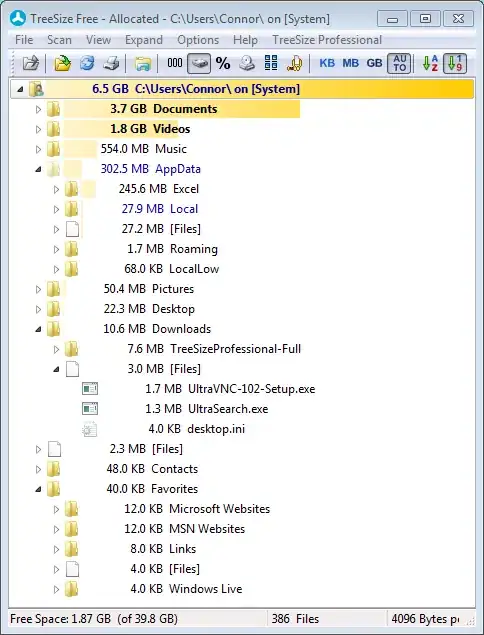
TreeSize is another such application.

Treesize in action

Gaff
  • 18,569
  • 15
  • 57
  • 68
Sathyajith Bhat
  • 61,504
  • 38
  • 179
  • 264
  • You beat me to it by 52 seconds. I've deleted mine and +1'd yours. – Chris W. Rea Nov 13 '09 at 20:00
  • I'd like to add that this looks a little safer than WinDirStat from a security perspective. I haven't looked at the code, though. But WindDirStat has to be downloaded from one of a few shady looking sites. This is downloaded right from the developers website. – user875234 Nov 19 '18 at 12:51
7

I like SpaceSniffer. Small, fast, and doesn't require an install.

ale
  • 3,369
  • 6
  • 40
  • 52
  • 1
    +1 for posting at same time as me, and remembering to mention the zero install. This is another one to stick on a USB key full of tools – AdamV Nov 13 '09 at 20:50
4

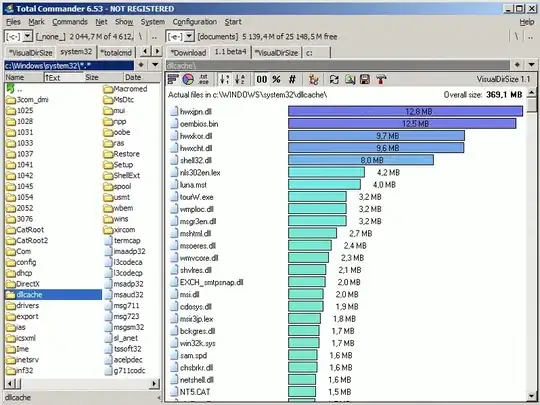
Fans of the mighty Total Commander use the VisualDirSize plug-in.

alt text

Gaff
  • 18,569
  • 15
  • 57
  • 68
3

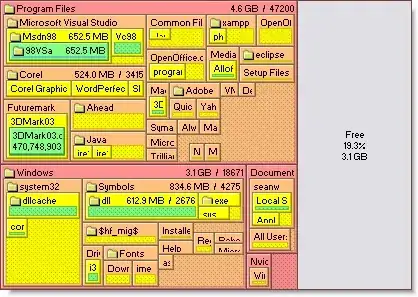
I like SpaceMonger.

No assumption graphical interface, The older version is free. Rightclick gives menu items 'delete','open', 'zoom', etc...

alt text

Gaff
  • 18,569
  • 15
  • 57
  • 68
rlb.usa
  • 1,518
  • 5
  • 20
  • 32
2

And another one: Overdisk

outsideblasts
  • 6,455
  • 1
  • 18
  • 19
1

I used to use Sequoia but started to find the look a bit dated, and it was flaky (especially if cancelled). Now prefer Spacesniffer, really intuitive to zoom in an a folder, zoom in again and so on, and be able to use back button to zoom back out to previous screen. Seems fairly quick too.

AdamV
  • 6,177
  • 2
  • 22
  • 38
0

For viewing disk usage I prefer Steffen Gerlach's Scanner, for its innovative and visual pie display, and where each pie can be accessed by using click drilling and right-click menu.

enter image description here

Gaff
  • 18,569
  • 15
  • 57
  • 68
harrymc
  • 455,459
  • 31
  • 526
  • 924
  • Pies and their stranger derivatives are horrible ways to compare chunks of data. I can't tell which purple wedge is larger for example – AdamV Nov 13 '09 at 20:42
  • You can by passing the cursor over it - it's indicated up left. Pies are the most visual for me, at least. – harrymc Nov 13 '09 at 21:26