Does anyone know how to permanently disable the Spybot S&D TeaTimer without uninstalling and reinstalling Spybot?
Asked
Active
Viewed 602 times


2 Answers
2
If you go in to Spybot's advanced settings (Mode > Advanced), then expand Tools and click Resident, and untick the option "Resident "TeaTimer" (Protection of over-all system settings) active."
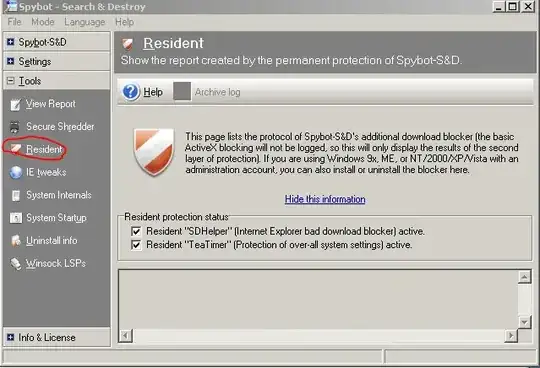
If this fails, the quickest way is to go in to the registry / regedit and go to the following key:
HKEY_CURRENT_USER\Software\Microsoft\Windows\CurrentVersion\Run
Then delete the TeaTimer entry.

Gaff
- 18,569
- 15
- 57
- 68

William Hilsum
- 116,650
- 19
- 182
- 266
1
rather than deleting registry entries, i recommend to use Autoruns (Sysinternals' excellent startup management utility) to disable the program instead.
Autoruns is freeware and portable, no installation required.