The entire box. How many gigs is everything using?
And how do I check total?
At a command line, type
df -a
This will list each device and usage information.
You might find
df -h
more readable, since it gives quantities in Gb or Mb, etc.

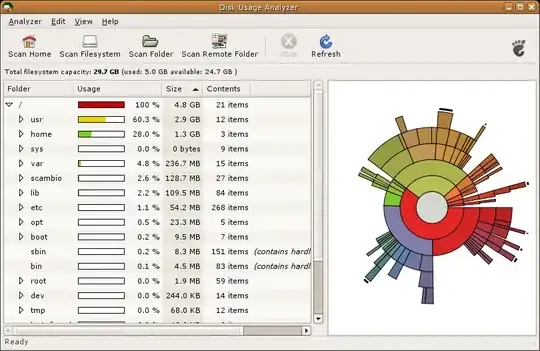
As suggested by others, du and df can easily do the job, but baobab (see screenshot below) is a great tool for analysing disk usage of whole file system or specific folders.
If you are using ubuntu, then baobab is already installed. Start it from Menu->Accessories->Disk Usage Analyzer or type baobab in a terminal window.
du . -h --max-depth=1
lists the size of all the folders in the current directory (or at a location of your choice)


du -sh folder
tells you how much folder is taking space. You can list multiple directories at once or use *.
df -h
tells you the total space of each mount point.
You can omit h (human readable) from both if you want to know the exact amounts.

There is also ncdu:
Not quite happy with the available disk usage analyzers and looking for a fun project to get used to C programming, I started working on ncdu: A disk usage analyzer with an ncurses interface, aimed to be run on a remote server where you don't have an entire gaphical setup, but have to do with a simple SSH connection. ncdu aims to be fast, simple and easy to use, and should be able to run in any minimal POSIX-like environment with ncurses installed.